

01
Separate identity from design language
Ask the model to preserve visible features such as silhouette, palette, clothing, pose, and expression without claiming it can infer a hidden real person. This distinction keeps the result useful and honest.
Cartoon to realistic AI
Translate an original cartoon into plausible materials while preserving its clearest design cues.
Upload the authorized illustration, then describe the materials, lighting, camera treatment, and design anchors that should survive the change in style.
Sign in before choosing a file. Your prompt will be restored when you return.
Higher-detail generation for paid plans
Example outputs
What one focused input can produce
Standard image
Advanced image
Output
one 1024 × 1024 raster image guided by the uploaded reference and your written material, lighting, and camera directions
Best for
original-character studies, costume exploration, pitch visuals, fan-owned concepts, and comparing stylized versus plausible materials
Not designed for
recovering a real identity, exact face matching, forensic prediction, deceptive impersonation, or guaranteed preservation of every drawing detail
The goal is a plausible new interpretation of the drawing—not proof of a hidden real face and not an exact reconstruction of a person.
01
Ask the model to preserve visible features such as silhouette, palette, clothing, pose, and expression without claiming it can infer a hidden real person. This distinction keeps the result useful and honest.
02
A flat yellow patch might become embroidery, painted metal, leather, or light. Name the intended material so realism comes from physical choices instead of generic skin texture and photographic blur.
03
Camera height, focal length language, background distance, and light direction affect plausibility. A restrained portrait setup is easier to review than dramatic effects, heavy makeup, and a crowded setting.
01
Use artwork you created, licensed, or otherwise have permission to transform.
02
List the silhouette, palette, clothing, pose, expression, and props that define the design.
03
State realistic materials, proportions, lighting, lens feel, setting, and details to avoid.
04
Review the result against the reference for design continuity and unintended identity or symbol changes.
05
Disclose the AI-assisted transformation where relevant and do not present it as a photograph of a real person.
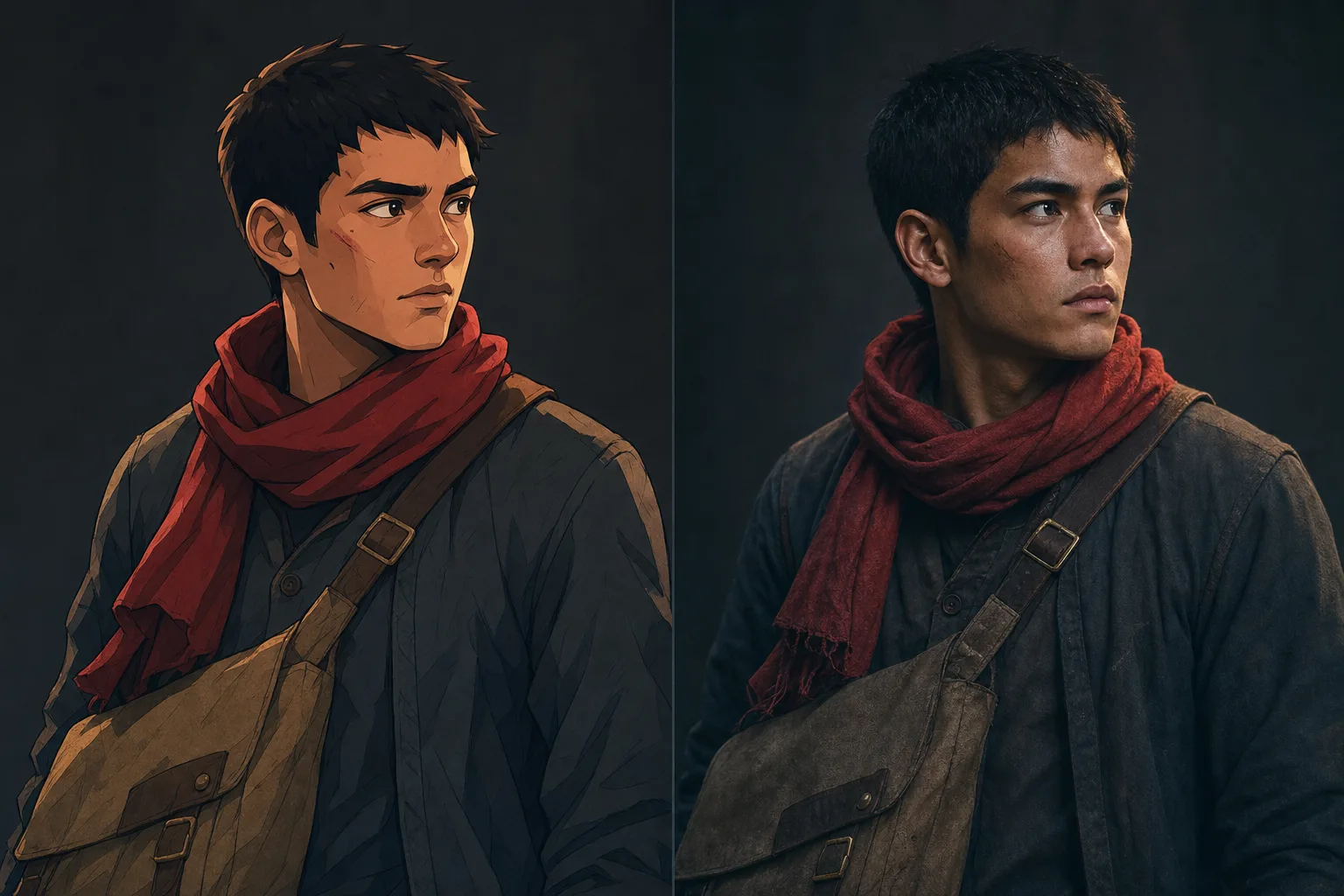
“Reimagine my uploaded original courier character as a realistic studio portrait. Preserve the red scarf, cropped black hair, asymmetrical satchel, and alert expression; practical fabric, 50mm portrait feel, gray background.”
Why it works: The prompt identifies concrete anchors and a restrained camera setup, making comparison easier.
“Translate the uploaded fantasy guard drawing into a buildable costume study. Preserve navy and copper shapes; use wool, aged brass, leather straps, realistic seams, full-body neutral pose, soft studio lighting.”
Why it works: Material and construction language turns symbolic drawing shapes into practical design questions.
“Create a plausible wildlife-documentary interpretation of the uploaded original cartoon creature. Preserve the six-legged silhouette, teal crest, and curious posture; believable feather and scale transitions, misty forest light.”
Compare shape, palette, costume, materials, lighting, identity risk, and disclosure needs one stage at a time before publishing the result.
Begin by separating structural cues from stylization. Note the character’s apparent age range, face shape, hair mass, clothing silhouette, palette, pose, camera angle, and the environmental clues that should remain recognizable. Then decide which cartoon conventions must change: eye size, nose definition, skin texture, fabric behavior, or lighting. The reference guides a new interpretation; it cannot reveal the objectively correct face of a fictional person, and the result should not be described as proof of how that character would really look.
Use a clean reference with one dominant subject and enough resolution to understand the design. Cropped hands, hidden clothing, or extreme perspective force the model to invent missing information. If identity consistency matters across several outputs, keep the same reference, framing language, age description, and distinctive wardrobe details. Even then, compare facial proportions and accessories carefully because each generation can introduce a different plausible person.
A cartoon omits information. The output invents plausible detail and cannot reveal a hidden or original real identity.
Stylized proportions, expressions, accessories, and color boundaries can change during realistic translation.
Review the result before publication, especially if it looks like a real person who was not part of the request.
Logos, text, jewelry, tattoos, and hand-held objects can be altered or invented and require close inspection.
Reviewed 2026-07-22 · Anime Maker product and editorial team
Page illustrations are editorial examples, not live account task logs. Judge the tool by the result shown in your own output panel.
Yes. This workflow requires a cartoon or illustrated reference because the transformation is guided by visible design cues in that image.
No. A drawing does not contain enough information to recover a true face or body. The output is one invented, plausible interpretation.
Name the important silhouette, hairstyle, palette, clothing, expression, pose, camera angle, props, and composition. Then describe realistic materials and lighting.
Keep the visible character anchors, choose a specific photographic treatment, and present the output as a generated interpretation.
Create a realistic interpretationThe scarf, satchel, pose, and expression carry across both treatments, while skin and fabric detail remain an invented interpretation.
Why it works: Calling it a fictional creature avoids a false claim of biological reconstruction while still supporting grounded design.
“Realistic” can mean cinematic illustration, polished 3D rendering, editorial portraiture, or natural photography. Name the target medium and its visible properties. For a photographic result, specify lens distance, skin texture, fabric, practical lighting, and environmental depth. For a cinematic interpretation, keep some designed color and silhouette. Changing every feature at once can erase the source character, so preserve a few strong anchors and let realism affect anatomy, materials, and light first.
Review the output for mismatched age cues, skin texture, eye direction, teeth, hands, jewelry, and clothing construction. Also watch for cultural or ethnic assumptions that were not present in the reference. If a result drifts into an unintended identity, revise the visible design cues rather than adding a real person’s name. Do not use this workflow for identity verification, forensic reconstruction, or claims about an unknown person.
Use original artwork or material you are authorized to transform. Protected characters, commissioned designs, and images of real people may carry additional rights and platform restrictions. A realistic rendition can look like a photograph even when no such person or event exists, so label it as an AI-generated interpretation when context could confuse viewers. Do not use the output to impersonate someone, manufacture evidence, or imply an endorsement.
Keep the source image, prompt, selected result, and edit notes together. Before publishing, remove accidental marks, confirm that the background does not imply a real location or organization, and check whether the final crop changes the meaning. For commercial campaigns or sensitive subjects, involve the appropriate rights holder or reviewer. Transparency does not weaken the creative concept; it tells the audience what kind of image they are looking at.
When sharing before-and-after examples, label both images clearly and avoid language such as “the real version” or “what the character actually looks like.” Prefer “realistic interpretation” or “photographic reimagining,” which describes the creative operation without turning an invented face into a factual claim. If the source resembles a child, private person, or sensitive subject, apply a higher review threshold and avoid public use when consent or context is uncertain. Do not present visual similarity as identity verification, and keep the source context attached when the interpretation is reviewed by collaborators. Recheck the disclosure after cropping or reposting the image.
Start with a reference intake check. Confirm who created the source, who is depicted, what permission exists, and how the new image will be used. A public image is not automatically free to transform, and a fictional character may still be protected by copyright or trademark. If the source depicts a real person, obtain appropriate consent before creating or publishing a realistic interpretation, particularly for advertising, sensitive topics, or identity-adjacent uses. Keep the original file and permission record connected to the project. Do not use a low-resolution repost when the creator, context, or editing history cannot be established, because uncertainty in the source carries into the result.
Define realism with a short visual specification. Choose whether the target should resemble natural photography, editorial portraiture, cinematic concept art, or polished 3D rendering. Record lens distance, depth of field, light source, skin and fabric texture, background treatment, and the design anchors that must survive. Then identify which cartoon conventions should change and which should remain. Enlarged eyes, simplified noses, impossible hair shapes, and painted highlights cannot all be converted literally. Make explicit choices about proportion and material instead of asking the model to discover one supposedly correct human face behind the drawing.
Review identity drift without claiming identity certainty. Compare face shape, apparent age, hair mass, expression, clothing silhouette, pose, palette, and distinctive props, but recognize that the realistic face is newly invented. If several outputs are needed, use the same authorized reference and stable descriptors, then select one result as the visual anchor for later work. Even with consistent inputs, inspect eye spacing, jaw width, skin tone, accessories, and age cues across the set. Do not fix drift by adding the name of a celebrity or private person. That substitutes a real identity for an artistic consistency problem and can create a misleading or unauthorized resemblance.
Prepare the final image for its publishing context. Remove accidental text, watermarks, signatures, logos, uniforms, badges, and background details that imply an affiliation. Check hands, teeth, eyes, jewelry, reflections, and camera geometry at full size, then inspect the actual crop used in the post or campaign. Add a label such as “AI-generated realistic interpretation” when viewers could mistake the work for a photograph of a real person or event. Alt text should describe the invented interpretation and source character cues without calling the subject real. If the image accompanies reporting, education, health, politics, or another sensitive topic, use a much higher review threshold or choose a clearly illustrative style.
Archive enough information for a collaborator to understand the transformation. Store the authorized source, prompt, selected result, rejected variants when relevant, edit notes, disclosure wording, and final exports. Record which elements were preserved, invented, retouched, or replaced. This is especially important when a realistic image moves from private concept work into a public campaign, because later crops and captions can change how it is interpreted. Recheck consent and rights when the intended use changes. A result approved as a personal character study is not automatically approved for advertising, merchandise, impersonation, or a context that suggests documentary truth.
Use a final review form that separates visual quality from identity and context risk. The visual column covers anatomy, skin texture, eyes, teeth, hair, clothing construction, lighting, reflections, background geometry, and compression. The identity column records whether the subject is fictional or real, what source permission exists, whether the result resembles an unintended person, and whether age or cultural cues drifted. The context column records placement, caption, disclosure, audience, and any sensitive claim. Require a clear decision for each issue: accept, retouch, regenerate, restrict use, or do not publish. Review the final crop and caption together, because responsible wording can be lost when an image is reposted without its original explanation. Keep the completed form with the project archive.
Revisit the permission and disclosure decision whenever the asset changes context. A realistic interpretation used in a private mood board may require new consent, review, and labeling when moved into an advertisement, profile, merchandise item, political post, or news-like layout. Do not rely on an approval that covered a different audience or purpose. Update the project record with the new placement, final caption, and responsible reviewer. Context is part of the image’s meaning, so the safety check must travel with the file rather than remain attached only to the first draft.
If the final image is redistributed, keep the disclosure close to the image and avoid captions that imply the invented face records a real person, event, or verified identity.
Uploading an image does not grant rights to transform or publish it. Use authorized material and follow applicable rules.
Rights and permitted uses vary. This page is designed for original or authorized artwork; protected characters and commercial publication can create additional risk.
Translate specific design choices into physical ones: fabric type, surface finish, practical fasteners, hair texture, light source, lens feel, and environmental context.
It should not be represented as documentary evidence or a photo of a real person. Label AI-assisted imagery when the context could otherwise mislead viewers.