Anime Maker logoAnime Maker
  • Features
  • Pricing
Anime Maker logoAnime Maker

Create cinematic anime clips from prompts, images, and storyboards.

GitHubGitHubTwitterX (Twitter)BlueskyBlueskyMastodonDiscordYouTubeYouTubeLinkedInEmail
Product
  • Features
  • Pricing
  • FAQ
  • AI Anime Generator
  • Photo to Anime AI
  • Image to Video Anime AI
  • Anime Character Generator
  • Anime Logo Maker
Resources
  • Creator Guide
Company
  • Contact
Legal
  • Cookie Policy
  • Privacy Policy
  • Terms of Service
© 2026 Anime Maker All Rights Reserved.

Drop your photo here

Portrait, selfie, pet, product, or landscape image

Convert a photo
Photo direction

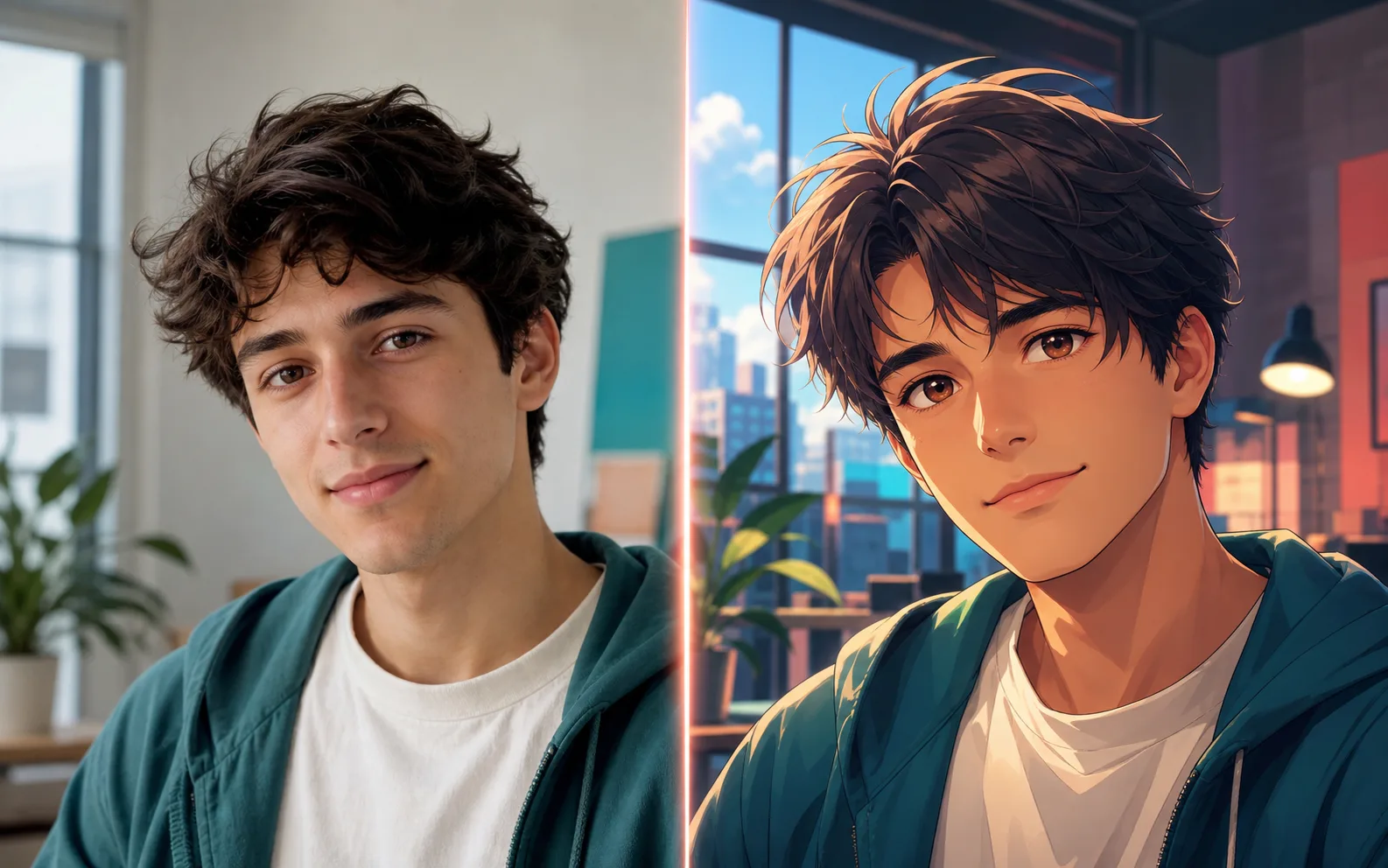
Keep the same pose and outfit, turn the photo into a cinematic anime portrait with soft daylight and crisp line art.

Mode
CinematicSoft pastelProfile avatarWallpaper
Output
1:1 avatar
4:5 portrait
16:9 wallpaper
Convert a photo

Realistic photo to anime result

Real examples make the tool feel concrete before the user starts generating.

Before and after portrait photo converted into anime art
Creator portrait

Prompt guided

Style control

Export ready

Photo to anime AI

Photo to Anime AI filter and generator from photo

Upload a portrait, selfie, pet photo, or product shot and shape it into an anime look that still respects the original subject.

3,600

monthly searches for photo to anime ai

1,300

monthly searches for anime generator from photo

28

reported KD for pic to anime

Long-tail examples

Real workflows for photo to anime ai searches.

A good photo to anime AI workflow should not erase what makes the original image useful. The face, pose, outfit, and mood give the result its anchor. This page now also covers anime filter, pic to anime, and anime generator from photo searches, because they all share the same intent: keep the subject recognizable while changing the visual language.

Before and after portrait photo converted into anime art
Creator portrait
photo to anime ai freeCreator portrait

Anime filter for portraits

Use a clear selfie or portrait to make anime profile images for social accounts, communities, and creator pages.

Try this workflow
Before and after orange cat photo converted into anime art
Pet keepsake
anime generator from photoPet keepsake

Character references from real photos

Turn a pose, outfit, or facial expression into a reference image before developing a full original character.

Try this workflow
Before and after selfie converted into anime avatar
Avatar ready
ai anime filterAvatar ready

Anime scenes from everyday shots

Start with a street, room, product, or travel photo, then restyle the composition into a more cinematic anime frame.

Try this workflow
Before and after mountain lake photo converted into anime wallpaper
Wallpaper scene
pic to animeWallpaper scene

Pic to anime experiments

Try quick versions from a source image, then refine the background, expression, and line style once the subject looks right.

Try this workflow

Workflow

Keep the person, change the visual language

Start with a clear goal, keep the brief focused, and move through the tool in a way that produces usable anime assets instead of random experiments.

01

Start with a clean image

Use a well-lit photo where the subject is easy to read. Blurry source images give the AI less to preserve.

02

Name what should stay

Mention hair, outfit, expression, pose, or object details that should carry into the anime version.

03

Guide the finish

Choose portrait, avatar, poster, or scene output so the result has a clear purpose.

Search intent map

Photo to anime options

Portrait

Selfies and profile images

Use simple backgrounds and strong facial detail.

Scene

Rooms, cities, products, and travel shots

Describe the mood and lighting you want to add.

Character reference

Poses, outfits, and identity design

Write which details must remain consistent.

FAQ

Questions about photo to anime ai

How does photo to anime AI work?

Photo to anime AI reads the subject, pose, colors, and composition in your image, then redraws it in an anime style. You get better results when the photo is clear and your prompt says what should stay recognizable.

Can I make an anime avatar from a photo?

Yes. A portrait photo is one of the easiest ways to make an anime avatar. Use a front-facing image, then ask for a profile picture, matching background, and the expression you want.

What photos work best?

Use images with good lighting, visible faces, and limited motion blur. If the image has several people, name the subject you want the AI to focus on.

Keep building from this workflow.

Move between related Anime Maker tools when the source image, character, logo, or video direction changes.

Anime Character GeneratorImage to Video Anime AIAI Anime GeneratorAnime Logo Maker

Ready to try photo to anime ai?

Start with one clear image, character, or scene idea. You can refine the style after the first result has the right shape.

Convert a photo