Anime Maker logoAnime Maker
  • घर
  • एआई एनीमे जेनरेटर
  • सुविधाऐं
  • मामले
  • मूल्य निर्धारण
  • ब्लॉग
Anime Maker logoAnime Maker

केंद्रित संकेतों से एनीमे चित्र, मूल पात्र, फोटो-आधारित चित्र और लघु वीडियो बनाएं।

Email
गुणनफल
  • सुविधाऐं
  • मूल्य निर्धारण
  • अक्सर पूछे जाने वाले प्रश्न
  • एआई एनीमे जेनरेटर
  • एनीमे एआई के लिए फोटो
  • छवि से वीडियो एनीमे एआई
  • एनीमे कैरेक्टर जेनरेटर
  • एनीमे लोगो निर्माता
अतिथि
  • के बारे में
  • संपर्क करें
विधि-सम्‍मत
  • कुकी नीति
  • गोपनीयता नीति
  • सेवा की शर्तें
© 2026 Anime Maker All Rights Reserved.

AI स्टोरीबोर्ड जनरेटर

शॉट प्लानिंग के लिए AI स्टोरीबोर्ड जनरेटर

एक script beat को storyboard sheet में बदलें, फिर चुने frames को ID, duration, dialogue reference और continuity notes वाले editable document में ले जाएँ।

ड्राफ्ट बनाएँ

यह टूल एक 1024 × 1024 raster image बनाता है। यह अलग editable frames, पूरी script, भरोसेमंद shot numbers, timeline या guaranteed character continuity नहीं देता।

जनरेशन मोड
आउटपुट फ़ॉर्मेट
एक image
1024 × 1024
Raster draft

उदाहरण आउटपुट

एक केंद्रित इनपुट क्या उत्पन्न कर सकता है

पहले तय करें कि शुरुआत और अंत के बीच क्या बदलता है। “उसे शक होता है” को filmable action बनाएँ: वह चलाना रोकती है, दूसरा गीला umbrella देखती है और key हथेली के नीचे छिपाती है। हर frame जगह, clue, reaction, action match या turn में से एक काम करे।
मानक छवि

उन्नत छवि

असल output

Output एक flat 1024 × 1024 image है, जो scene exploration, camera options, animation prep और pitch के लिए उपयोगी है। यह separate shots, layered file, complete list, exact lens plan या finished animatic नहीं है।

सबसे उपयोगी

Output एक flat 1024 × 1024 image है, जो scene exploration, camera options, animation prep और pitch के लिए उपयोगी है। यह separate shots, layered file, complete list, exact lens plan या finished animatic नहीं है।

इसके लिए नहीं

यह टूल एक 1024 × 1024 raster image बनाता है। यह अलग editable frames, पूरी script, भरोसेमंद shot numbers, timeline या guaranteed character continuity नहीं देता।

जो guaranteed नहीं है उसे जाँचें 2026-07-22

Adobe storyboard को director की visual intent team तक पहुँचाने वाला guide बताता है; W3C informative image के लिए equivalent text माँगता है। Quality का अर्थ है कि दूसरा व्यक्ति समझे, सवाल करे और traceable file में आगे काम करे।

ड्रॉ करने से पहले सीन तोड़ेंपाँच चरण की storyboard प्रक्रियाPrompts और review criteriaबीट से production board तकजो guaranteed नहीं है उसे जाँचेंAI storyboard के सवाल

ड्रॉ करने से पहले सीन तोड़ें

Prose को visible action बनाएँ · हर shot को काम दें · Continuity को state की तरह लिखें

Shot list में ID, scene, size, angle, movement, dialogue cue, duration, sound और continuity जोड़ें। Overhead plan sides, eyeline, रास्ता, props, costume, weather और light जाँचने देता है। Repeated anchors drift कम करते हैं, identity guarantee नहीं।

01

Prose को visible action बनाएँ

पहले तय करें कि शुरुआत और अंत के बीच क्या बदलता है। “उसे शक होता है” को filmable action बनाएँ: वह चलाना रोकती है, दूसरा गीला umbrella देखती है और key हथेली के नीचे छिपाती है। हर frame जगह, clue, reaction, action match या turn में से एक काम करे।

02

हर shot को काम दें

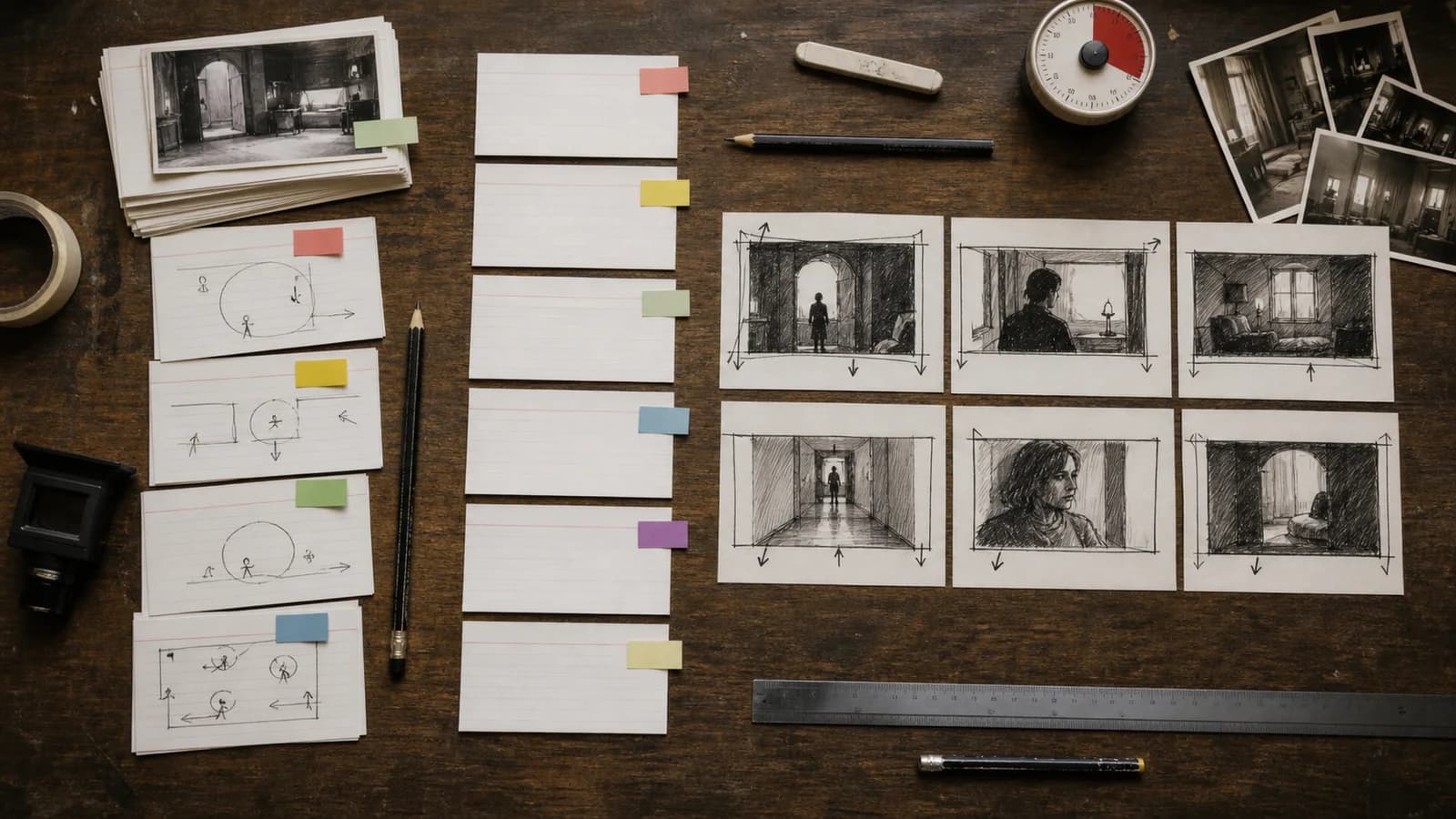
Shot list में ID, scene, size, angle, movement, dialogue cue, duration, sound और continuity जोड़ें। Overhead plan sides, eyeline, रास्ता, props, costume, weather और light जाँचने देता है। Repeated anchors drift कम करते हैं, identity guarantee नहीं।

03

Continuity को state की तरह लिखें

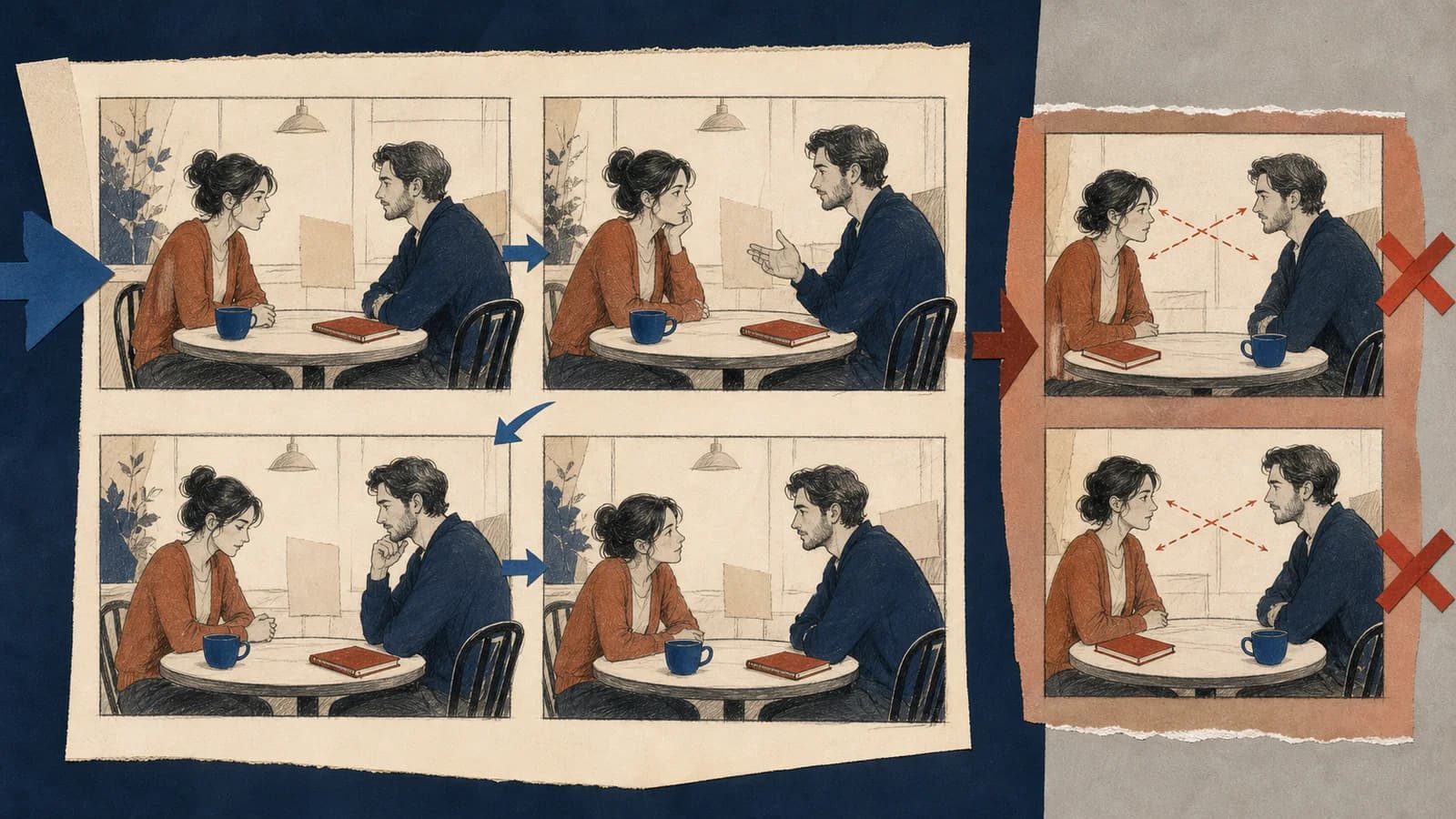
पहले panel count, reading path और turn; फिर face, hands, architecture, fake text और swapped props देखें। Approved frames को ID, duration, status, owner और date वाले editable board में बनाएँ। Rhythm को temporary audio वाली animatic में जाँचें।

पाँच चरण की storyboard प्रक्रिया

01

Prose को visible action बनाएँ

पहले तय करें कि शुरुआत और अंत के बीच क्या बदलता है। “उसे शक होता है” को filmable action बनाएँ: वह चलाना रोकती है, दूसरा गीला umbrella देखती है और key हथेली के नीचे छिपाती है। हर frame जगह, clue, reaction, action match या turn में से एक काम करे।

02

हर shot को काम दें

Shot list में ID, scene, size, angle, movement, dialogue cue, duration, sound और continuity जोड़ें। Overhead plan sides, eyeline, रास्ता, props, costume, weather और light जाँचने देता है। Repeated anchors drift कम करते हैं, identity guarantee नहीं।

03

ड्राफ्ट बनाएँ

यह टूल एक 1024 × 1024 raster image बनाता है। यह अलग editable frames, पूरी script, भरोसेमंद shot numbers, timeline या guaranteed character continuity नहीं देता।

04

Failure modes और limits

पहले panel count, reading path और turn; फिर face, hands, architecture, fake text और swapped props देखें। Approved frames को ID, duration, status, owner और date वाले editable board में बनाएँ। Rhythm को temporary audio वाली animatic में जाँचें।

05

Editable handoff फिर बनाएँ

Web storyboard में sequence और turn बताने वाला alt तथा complex board में visible shot list चाहिए। Status के लिए केवल color न लें। Authorized source प्रयोग करें और logo, protected character, real person, stunt, location तथा brand जाँचें।

Prompts और review criteria

पहले तय करें कि शुरुआत और अंत के बीच क्या बदलता है। “उसे शक होता है” को filmable action बनाएँ: वह चलाना रोकती है, दूसरा गीला umbrella देखती है और key हथेली के नीचे छिपाती है। हर frame जगह, clue, reaction, action match या turn में से एक काम करे।
Output एक flat 1024 × 1024 image है, जो scene exploration, camera options, animation prep और pitch के लिए उपयोगी है। यह separate shots, layered file, complete list, exact lens plan या finished animatic नहीं है।

Prose को visible action बनाएँ

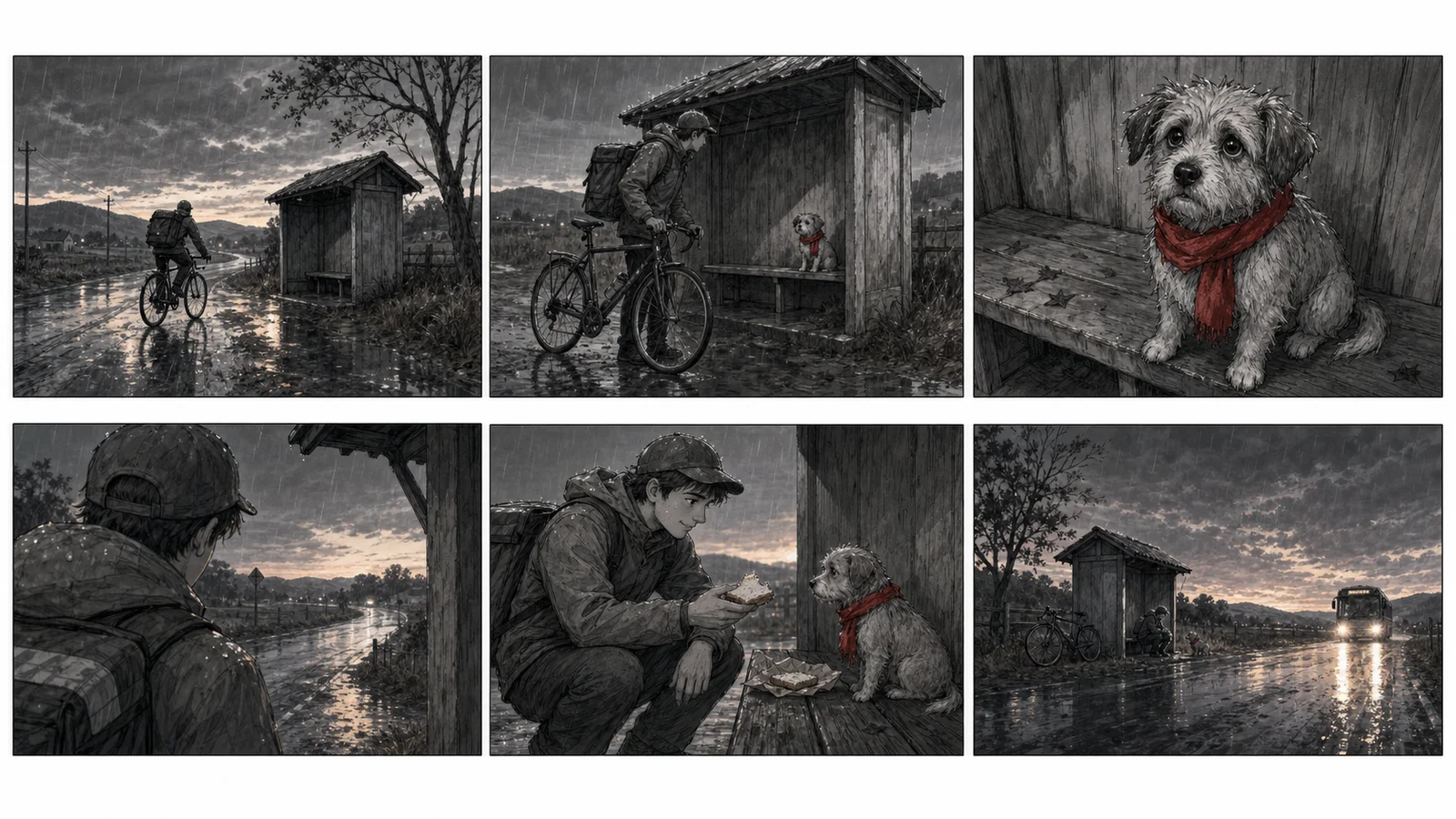
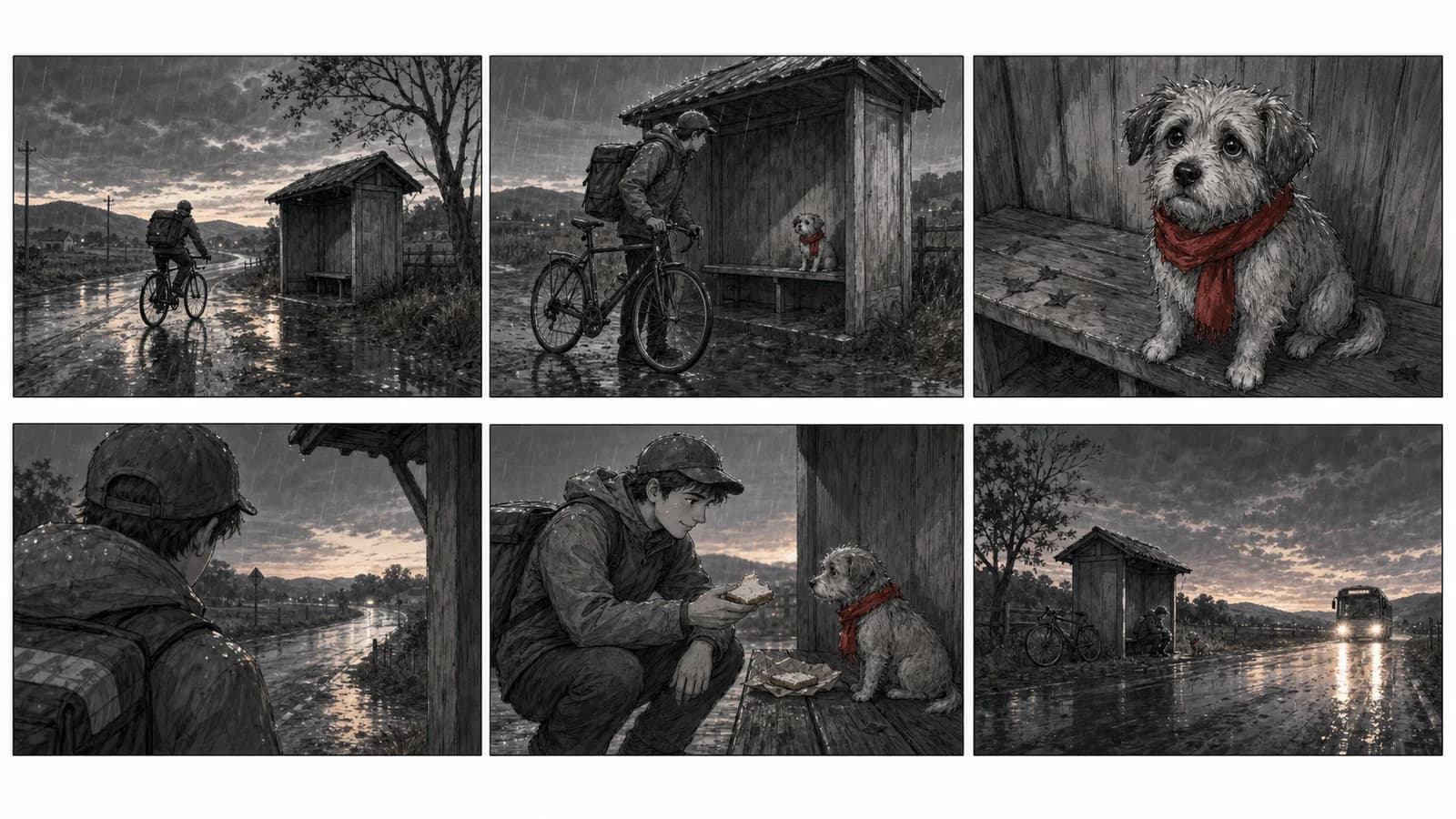
“बिना text या numbers का original छह-panel film storyboard। Mustard raincoat पहना bicycle courier शाम को rural bus shelter पहुँचे। 1 बारिश, सड़क, shelter, bicycle का wide. 2 bench के नीचे आवाज़ सुनते हुए medium. 3 red scarf वाले छोटे dog का close-up. 4 sandwich देते हुए over-shoulder. 5 समान axis और props वाला two-shot. 6 बारिश में bus headlights का final wide. Professional pencil और gray marker; courier, bicycle, dog, scarf, bench, weather consistent; logo या watermark नहीं। पहले तय करें कि शुरुआत और अंत के बीच क्या बदलता है। “उसे शक होता है” को filmable action बनाएँ: वह चलाना रोकती है, दूसरा गीला umbrella देखती है और key हथेली के नीचे छिपाती है। हर frame जगह, clue, reaction, action match या turn में से एक काम करे।”

क्या जाँचें पहले तय करें कि शुरुआत और अंत के बीच क्या बदलता है। “उसे शक होता है” को filmable action बनाएँ: वह चलाना रोकती है, दूसरा गीला umbrella देखती है और key हथेली के नीचे छिपाती है। हर frame जगह, clue, reaction, action match या turn में से एक काम करे।

Shot list में ID, scene, size, angle, movement, dialogue cue, duration, sound और continuity जोड़ें। Overhead plan sides, eyeline, रास्ता, props, costume, weather और light जाँचने देता है। Repeated anchors drift कम करते हैं, identity guarantee नहीं।

बीट से production board तक

Prose को visible action बनाएँ · Continuity को state की तरह लिखें · Editable handoff फिर बनाएँ

Prose को visible action बनाएँ

Output एक flat 1024 × 1024 image है, जो scene exploration, camera options, animation prep और pitch के लिए उपयोगी है। यह separate shots, layered file, complete list, exact lens plan या finished animatic नहीं है।

पहले तय करें कि शुरुआत और अंत के बीच क्या बदलता है। “उसे शक होता है” को filmable action बनाएँ: वह चलाना रोकती है, दूसरा गीला umbrella देखती है और key हथेली के नीचे छिपाती है। हर frame जगह, clue, reaction, action match या turn में से एक काम करे।

हर shot को काम दें

पहले तय करें कि शुरुआत और अंत के बीच क्या बदलता है। “उसे शक होता है” को filmable action बनाएँ: वह चलाना रोकती है, दूसरा गीला umbrella देखती है और key हथेली के नीचे छिपाती है। हर frame जगह, clue, reaction, action match या turn में से एक काम करे।

जो guaranteed नहीं है उसे जाँचें

Prose को visible action बनाएँ

Output एक flat 1024 × 1024 image है, जो scene exploration, camera options, animation prep और pitch के लिए उपयोगी है। यह separate shots, layered file, complete list, exact lens plan या finished animatic नहीं है।

हर shot को काम दें

पहले तय करें कि शुरुआत और अंत के बीच क्या बदलता है। “उसे शक होता है” को filmable action बनाएँ: वह चलाना रोकती है, दूसरा गीला umbrella देखती है और key हथेली के नीचे छिपाती है। हर frame जगह, clue, reaction, action match या turn में से एक काम करे।

Continuity को state की तरह लिखें

Shot list में ID, scene, size, angle, movement, dialogue cue, duration, sound और continuity जोड़ें। Overhead plan sides, eyeline, रास्ता, props, costume, weather और light जाँचने देता है। Repeated anchors drift कम करते हैं, identity guarantee नहीं।

Editable handoff फिर बनाएँ

पहले panel count, reading path और turn; फिर face, hands, architecture, fake text और swapped props देखें। Approved frames को ID, duration, status, owner और date वाले editable board में बनाएँ। Rhythm को temporary audio वाली animatic में जाँचें।

AI storyboard के सवाल

Prose को visible action बनाएँ?

Output एक flat 1024 × 1024 image है, जो scene exploration, camera options, animation prep और pitch के लिए उपयोगी है। यह separate shots, layered file, complete list, exact lens plan या finished animatic नहीं है।

हर shot को काम दें?

पहले तय करें कि शुरुआत और अंत के बीच क्या बदलता है। “उसे शक होता है” को filmable action बनाएँ: वह चलाना रोकती है, दूसरा गीला umbrella देखती है और key हथेली के नीचे छिपाती है। हर frame जगह, clue, reaction, action match या turn में से एक काम करे।

Continuity को state की तरह लिखें?

Shot list में ID, scene, size, angle, movement, dialogue cue, duration, sound और continuity जोड़ें। Overhead plan sides, eyeline, रास्ता, props, costume, weather और light जाँचने देता है। Repeated anchors drift कम करते हैं, identity guarantee नहीं।

Editable handoff फिर बनाएँ?

Visual production जारी रखें

Editable handoff फिर बनाएँVisual production जारी रखेंFailure modes और limitsहर shot को काम दें

बीट से production board तक

पहले panel count, reading path और turn; फिर face, hands, architecture, fake text और swapped props देखें। Approved frames को ID, duration, status, owner और date वाले editable board में बनाएँ। Rhythm को temporary audio वाली animatic में जाँचें।

ड्राफ्ट बनाएँ

Output एक flat 1024 × 1024 image है, जो scene exploration, camera options, animation prep और pitch के लिए उपयोगी है। यह separate shots, layered file, complete list, exact lens plan या finished animatic नहीं है।

Shot list में ID, scene, size, angle, movement, dialogue cue, duration, sound और continuity जोड़ें। Overhead plan sides, eyeline, रास्ता, props, costume, weather और light जाँचने देता है। Repeated anchors drift कम करते हैं, identity guarantee नहीं।

Continuity को state की तरह लिखें

“बिना text या numbers का original छह-panel film storyboard। Mustard raincoat पहना bicycle courier शाम को rural bus shelter पहुँचे। 1 बारिश, सड़क, shelter, bicycle का wide. 2 bench के नीचे आवाज़ सुनते हुए medium. 3 red scarf वाले छोटे dog का close-up. 4 sandwich देते हुए over-shoulder. 5 समान axis और props वाला two-shot. 6 बारिश में bus headlights का final wide. Professional pencil और gray marker; courier, bicycle, dog, scarf, bench, weather consistent; logo या watermark नहीं। हर shot को काम दें: Shot list में ID, scene, size, angle, movement, dialogue cue, duration, sound और continuity जोड़ें। Overhead plan sides, eyeline, रास्ता, props, costume, weather और light जाँचने देता है। Repeated anchors drift कम करते हैं, identity guarantee नहीं। Shot list में ID, scene, size, angle, movement, dialogue cue, duration, sound और continuity जोड़ें। Overhead plan sides, eyeline, रास्ता, props, costume, weather और light जाँचने देता है। Repeated anchors drift कम करते हैं, identity guarantee नहीं।”

क्या जाँचें Shot list में ID, scene, size, angle, movement, dialogue cue, duration, sound और continuity जोड़ें। Overhead plan sides, eyeline, रास्ता, props, costume, weather और light जाँचने देता है। Repeated anchors drift कम करते हैं, identity guarantee नहीं।

हर shot को काम दें

“बिना text या numbers का original छह-panel film storyboard। Mustard raincoat पहना bicycle courier शाम को rural bus shelter पहुँचे। 1 बारिश, सड़क, shelter, bicycle का wide. 2 bench के नीचे आवाज़ सुनते हुए medium. 3 red scarf वाले छोटे dog का close-up. 4 sandwich देते हुए over-shoulder. 5 समान axis और props वाला two-shot. 6 बारिश में bus headlights का final wide. Professional pencil और gray marker; courier, bicycle, dog, scarf, bench, weather consistent; logo या watermark नहीं। Continuity को state की तरह लिखें: पहले panel count, reading path और turn; फिर face, hands, architecture, fake text और swapped props देखें। Approved frames को ID, duration, status, owner और date वाले editable board में बनाएँ। Rhythm को temporary audio वाली animatic में जाँचें। पहले panel count, reading path और turn; फिर face, hands, architecture, fake text और swapped props देखें। Approved frames को ID, duration, status, owner और date वाले editable board में बनाएँ। Rhythm को temporary audio वाली animatic में जाँचें।”

क्या जाँचें पहले panel count, reading path और turn; फिर face, hands, architecture, fake text और swapped props देखें। Approved frames को ID, duration, status, owner और date वाले editable board में बनाएँ। Rhythm को temporary audio वाली animatic में जाँचें।

Shot list में ID, scene, size, angle, movement, dialogue cue, duration, sound और continuity जोड़ें। Overhead plan sides, eyeline, रास्ता, props, costume, weather और light जाँचने देता है। Repeated anchors drift कम करते हैं, identity guarantee नहीं।

Continuity को state की तरह लिखें

Shot list में ID, scene, size, angle, movement, dialogue cue, duration, sound और continuity जोड़ें। Overhead plan sides, eyeline, रास्ता, props, costume, weather और light जाँचने देता है। Repeated anchors drift कम करते हैं, identity guarantee नहीं।

पहले panel count, reading path और turn; फिर face, hands, architecture, fake text और swapped props देखें। Approved frames को ID, duration, status, owner और date वाले editable board में बनाएँ। Rhythm को temporary audio वाली animatic में जाँचें।

Editable handoff फिर बनाएँ

पहले panel count, reading path और turn; फिर face, hands, architecture, fake text और swapped props देखें। Approved frames को ID, duration, status, owner और date वाले editable board में बनाएँ। Rhythm को temporary audio वाली animatic में जाँचें।

Web storyboard में sequence और turn बताने वाला alt तथा complex board में visible shot list चाहिए। Status के लिए केवल color न लें। Authorized source प्रयोग करें और logo, protected character, real person, stunt, location तथा brand जाँचें।

Failure modes और limits

Web storyboard में sequence और turn बताने वाला alt तथा complex board में visible shot list चाहिए। Status के लिए केवल color न लें। Authorized source प्रयोग करें और logo, protected character, real person, stunt, location तथा brand जाँचें।

Adobe storyboard को director की visual intent team तक पहुँचाने वाला guide बताता है; W3C informative image के लिए equivalent text माँगता है। Quality का अर्थ है कि दूसरा व्यक्ति समझे, सवाल करे और traceable file में आगे काम करे।

Accessibility, sources और rights

Adobe storyboard को director की visual intent team तक पहुँचाने वाला guide बताता है; W3C informative image के लिए equivalent text माँगता है। Quality का अर्थ है कि दूसरा व्यक्ति समझे, सवाल करे और traceable file में आगे काम करे।

Output एक flat 1024 × 1024 image है, जो scene exploration, camera options, animation prep और pitch के लिए उपयोगी है। यह separate shots, layered file, complete list, exact lens plan या finished animatic नहीं है।

Failure modes और limits

Web storyboard में sequence और turn बताने वाला alt तथा complex board में visible shot list चाहिए। Status के लिए केवल color न लें। Authorized source प्रयोग करें और logo, protected character, real person, stunt, location तथा brand जाँचें।

Accessibility, sources और rights

Adobe storyboard को director की visual intent team तक पहुँचाने वाला guide बताता है; W3C informative image के लिए equivalent text माँगता है। Quality का अर्थ है कि दूसरा व्यक्ति समझे, सवाल करे और traceable file में आगे काम करे।

पहले panel count, reading path और turn; फिर face, hands, architecture, fake text और swapped props देखें। Approved frames को ID, duration, status, owner और date वाले editable board में बनाएँ। Rhythm को temporary audio वाली animatic में जाँचें।

Failure modes और limits?

Web storyboard में sequence और turn बताने वाला alt तथा complex board में visible shot list चाहिए। Status के लिए केवल color न लें। Authorized source प्रयोग करें और logo, protected character, real person, stunt, location तथा brand जाँचें।

Accessibility, sources और rights?

Adobe storyboard को director की visual intent team तक पहुँचाने वाला guide बताता है; W3C informative image के लिए equivalent text माँगता है। Quality का अर्थ है कि दूसरा व्यक्ति समझे, सवाल करे और traceable file में आगे काम करे।