
01
Shot का काम पहले लिखें
लिखें कि reader को entrance, route, distance या clue में क्या समझना है। सुंदर लेकिन जानकारी छिपाने वाला background असफल है।
वेबटून बैकग्राउंड जनरेटर
एक location, shot का काम और character तथा dialogue के लिए ज़रूरी जगह बताएं। Square concept बनाएं, perspective और landmarks जाँचें, फिर drawing या 3D software में असली production asset तैयार करें।
Location, horizon, vanishing logic, depth layers, standing zone, bubble space, समय और landmarks लिखें। Output एक square raster है।
सशुल्क योजनाओं के लिए उच्च-विवरण पीढ़ी
उदाहरण आउटपुट
एक केंद्रित इनपुट क्या उत्पन्न कर सकता है
मानक छवि
उन्नत छवि
देखें कि एक square क्या नहीं कर सकता
एक 1024×1024 flattened raster background concept
Cast से पहले खाली stage की योजना बनाएं
environment exploration, establishing shots, color keys, lighting variants, pitch और manual rebuild reference
पूरा लंबवत एपिसोड, परतों वाली PSD फ़ाइल, दोबारा इस्तेमाल होने वाला 3D सेट, घुमाया जा सकने वाला कैमरा, बिल्कुल एक-जैसा दृश्य, स्वचालित परिप्रेक्ष्य सुधार या सामूहिक निर्माण
पूरा लंबवत एपिसोड, परतों वाली PSD फ़ाइल, दोबारा इस्तेमाल होने वाला 3D सेट, घुमाया जा सकने वाला कैमरा, बिल्कुल एक-जैसा दृश्य, स्वचालित परिप्रेक्ष्य सुधार या सामूहिक निर्माण
Concept से recurring location तक जाएँ 2026-07-22
तरीका Krita, Blender, Adobe, WEBTOON CANVAS और W3C की आधिकारिक perspective, camera, export और image-accessibility guidance से जाँचा गया है।
उपयोगी background जगह समझाता है, भाव को सहारा देता है और bodies, movement तथा mobile text के लिए room छोड़ता है।
01
लिखें कि reader को entrance, route, distance या clue में क्या समझना है। सुंदर लेकिन जानकारी छिपाने वाला background असफल है।
02
Kerb, roof, window और floor lines को compatible convergence तक trace करें और silhouette से door height तथा ground contact जाँचें।
03
Standing और movement के लिए floor, heads के पीछे low-contrast area रखें। Final bubbles editor में लगाएं।
01
लिखें कि reader को entrance, route, distance या clue में क्या समझना है। सुंदर लेकिन जानकारी छिपाने वाला background असफल है।
02
Kerb, roof, window और floor lines को compatible convergence तक trace करें और silhouette से door height तथा ground contact जाँचें।
03
Standing और movement के लिए floor, heads के पीछे low-contrast area रखें। Final bubbles editor में लगाएं।
04
Plan, elevation, dimensions, palette, materials, fixed/movable props और approved views save करें; prompt geometry lock नहीं करता।
05
Square image को लंबा न खींचें। Crop, extend या redraw करें और phone width पर final जाँचें।
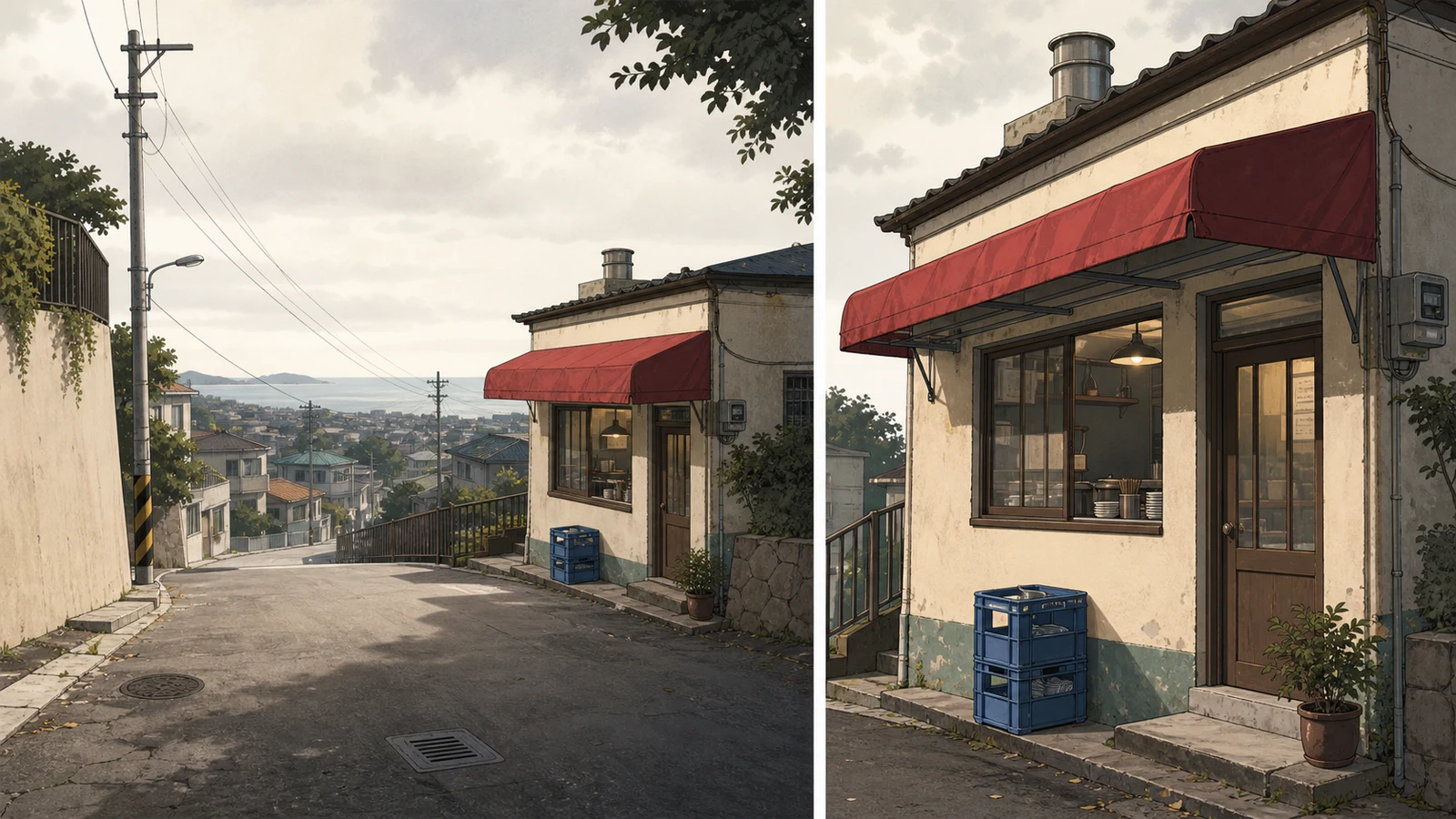
“Original webtoon background: बारिश के बाद समुद्र किनारे ढलान वाली गली में छोटी दुकान, कोई व्यक्ति नहीं। Standing eye level, two-point perspective, foreground road, midground storefront, पीछे hillside homes और sea. Door के पास standing zone, bubble के लिए शांत wall और sky. बिना अक्षर की dark red awning, blue crate, wooden door, left utility pole, तीन plants. कोई text, logo, brand, watermark या UI नहीं। Kerb, roof, window और floor lines को compatible convergence तक trace करें और silhouette से door height तथा ground contact जाँचें। एक ही ढलान वाली दुकान के दो views में लाल awning, नीला crate, pole, door और staging zone बने रहते हैं।”
Cast से पहले खाली stage की योजना बनाएं Kerb, roof, window और floor lines को compatible convergence तक trace करें और silhouette से door height तथा ground contact जाँचें। एक ही ढलान वाली दुकान के दो views में लाल awning, नीला crate, pole, door और staging zone बने रहते हैं।
Shot purpose, perspective, staging, continuity, 2D/3D rebuild, light, export, accessibility और rights पर काम करें।
लिखें कि reader को entrance, route, distance या clue में क्या समझना है। सुंदर लेकिन जानकारी छिपाने वाला background असफल है। एक 1024×1024 flattened raster background concept
Plan, elevation, dimensions, palette, materials, fixed/movable props और approved views save करें; prompt geometry lock नहीं करता। पूरा लंबवत एपिसोड, परतों वाली PSD फ़ाइल, दोबारा इस्तेमाल होने वाला 3D सेट, घुमाया जा सकने वाला कैमरा, बिल्कुल एक-जैसा दृश्य, स्वचालित परिप्रेक्ष्य सुधार या सामूहिक निर्माण
Kerb, roof, window और floor lines को compatible convergence तक trace करें और silhouette से door height तथा ground contact जाँचें। environment exploration, establishing shots, color keys, lighting variants, pitch और manual rebuild reference
Plan, elevation, dimensions, palette, materials, fixed/movable props और approved views save करें; prompt geometry lock नहीं करता। पूरा लंबवत एपिसोड, परतों वाली PSD फ़ाइल, दोबारा इस्तेमाल होने वाला 3D सेट, घुमाया जा सकने वाला कैमरा, बिल्कुल एक-जैसा दृश्य, स्वचालित परिप्रेक्ष्य सुधार या सामूहिक निर्माण
एक बार का दृश्य layered 2D हो सकता है; बार-बार आने वाली जगह के लिए simple 3D उपयोगी है। Concept में editable depth नहीं होती। पूरा लंबवत एपिसोड, परतों वाली PSD फ़ाइल, दोबारा इस्तेमाल होने वाला 3D सेट, घुमाया जा सकने वाला कैमरा, बिल्कुल एक-जैसा दृश्य, स्वचालित परिप्रेक्ष्य सुधार या सामूहिक निर्माण
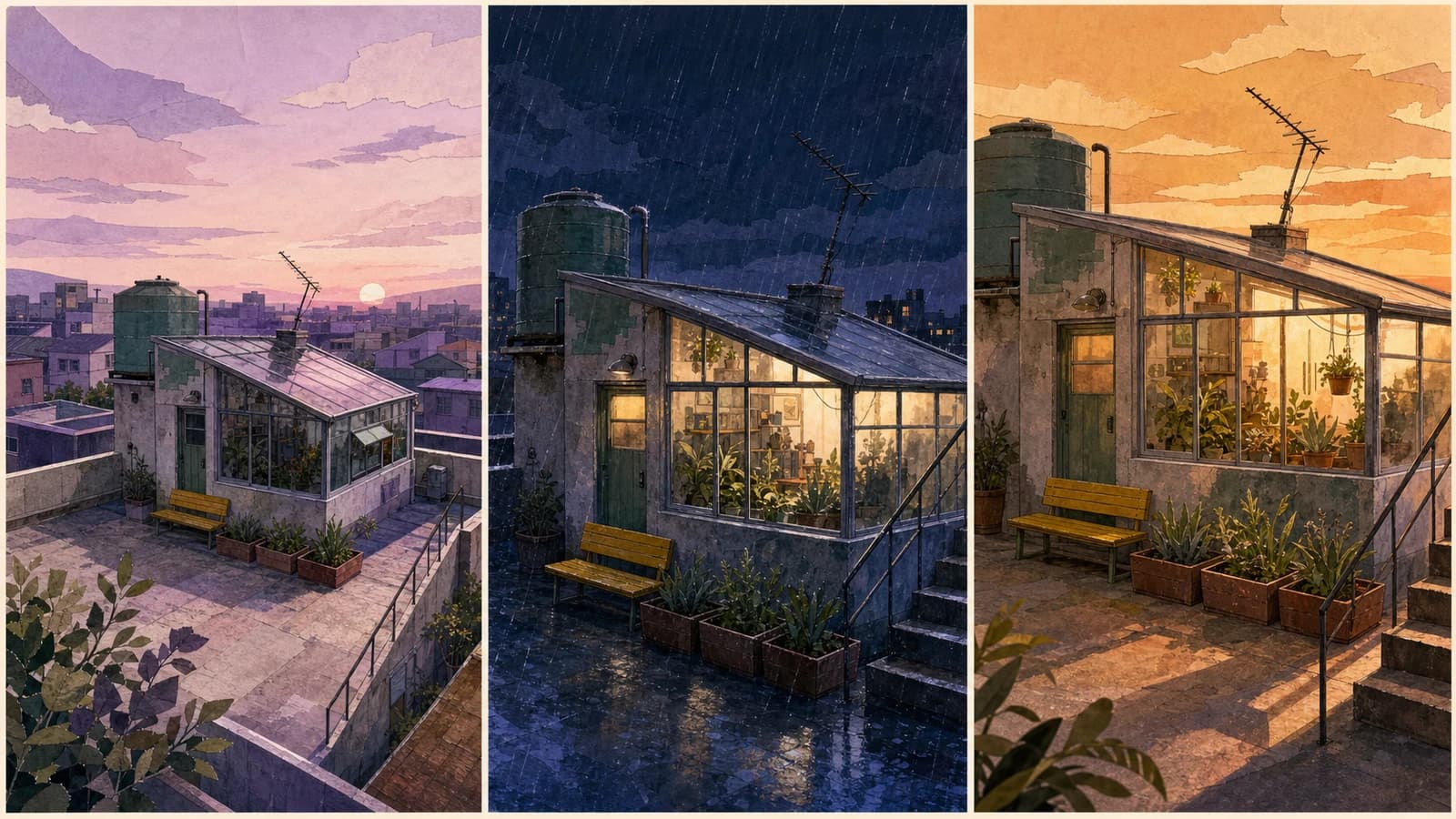
Roof, door और bench identity हैं; dawn, rain और open door states हैं। हर state का episode record रखें। पूरा लंबवत एपिसोड, परतों वाली PSD फ़ाइल, दोबारा इस्तेमाल होने वाला 3D सेट, घुमाया जा सकने वाला कैमरा, बिल्कुल एक-जैसा दृश्य, स्वचालित परिप्रेक्ष्य सुधार या सामूहिक निर्माण
समीक्षा तिथि 2026-07-22 · Anime Maker उत्पाद और संपादकीय टीम
पेज की तस्वीरें संपादकीय उदाहरण हैं, आपके खाते के वास्तविक कार्य-रिकॉर्ड नहीं। टूल का आकलन अपने परिणाम पैनल में दिखने वाले आउटपुट से करें।
लिखें कि reader को entrance, route, distance या clue में क्या समझना है। सुंदर लेकिन जानकारी छिपाने वाला background असफल है। एक 1024×1024 flattened raster background concept
Kerb, roof, window और floor lines को compatible convergence तक trace करें और silhouette से door height तथा ground contact जाँचें। environment exploration, establishing shots, color keys, lighting variants, pitch और manual rebuild reference
Standing और movement के लिए floor, heads के पीछे low-contrast area रखें। Final bubbles editor में लगाएं। पूरा लंबवत एपिसोड, परतों वाली PSD फ़ाइल, दोबारा इस्तेमाल होने वाला 3D सेट, घुमाया जा सकने वाला कैमरा, बिल्कुल एक-जैसा दृश्य, स्वचालित परिप्रेक्ष्य सुधार या सामूहिक निर्माण
एक shot job और कुछ fixed landmarks से शुरू करें; geometry सुधारकर location को version करें।
Background concept बनाएंयह example location पहचान दिखाता है; tool हर task में एक square concept बनाता है।
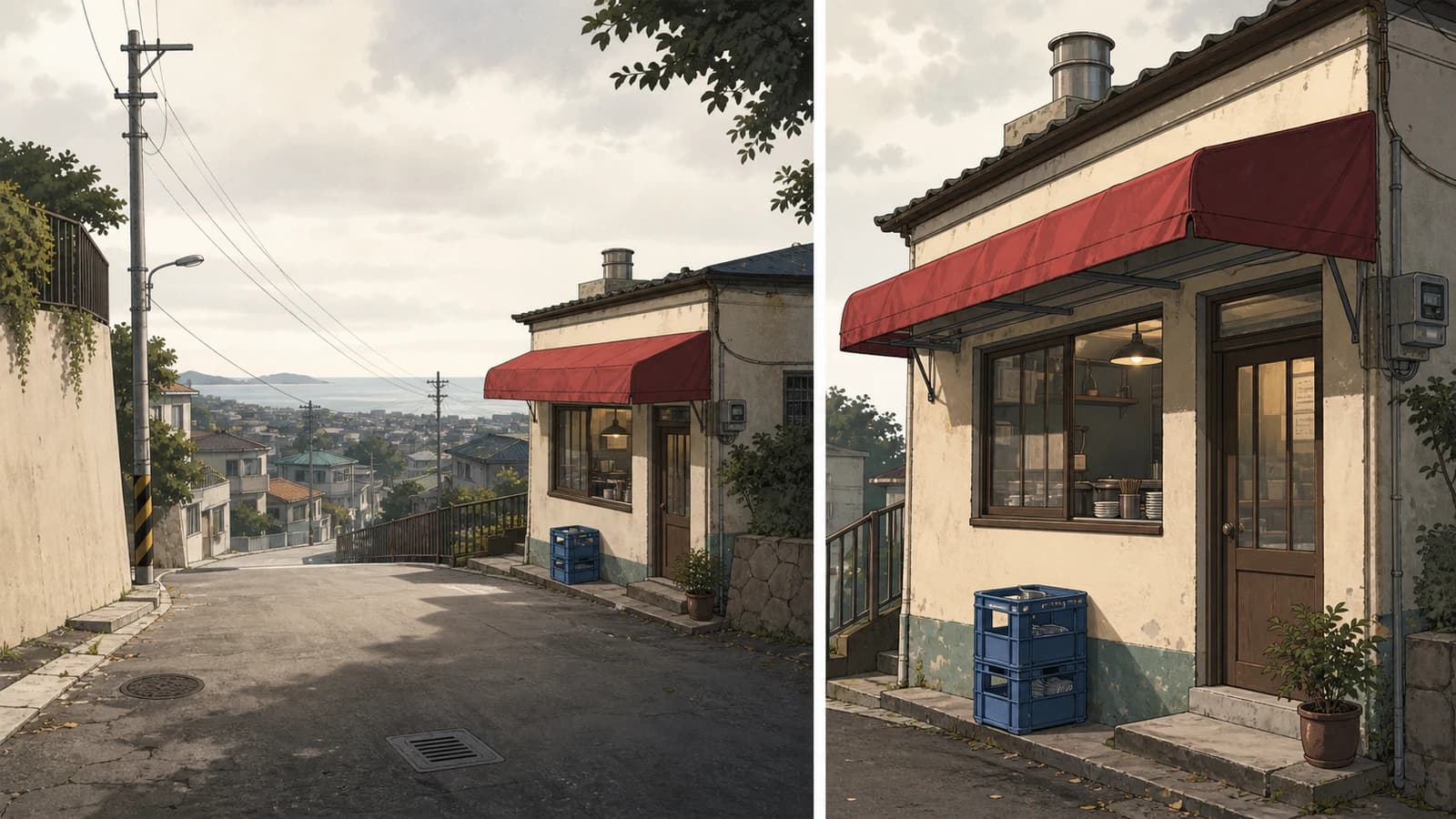
“Original webtoon background: बारिश के बाद समुद्र किनारे ढलान वाली गली में छोटी दुकान, कोई व्यक्ति नहीं। Standing eye level, two-point perspective, foreground road, midground storefront, पीछे hillside homes और sea. Door के पास standing zone, bubble के लिए शांत wall और sky. बिना अक्षर की dark red awning, blue crate, wooden door, left utility pole, तीन plants. कोई text, logo, brand, watermark या UI नहीं। Standing और movement के लिए floor, heads के पीछे low-contrast area रखें। Final bubbles editor में लगाएं। यह example location पहचान दिखाता है; tool हर task में एक square concept बनाता है।”
Cast से पहले खाली stage की योजना बनाएं Standing और movement के लिए floor, heads के पीछे low-contrast area रखें। Final bubbles editor में लगाएं। यह example location पहचान दिखाता है; tool हर task में एक square concept बनाता है।
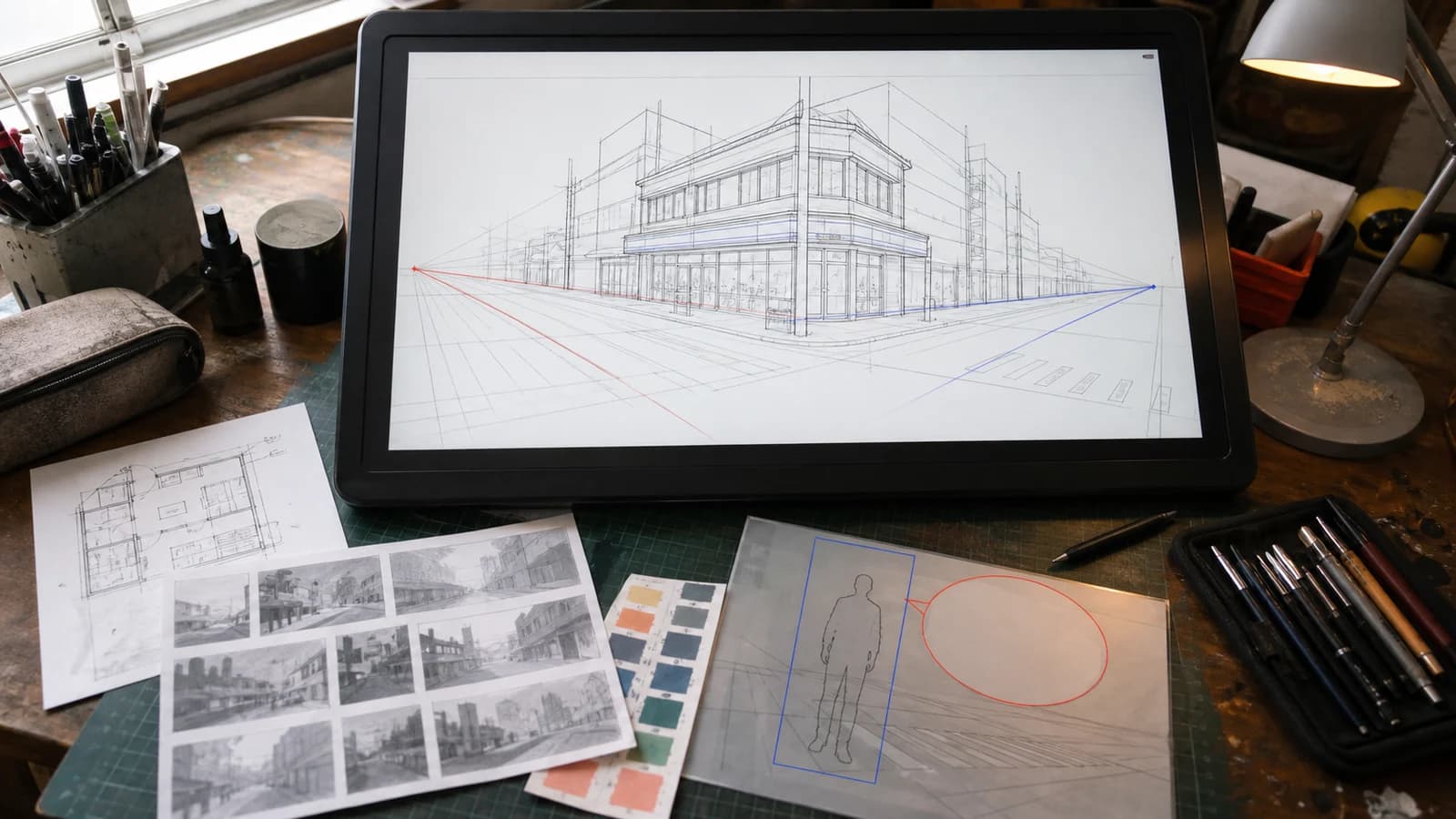
“Original webtoon background: बारिश के बाद समुद्र किनारे ढलान वाली गली में छोटी दुकान, कोई व्यक्ति नहीं। Standing eye level, two-point perspective, foreground road, midground storefront, पीछे hillside homes और sea. Door के पास standing zone, bubble के लिए शांत wall और sky. बिना अक्षर की dark red awning, blue crate, wooden door, left utility pole, तीन plants. कोई text, logo, brand, watermark या UI नहीं। Plan, elevation, dimensions, palette, materials, fixed/movable props और approved views save करें; prompt geometry lock नहीं करता। काम की desk पर two-point perspective, floor plan, value thumbnails, palette, character zone और bubble zone साथ दिखते हैं।”
Cast से पहले खाली stage की योजना बनाएं Plan, elevation, dimensions, palette, materials, fixed/movable props और approved views save करें; prompt geometry lock नहीं करता। काम की desk पर two-point perspective, floor plan, value thumbnails, palette, character zone और bubble zone साथ दिखते हैं।
एक बार का दृश्य layered 2D हो सकता है; बार-बार आने वाली जगह के लिए simple 3D उपयोगी है। Concept में editable depth नहीं होती। एक ही ढलान वाली दुकान के दो views में लाल awning, नीला crate, pole, door और staging zone बने रहते हैं।
Standing और movement के लिए floor, heads के पीछे low-contrast area रखें। Final bubbles editor में लगाएं। पूरा लंबवत एपिसोड, परतों वाली PSD फ़ाइल, दोबारा इस्तेमाल होने वाला 3D सेट, घुमाया जा सकने वाला कैमरा, बिल्कुल एक-जैसा दृश्य, स्वचालित परिप्रेक्ष्य सुधार या सामूहिक निर्माण
Roof, door और bench identity हैं; dawn, rain और open door states हैं। हर state का episode record रखें। यह example location पहचान दिखाता है; tool हर task में एक square concept बनाता है।
Plan, elevation, dimensions, palette, materials, fixed/movable props और approved views save करें; prompt geometry lock नहीं करता। एक ही ढलान वाली दुकान के दो views में लाल awning, नीला crate, pole, door और staging zone बने रहते हैं।
Square image को लंबा न खींचें। Crop, extend या redraw करें और phone width पर final जाँचें। काम की desk पर two-point perspective, floor plan, value thumbnails, palette, character zone और bubble zone साथ दिखते हैं।
एक बार का दृश्य layered 2D हो सकता है; बार-बार आने वाली जगह के लिए simple 3D उपयोगी है। Concept में editable depth नहीं होती। यह example location पहचान दिखाता है; tool हर task में एक square concept बनाता है।
Informative image का अर्थ alt text या transcript में दें, authorized material उपयोग करें और edits का record रखें। एक 1024×1024 flattened raster background concept
Roof, door और bench identity हैं; dawn, rain और open door states हैं। हर state का episode record रखें। काम की desk पर two-point perspective, floor plan, value thumbnails, palette, character zone और bubble zone साथ दिखते हैं।
लिखें कि reader को entrance, route, distance या clue में क्या समझना है। सुंदर लेकिन जानकारी छिपाने वाला background असफल है। environment exploration, establishing shots, color keys, lighting variants, pitch और manual rebuild reference
Square image को लंबा न खींचें। Crop, extend या redraw करें और phone width पर final जाँचें। एक 1024×1024 flattened raster background concept
Kerb, roof, window और floor lines को compatible convergence तक trace करें और silhouette से door height तथा ground contact जाँचें। पूरा लंबवत एपिसोड, परतों वाली PSD फ़ाइल, दोबारा इस्तेमाल होने वाला 3D सेट, घुमाया जा सकने वाला कैमरा, बिल्कुल एक-जैसा दृश्य, स्वचालित परिप्रेक्ष्य सुधार या सामूहिक निर्माण
Informative image का अर्थ alt text या transcript में दें, authorized material उपयोग करें और edits का record रखें। environment exploration, establishing shots, color keys, lighting variants, pitch और manual rebuild reference
Standing और movement के लिए floor, heads के पीछे low-contrast area रखें। Final bubbles editor में लगाएं। एक ही ढलान वाली दुकान के दो views में लाल awning, नीला crate, pole, door और staging zone बने रहते हैं।
तरीका Krita, Blender, Adobe, WEBTOON CANVAS और W3C की आधिकारिक perspective, camera, export और image-accessibility guidance से जाँचा गया है।
Square image को लंबा न खींचें। Crop, extend या redraw करें और phone width पर final जाँचें। पूरा लंबवत एपिसोड, परतों वाली PSD फ़ाइल, दोबारा इस्तेमाल होने वाला 3D सेट, घुमाया जा सकने वाला कैमरा, बिल्कुल एक-जैसा दृश्य, स्वचालित परिप्रेक्ष्य सुधार या सामूहिक निर्माण
Informative image का अर्थ alt text या transcript में दें, authorized material उपयोग करें और edits का record रखें। पूरा लंबवत एपिसोड, परतों वाली PSD फ़ाइल, दोबारा इस्तेमाल होने वाला 3D सेट, घुमाया जा सकने वाला कैमरा, बिल्कुल एक-जैसा दृश्य, स्वचालित परिप्रेक्ष्य सुधार या सामूहिक निर्माण
Kerb, roof, window और floor lines को compatible convergence तक trace करें और silhouette से door height तथा ground contact जाँचें। पूरा लंबवत एपिसोड, परतों वाली PSD फ़ाइल, दोबारा इस्तेमाल होने वाला 3D सेट, घुमाया जा सकने वाला कैमरा, बिल्कुल एक-जैसा दृश्य, स्वचालित परिप्रेक्ष्य सुधार या सामूहिक निर्माण
Standing और movement के लिए floor, heads के पीछे low-contrast area रखें। Final bubbles editor में लगाएं। पूरा लंबवत एपिसोड, परतों वाली PSD फ़ाइल, दोबारा इस्तेमाल होने वाला 3D सेट, घुमाया जा सकने वाला कैमरा, बिल्कुल एक-जैसा दृश्य, स्वचालित परिप्रेक्ष्य सुधार या सामूहिक निर्माण
Plan, elevation, dimensions, palette, materials, fixed/movable props और approved views save करें; prompt geometry lock नहीं करता। एक ही ढलान वाली दुकान के दो views में लाल awning, नीला crate, pole, door और staging zone बने रहते हैं।
एक बार का दृश्य layered 2D हो सकता है; बार-बार आने वाली जगह के लिए simple 3D उपयोगी है। Concept में editable depth नहीं होती। यह example location पहचान दिखाता है; tool हर task में एक square concept बनाता है।
Roof, door और bench identity हैं; dawn, rain और open door states हैं। हर state का episode record रखें। काम की desk पर two-point perspective, floor plan, value thumbnails, palette, character zone और bubble zone साथ दिखते हैं।
Square image को लंबा न खींचें। Crop, extend या redraw करें और phone width पर final जाँचें। एक 1024×1024 flattened raster background concept
Informative image का अर्थ alt text या transcript में दें, authorized material उपयोग करें और edits का record रखें। environment exploration, establishing shots, color keys, lighting variants, pitch और manual rebuild reference