Anime Maker logoAnime Maker
  • Home
  • AI Anime Generator
  • Features
  • Cases
  • Pricing
  • Blog
Anime Maker logoAnime Maker

Create anime images, original characters, photo-based illustrations, and short videos from focused prompts.

Email
Product
  • Features
  • Pricing
  • FAQ
  • AI Anime Generator
  • Photo to Anime AI
  • Image to Video Anime AI
  • Anime Character Generator
  • Anime Logo Maker
Company
  • About
  • Contact
Legal
  • Cookie Policy
  • Privacy Policy
  • Terms of Service
© 2026 Anime Maker All Rights Reserved.

AI storyboard generator

AI Storyboard Generator for Shot Planning

Turn a compact script beat into one visual storyboard contact sheet, then use the shot-planning guide below to decide what must be redrawn, numbered, timed, and carried into production.

Break one scene into visible camera decisions

Use the starter prompt as a miniature directing brief: establish the place, identify the action change in each shot, repeat continuity anchors, and ask for blank panels without generated notes.

Generation mode
Output format
One image
1024 × 1024
Raster storyboard draft

Example outputs

What one focused input can produce

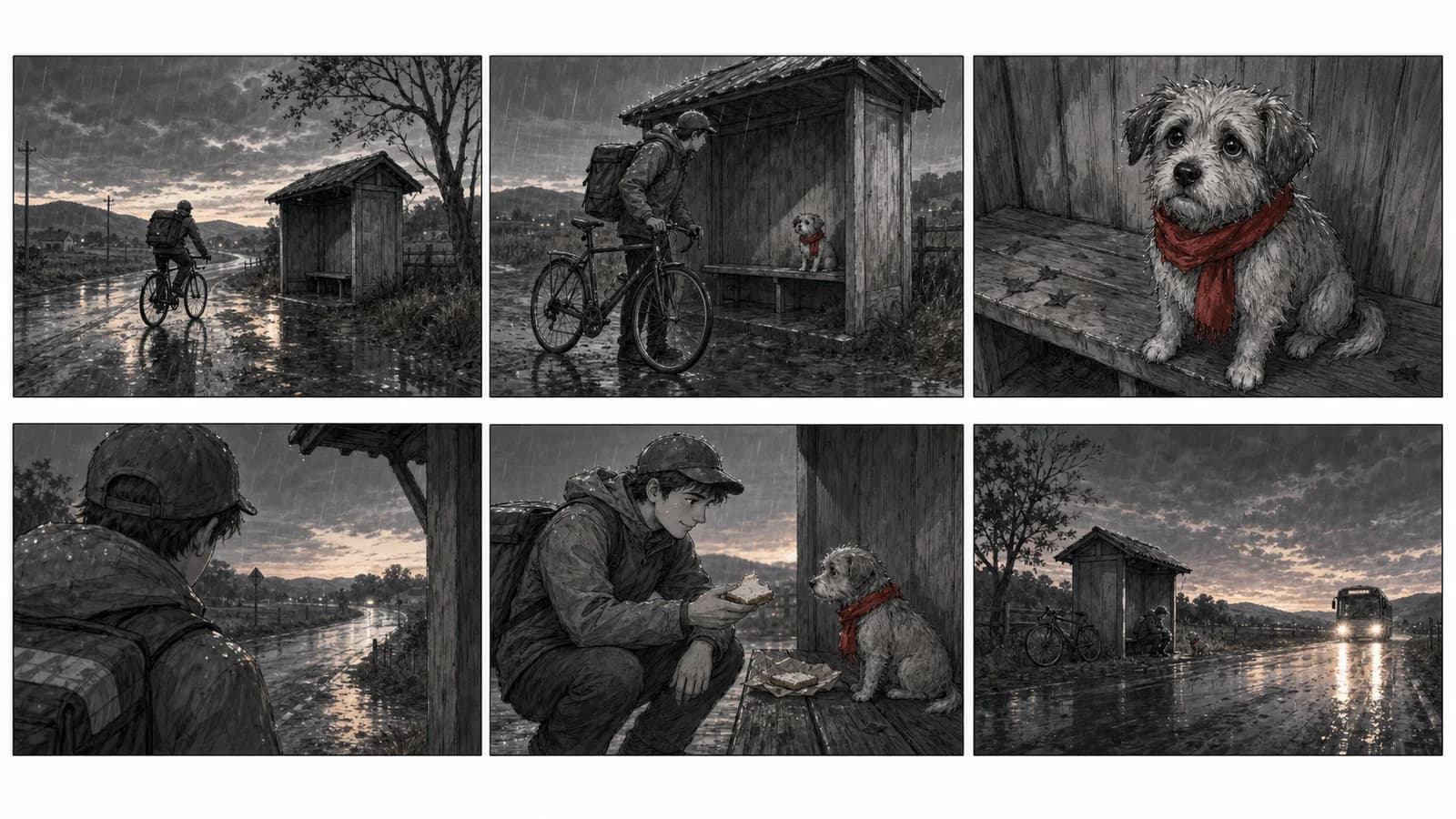
Six-panel graphite storyboard of a bicycle courier finding a small dog at a rainy rural bus shelter

Standard image

Advanced image

Actual output

one 1024 × 1024 flattened raster image containing a storyboard or contact-sheet draft

Best used for

early scene exploration, pitch conversations, camera alternatives, animation planning, social video concepts, and previsualization notes

Not designed for

editable shot cards, separate frames, exact lens or timing metadata, finished animatics, complete scripts, or guaranteed continuity

Product and guidance reviewed 2026-07-22

Product behavior was checked against the current AnimeImageGeneratorPanel and image-generation request flow. External production guidance was reviewed against Adobe storyboarding material and W3C image-accessibility guidance.

Direct the sequence before polishing the drawingsFive steps from scene beat to storyboard handoffStoryboard prompts with review criteriaMove from script beat to a shootable shot planReview what the generated sheet cannot guaranteeQuestions about the AI storyboard generator

Direct the sequence before polishing the drawings

A useful storyboard answers production questions about framing, staging, screen direction, reveals, and coverage. Drawing finish is secondary to whether the next collaborator can understand the scene.

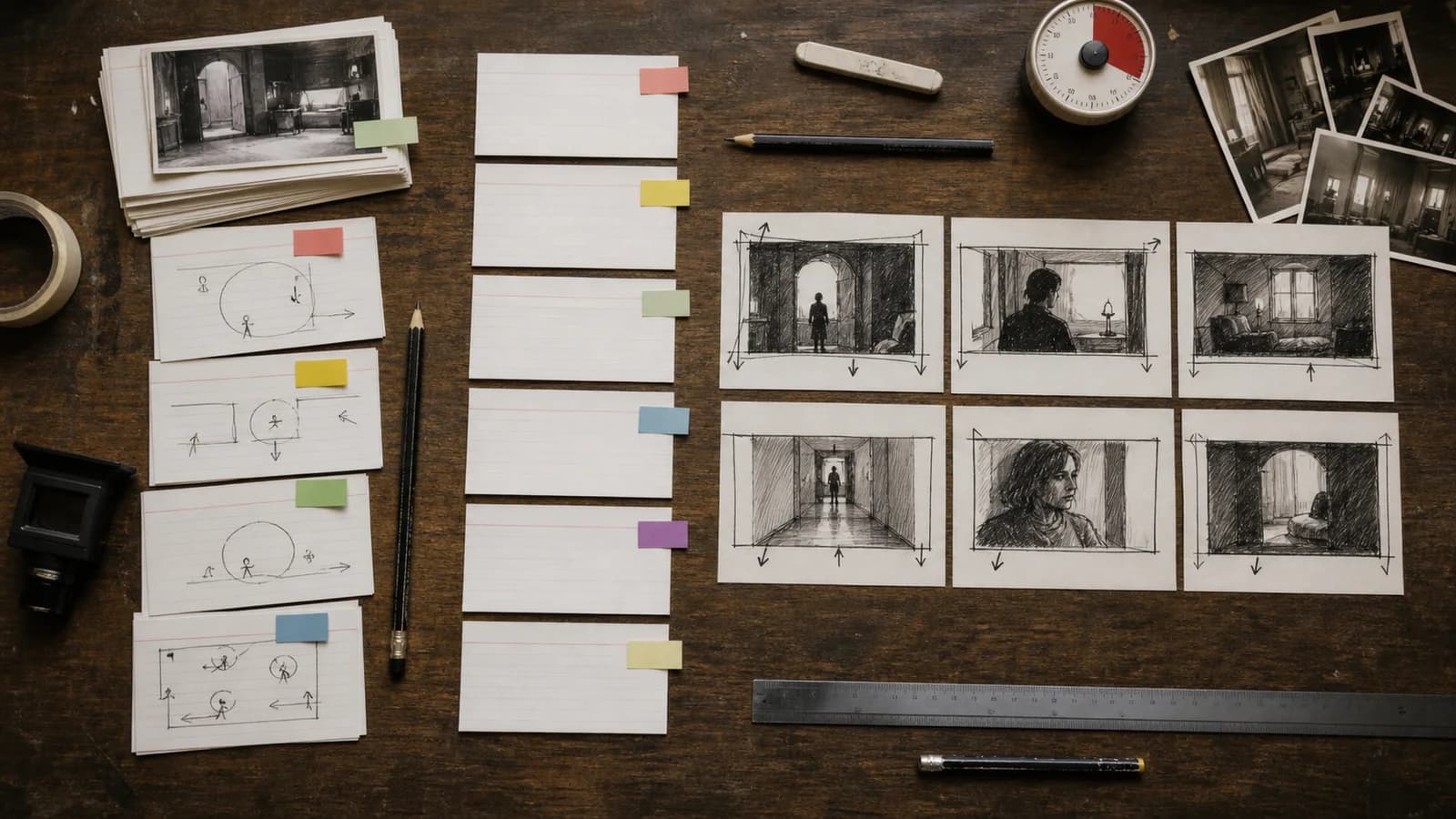
Overhead filmmaking desk where blank script cards lead into a shot list and six hand-drawn storyboard thumbnails

01

Write observable beats, not literary summary

A camera cannot photograph “she realizes home has changed” by itself. Translate that sentence into evidence: she stops at the gate, compares a faded key with a new lock, then looks toward a lit upstairs window. Each panel should contain one visible state that can be staged.

02

Give every shot a reason to exist

Name the information gained in each frame: locate the scene, reveal a clue, clarify geography, show a reaction, or change control. If two adjacent shots perform the same job, combine them or make the second one alter scale, knowledge, or emotion.

03

Repeat continuity anchors deliberately

State the same wardrobe, prop side, weather, time of day, and travel direction in the prompt. Repetition helps, but it is not a continuity lock. Compare every frame manually and redraw any detail that would confuse blocking or editorial continuity.

Five steps from scene beat to storyboard handoff

01

Mark the scene turn

Identify the moment when information, intention, power, place, or emotion changes. The storyboard must build toward and clearly show that turn.

02

Draft a shot list

For each shot, write purpose, subject, size, angle, movement, action, dialogue reference, and continuity notes before asking for images.

03

Generate one contact sheet

Request a small number of ordered panels with blank interiors and stable anchors. Treat the result as a visual proposal, not production truth.

04

Run sequence checks

Review geography, screen direction, eyelines, props, wardrobe, light, action matching, shot variety, and whether the dramatic turn reads without explanation.

05

Rebuild the handoff

Extract or redraw approved frames in an editable file, assign IDs and durations, add dialogue and camera notes, then record revision status and ownership.

Storyboard prompts with review criteria

Six-shot storyboard sequence of a courier meeting a dog in a rainy bus shelter
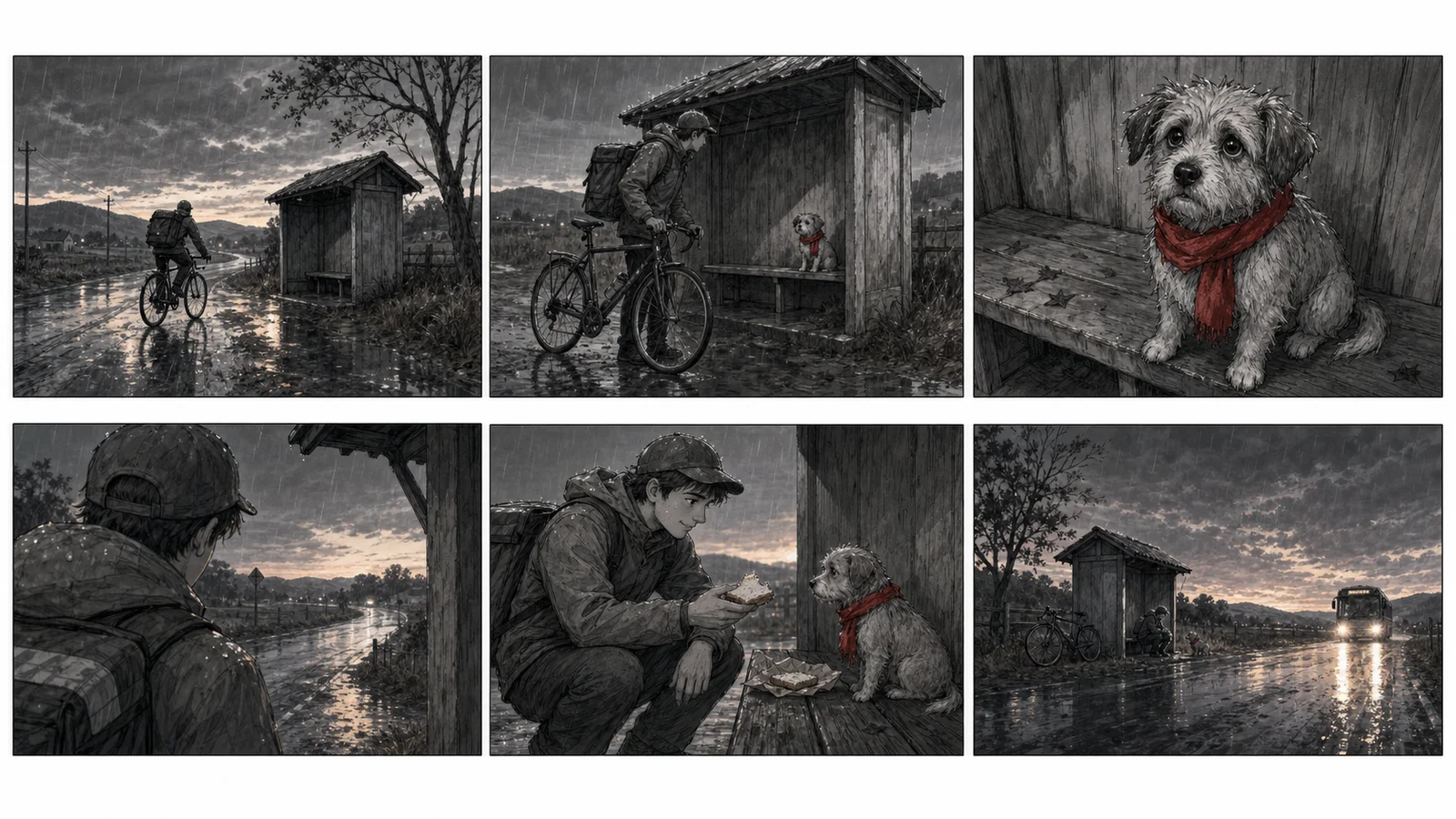
The contact sheet varies shot scale while keeping the shelter, rain, courier, bicycle, dog, and red scarf available as continuity anchors.

A six-shot encounter at a bus shelter

“Six storyboard panels: rainy rural shelter; mustard-coat bicycle courier arrives; sound under bench; close-up of dog with red scarf; courier offers sandwich; two-shot; bus headlights in final wide. Preserve screen direction and all props. Graphite, no text.”

What to inspect: The sequence has one location, one recurring red prop, a clear discovery, and a final change. It is suitable for comparing framing, but the generated sheet must still be checked for bicycle placement, scarf side, hand action, shelter geography, and whether the final headlights read at thumbnail size.

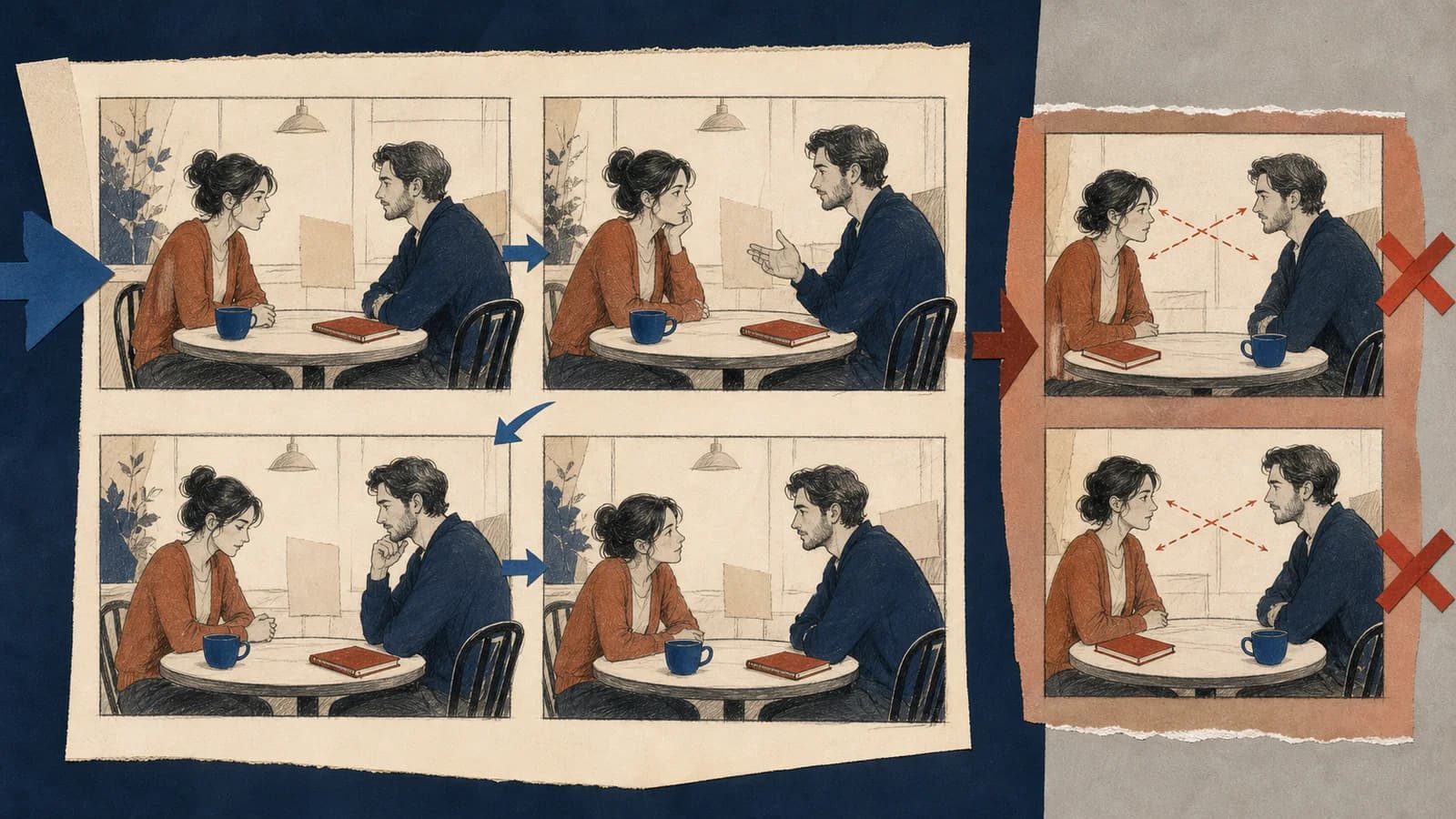
Storyboard continuity board comparing stable eyelines and props with a sequence containing position errors
Continuity review is a separate pass: compare screen side, eyeline, hand use, furniture, and recurring props across adjacent frames.

Move from script beat to a shootable shot plan

Open the stage that matches your next decision: scene breakdown, shot list, blocking, continuity, revision, handoff, accessibility, or rights review.

Turn prose into actions a camera can observe

Begin with the scene purpose, not the art style. Write what changes between the first and last image: a character gains information, loses control, reaches a place, makes a choice, or reveals an object. Then underline every visible action and remove internal explanation that has no physical evidence. “Nora becomes suspicious” is not yet a shot. “Nora stops stirring, sees a second wet umbrella by the door, and hides the key under her palm” gives the board a face, clue, hand action, and prop state to stage.

Divide the scene into beats before dividing it into shots. A beat changes intention, information, emotion, or power; a shot is one camera view chosen to express part of that change. Several shots can serve one beat, while a simple beat may need only one frame. If the prompt lists camera sizes without a dramatic progression, the result can look like a random contact sheet. Write a one-line job beside every proposed image: establish geography, introduce the clue, show who notices, preserve the action, or land the result.

Review what the generated sheet cannot guarantee

The result is one flattened square image

The current generator returns one 1024 × 1024 raster result. It does not deliver separately downloadable panels, editable vectors, layered shot cards, a timeline, or a native storyboard project.

Panel count and order can drift

The model may merge panels, omit a requested beat, repeat a frame, or arrange the sequence ambiguously. Confirm the count and reading path before discussing drawing quality.

Continuity is approximate

Faces, costume details, prop sides, furniture, weather, and screen direction can change between panels. Repeated prompt anchors reduce some drift but do not guarantee a match.

Production metadata is not generated reliably

Do not trust text-like marks for shot IDs, dialogue, duration, focal length, camera movement, VFX notes, or approval status. Add verified metadata in a separate editable document.

Questions about the AI storyboard generator

What does the AI storyboard generator produce?

It produces one 1024 × 1024 flattened raster image that can contain a storyboard or contact-sheet draft. It does not return separate editable frames, a shot database, a script, or a timed animatic.

Can I paste a full screenplay into the generator?

A short scene beat is more practical. Select one location, a small cast, and roughly four to eight visible shots. Break longer scripts into scenes and maintain your own numbered shot list across generations.

How should I write an AI storyboard prompt?

State format, panel count, cast anchors, location, reading direction, then list each shot with purpose, shot size, action, and continuity facts. Ask for no written text and keep dialogue in your external script.

Can it keep the same character in every frame?

Continue the visual production workflow

AI Comic GeneratorComic Strip MakerAI Manga GeneratorAnime Character Generator

Draft the scene, then make the production decisions yourself

Start with one location and one dramatic turn. Generate a visual contact sheet, select the useful frames, and rebuild them as a numbered shot list or editable storyboard.

Generate a storyboard draft

Representative output direction: one flattened visual sheet can communicate shot progression, but shot IDs, duration, dialogue, lens notes, and approval status still need an editable production document.

A conversation with matched coverage

“Late-night laundromat, two adult siblings and one red sock in a dryer. Establishing shot, neutral two-shot, matching over-the-shoulders, insert of sock, reaction close-up, final wide. Keep both eyelines, seating, machines, and the 180-degree axis consistent. No text.”

What to inspect: This brief tests whether the coverage can be cut together. A useful result keeps each person on a stable side of frame and preserves the dryer position; an attractive image that crosses the axis accidentally is a failed storyboard decision.

A concise product demonstration

“Six-panel storyboard for a refillable teal bottle: discarded plastic problem, refill point discovery, phone scan gesture, close-up of water flow, bottle returned to bag, clean final composition. Same bottle and sleeve in every frame, practical camera progression, no words or logos.”

What to inspect: The object provides a stable through-line and every shot has a demonstrable action. Brand copy, legal claims, UI screens, timing, and exact product appearance must be supplied and approved outside the generated image.

Keep the generated task small enough for one square sheet. Four to eight panels, one main location, one or two primary characters, and one turning point are a practical brief. Longer material should be split into scenes with a separate continuity record. The current tool does not remember a previous generation as an editable project, so record approved wardrobe, props, time of day, screen direction, and frame references outside the prompt before moving to the next sheet.

Give each storyboard frame production metadata

A visual frame and a shot-list row answer different questions. The frame shows composition, relative scale, blocking, and the moment selected from the action. The row records a unique shot ID, scene reference, purpose, subject, shot size, angle, movement, dialogue cue, estimated duration, lens intention, sound note, continuity issue, and production status. The generator does not create those fields reliably, especially as embedded text, so build the editable list yourself and connect each approved drawing to one row.

Use shot size as information design. A wide shot can establish geography or isolation; a medium shot can show action and body relationship; a close-up can reveal evidence or force attention; an insert isolates a meaningful object. Do not vary size just to make the sheet lively. Ask what the audience needs to know at that instant and whether the previous image already supplied it. Repeated close-ups can destroy geography, while repeated wides can keep emotional evidence too distant.

Camera movement belongs in the plan only when it changes how information is delivered. “Slow push toward the unopened locker as the room empties” has a subject, direction, timing intention, and reveal. “Cinematic camera movement” does not. Since a still contact sheet cannot prove motion or duration, add movement arrows or notes later in the editable board and test the idea in an animatic when timing matters.

Protect geography, eyelines, movement, and prop state

Before requesting coverage, draw a simple overhead plan of the location. Mark doors, windows, furniture, actors, travel direction, and the camera side. This plan helps you notice when a generated reverse angle moves the door, swaps the characters, or points both eyelines the same way. For two-person coverage, establish the screen axis and decide when crossing it is motivated. The familiar 180-degree practice is not a law that forbids every crossing; it is a way to keep left-right relationships understandable unless the transition deliberately reorients the audience.

Track continuity as state, not only appearance. Record which hand holds the cup, whether the bag is open, how wet the coat is, where the chair faces, which lights are on, and what has changed because of the previous action. A storyboard can simplify costume drawing, but it cannot change a plot-bearing object without consequence. Compare adjacent frames at thumbnail size and full size; large differences in silhouette show immediately, while small prop reversals require a dedicated pass.

Continuity review also asks whether actions can cut. If one frame begins a reach and the next shows the hand already withdrawn, the editor may lack the useful middle state. Add the moment of contact or change the planned cut point. For animation, note key poses and screen travel; for live action, identify coverage that protects the performance and edit. Generated frames propose images, but only the production team can decide which actions need coverage and how much.

Write an ordered visual brief instead of a plot paragraph

Start the prompt with the artifact: “six-panel storyboard contact sheet, rough graphite, no written text.” Then define the character and location anchors once. List panels in intended reading order with a shot size, visible action, and new information. End by repeating global constraints such as wardrobe, recurring props, weather, screen direction, blank margins, and the absence of captions or logos. This structure cannot force perfect compliance, but it makes omissions and drift easier to diagnose.

Use concrete continuity nouns rather than stylistic synonyms. If the coat is mustard yellow, the bicycle has a front basket, and the dog wears a red scarf, repeat those exact anchors. A creative-writing instinct to vary “coat,” “jacket,” and “rain shell” can become three different garments. Keep emotional direction observable: lowered shoulders, withheld eye contact, clenched fingers, or a pause at the doorway. Avoid naming protected films, living artists, or copyrighted characters as shortcuts for the look.

When a result fails, revise one class of problem at a time. If order is wrong, simplify the number of panels and restate progression. If identity drifts, reduce the cast and repeat anchors. If geography changes, provide a simpler layout and fewer reverse angles. If every frame is the same size, assign a purpose and shot size explicitly. Changing story, cast, camera, rendering, and palette together makes the next output hard to evaluate.

Reject attractive boards that do not solve the scene

Check structural failures before drawing quality. Count the panels, identify the intended first and last frame, and summarize the action using only what is visible. Reject sheets that duplicate a beat, skip the turn, merge panels, invent a new location, or make the reading path ambiguous. A polished close-up cannot rescue a sequence that no longer tells the planned event.

Then check production failures: inconsistent faces, wrong screen side, impossible eyelines, disappearing props, costume changes, broken hands, altered architecture, false text, and unsafe action. Separate issues that affect understanding from details that can be redrawn later. A wrong scarf texture is minor; moving the scarf to another character when it identifies the lost dog is not. Record the decision to accept, redraw, regenerate, or remove each frame.

Finally check scope. One raster sheet cannot validate location access, stunt design, child or animal handling, VFX cost, product claims, brand approval, or legal rights. Treat apparent camera feasibility as a sketch, not a promise that the lens, rig, light, schedule, or budget will work. Department heads and responsible reviewers need to convert the concept into an approved plan.

Rebuild selected frames into an editable production board

Do not let the generated contact sheet become the only master. Extract or redraw selected frames at a consistent aspect ratio, place them in an editable board, and assign stable IDs. Add dialogue references rather than rewriting the script inside the image. Record shot purpose, action, movement, duration estimate, transition, sound, continuity notes, status, owner, and revision date. A collaborator should be able to identify what changed without comparing unnamed exports.

Create an animatic when timing and editorial rhythm matter. Place the approved frames against temporary dialogue, sound, and explicit duration values. Watch for shots that repeat information, reveals that arrive early, reactions that have no time to register, and movements that cannot match across the cut. The AI storyboard generator does not produce a timed sequence; the animatic is where still-image assumptions become testable time.

Keep rejected ideas where they can inform discussion, but label them clearly so they are not mistaken for approval. Export a review copy for easy sharing and preserve the editable board as the source of truth. If the screenplay changes, update the affected shot rows and board revision together. A beautiful PDF with stale scene facts is more dangerous than a rough board that accurately reflects the current plan.

Describe the sequence for collaborators who cannot rely on the image

A storyboard carries ordered information, so its alternative text should convey more than “six drawings.” The W3C Web Accessibility Initiative explains that informative and complex images need text alternatives that communicate their essential information. For a short board, describe the scene progression and turning point. For a dense production board, provide a nearby structured transcript or shot list containing the equivalent sequence, actions, dialogue references, and notes.

Do not depend on color alone for approval, character ownership, or continuity warnings. Pair color with labels, borders, symbols, or status fields in the editable board. Keep text out of the generated art and add it as real text where collaborators can resize, search, translate, and copy it. Review the final shared format with keyboard navigation and at high zoom if it will be used as a web document.

Localization can change dialogue length, reading direction, and the timing of a reveal. Keep dialogue linked to script IDs rather than baked into the panels. If a right-to-left version changes sequence order, rebuild the board deliberately instead of mirroring character handedness, signage, props, or camera geography. A local editor should review both language and visual timing.

Use production guidance and authorized visual material

Adobe’s storyboarding guidance describes the board as a way to communicate the director’s intended images to the wider crew and emphasizes the storyboard artist’s role in choices such as composition. That communication goal is the right quality test here: can another person understand the intended scene and ask useful production questions? The generated image is a starting artifact in that conversation, not evidence that a shot has been approved or can be executed exactly as drawn.

Use original characters, locations you can depict, and references you are authorized to transform. Do not ask for a protected film frame, studio character, trademarked product, or a living artist’s signature style as a shortcut. Before publication or client delivery, inspect accidental logos, pseudo-text, uniforms, recognizable private people, and environmental details that imply a real organization or endorsement.

Keep the prompt, selected output, revision notes, source permissions, and final board together. Record which frames were generated, redrawn, replaced, or approved by a human. For commercial, educational, or sensitive material, apply the project’s normal legal, safety, accessibility, and factual review. The board can help people see an idea sooner; it does not replace accountable production decisions.

A storyboard does not clear rights or feasibility

Avoid protected characters, named living artists, unlicensed references, and misleading logos. A drawing also does not confirm location access, stunt safety, budget, equipment, or legal approval.

It can repeat visual details, but exact continuity is not guaranteed. Keep the cast small, reuse identical anchor language, compare frames side by side, and redraw or regenerate changes that affect the scene.

Is the result ready for a film crew or animation team?

Not by itself. Rebuild approved frames in an editable board, assign shot IDs, dialogue references, duration, camera notes, transitions, version status, and the owner responsible for each revision.

How is a storyboard different from a shot list?

A storyboard shows composition, blocking, and visual progression. A shot list records production metadata in searchable text. They support each other; one visual raster sheet should not replace the editable shot list.