
2026/07/21
AI పాత్రను ప్రతి సన్నివేశంలో ఒకేలా ఎలా ఉంచాలి
పాత్ర షీట్, స్థిర prompt, అనుమతి ఉన్న reference, ఒక్కోసారి ఒక్క మార్పు, shot-by-shot QAతో AI పాత్ర గుర్తింపును కాపాడే విధానం.
AI పాత్ర ప్రతి చిత్రంలో ఒకే వ్యక్తిగా కనిపించాలంటే ఒక “magic prompt” సరిపోదు. నియంత్రిత production process అవసరం: పాత్రను ఒకసారి స్పష్టంగా నిర్వచించండి, reference imageను approve చేయండి, ప్రతి revisionలో ఒక్క variable మాత్రమే మార్చండి, ప్రతి కొత్త చిత్రాన్ని ఒకే continuity checklistతో పరిశీలించండి.
ఈ పద్ధతి comics, webtoons, visual novels, storyboards, వరుస social-media కథలకు ఉపయోగపడుతుంది. వాస్తవ పరిమితిని గుర్తుంచుకోవాలి: విడివిడిగా జరిగే generations probabilistic. అదే text, అదే ముఖాన్ని హామీ ఇవ్వదు. మీరు నియంత్రించగలవి brief, reference, versions, selection, retouch.
సంక్షిప్త సమాధానం: ముఖం, జుట్టు, costume silhouette, color palette, ఒక signature prop అనే ఐదు visual anchorsను స్థిరపరచండి. ఆ blockను అదే పదాలతో మళ్లీ ఉపయోగించి, scene block మాత్రమే మార్చి, ప్రతి outputలో ఐదింటినీ తనిఖీ చేయండి.
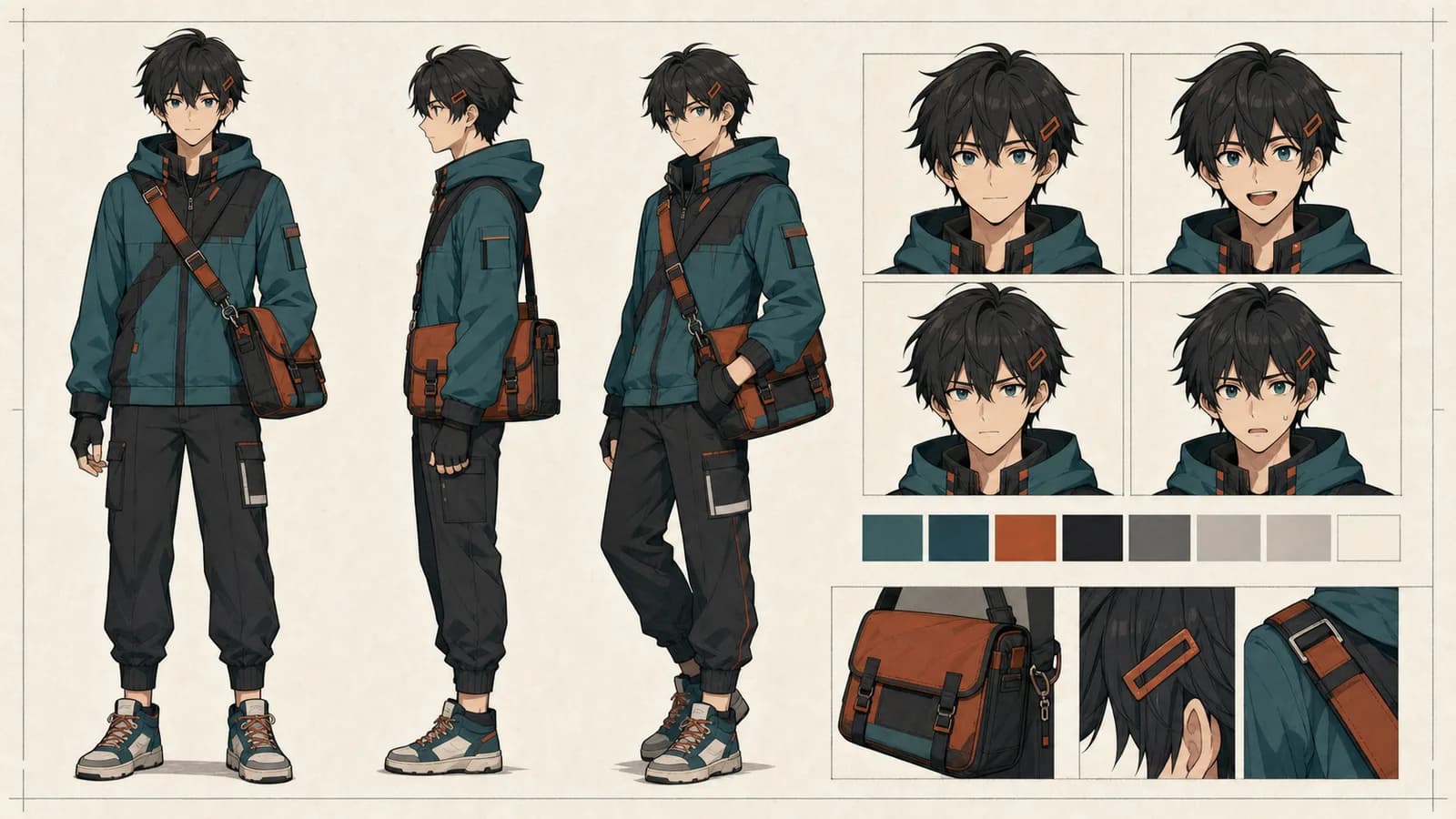
“ఒకేలా” అంటే ఏమిటో ముందుగా నిర్ణయించండి
Consistency అంటే ప్రతి pixel ఒకేలా ఉండటం కాదు. expression, pose, lighting, camera angle మారవచ్చు; చూసిన వెంటనే అదే పాత్ర అని గుర్తుపడాలి.
| భాగం | సాధారణంగా స్థిరం | మారవచ్చు |
|---|---|---|
| ముఖం | ఆకారం, కంటి రంగు, కనుబొమ్మ, మచ్చ లేదా గాయం | expression, gaze, head angle |
| జుట్టు | cut, fringe, base color, ప్రత్యేకమైన వెంట్రుక | గాలి, తడితనం, temporary style |
| దుస్తులు | silhouette, ప్రధాన రంగులు, emblem, material | folds, damage, weather layers |
| వస్తువు | signature prop, దాన్ని పట్టే చేయి | స్థానం, open/closed state |
| Rendering | line, shading family | సమయం, contrast, shot size |
ఒక sequenceకు కనీసం ఐదు గుర్తులను రాయండి. ఇద్దరు ఒకే frameలో ఉంటే వారి descriptions విడిగా రాసి, ఎడమ-కుడి positions, actions స్పష్టంగా చెప్పండి.
ఒక పేజీ character sheet తయారు చేయండి
ఇది పొడవైన biography కాదు; production specification. Role, కనిపించే వయసు, body build, face, hair, clothing layers, మూడు నుంచి ఐదు colors, height relation, signature prop, మారకూడని మూడు details, అనుమతించిన variations నమోదు చేయండి.
“అందమైన cyberpunk heroine”ను QA చేయలేం. “యువ courier, compact athletic build, కిందికి వంగిన amber eyes, దవడ వరకు straight black bob, ఎడమ కణతపై cyan rectangular clip, charcoal cropped jacket, yellow diagonal strap” అనే వివరణలో కనిపించే facts ఉన్నాయి.
Design exploration కోసం anime character generator ఉపయోగించవచ్చు. ప్రస్తుతం ఇది text నుంచి ప్రతి requestకు ఒక 1024 × 1024 square raster image తయారు చేస్తుంది; requests మధ్య identity lock చేయదు. మంచి outputను trained character modelగా కాకుండా design candidateగా చూడండి.
ఉపయోగకరమైన reference sheetలో simple background, front లేదా three-quarter view, పూర్తి costume, ముఖ్య expressions, signature prop స్పష్టంగా ఉండాలి. చిన్న labelsను తర్వాత editorలో జోడించండి. Photo నుంచి మొదలు పెడితే Photo to Anime AI JPG, PNG లేదా WebPను referenceగా ఉపయోగించి కొత్త interpretation తయారు చేస్తుంది; sourceను pixel-perfectగా copy చేయదు.
Promptను fixed, variable blocksగా విడగొట్టండి
ప్రతి panelకు పూర్తి promptను మళ్లీ రాస్తే design drift వస్తుంది. నాలుగు blocks ఉపయోగించండి:
- స్థిర identity: face, hair, costume, colors, prop—అదే పదాలు.
- Scene, action: ఒక imageలో ఒక story moment.
- Camera, composition: shot size, viewpoint, direction, empty space.
- Rendering, exclusions: line, color, light, రావద్దని చెప్పే అంశాలు.
స్థిర పాత్ర: యువ courier; కిందికి వంగిన amber eyes; దవడ వరకు black bob;
ఎడమ కణతపై cyan clip; charcoal jacket; yellow strap; silver compass.
Scene: వర్షం తర్వాత elevated station. తలుపు దగ్గర ఆగి వెనక్కి చూస్తుంది.
Camera: medium three-quarter shot; కుడి thirdలో పాత్ర; ఎడమవైపు dialogue space.
Avoid: eye color change, hidden clip, new accessory, text, logo, watermark.MIRA_CORE_v03, SC03_SH04_v05 వంటి version names వాడండి. OpenAI అధికారిక image guide కూడా purpose, subject, action, location, style స్పష్టంగా చెప్పి, మిగతావి అలాగే ఉంచుతూ step-by-step revisions చేయమని సూచిస్తుంది.
పూర్తి chapterకు ముందు difficulty ladder పరీక్షించండి
Neutral portrait, కొత్త expression, profile, full body, environment, second character, action క్రమంలో generate చేయండి. Profile దగ్గరే design విఫలమైతే అక్కడే sheet లేదా reference సరిచేయండి. స్థిరంగా లేని designతో ముప్పై action panels చేస్తే ముప్పై repair jobs వస్తాయి.
Sequential storytellingలో ముందుగా beats, panel order నిర్ణయించండి. AI manga generator compact black-and-white conceptsకు, AI comic generator square draftsకు ఉపయోగపడతాయి. రెండూ ఒక్కసారి ఒక raster image ఇస్తాయి; pages మధ్య character lock లేదా editable text layer ఇవ్వవు. Final dialogue, speech bubblesను art approve అయిన తర్వాత editorలో జోడించండి.
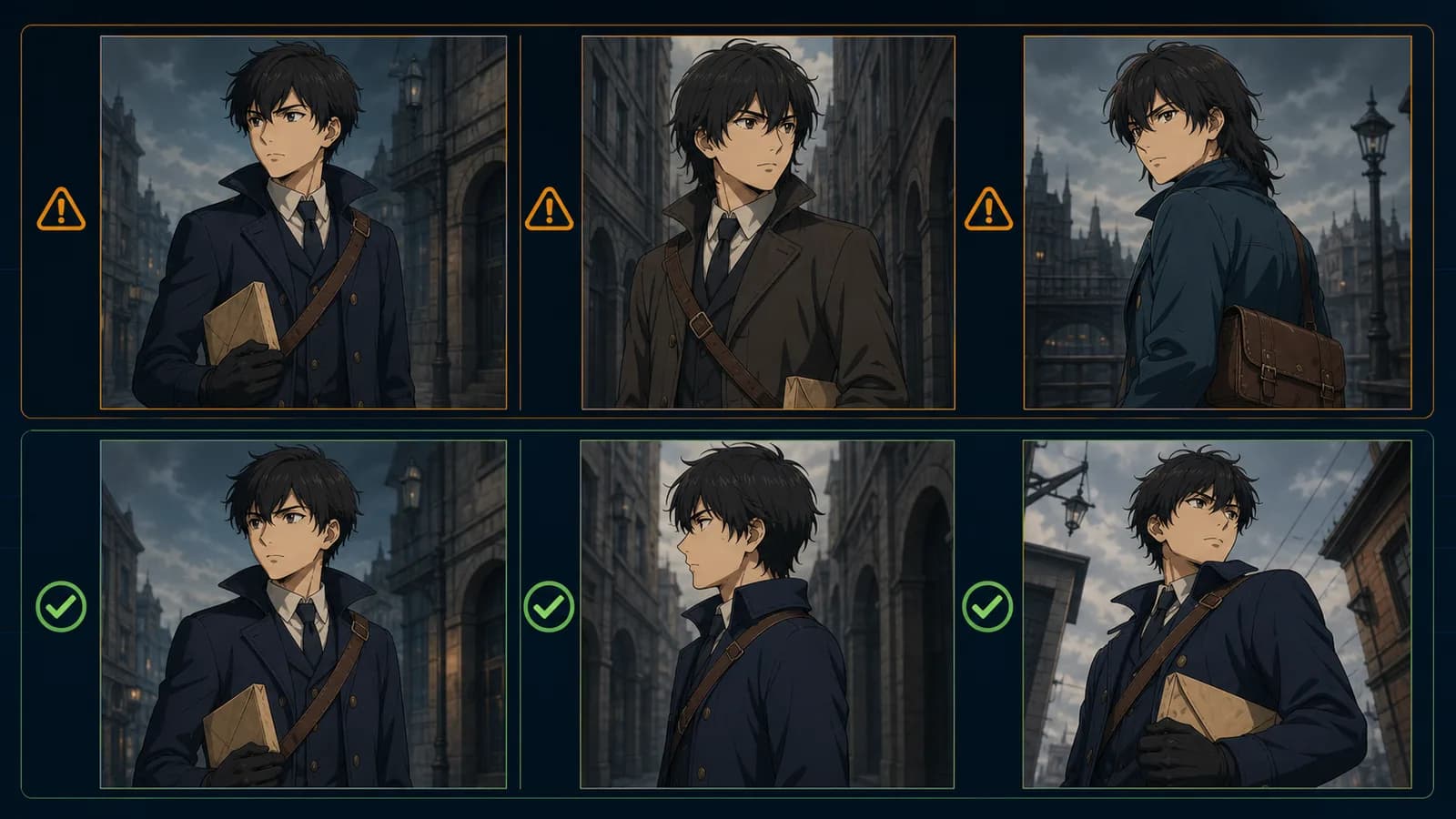
ప్రతి revisionలో ఒక్క variable మాత్రమే మార్చండి
Image దాదాపు సరైనప్పుడు పెద్ద mismatchను గుర్తించి దానికి సంబంధించిన instruction మాత్రమే మార్చండి. Face, pose, light, camera అన్నీ ఒకేసారి మార్చితే ఏది పనిచేసిందో తెలియదు. Version, one change, result, decision రికార్డు చేయండి.
“మిగతావన్నీ అలాగే ఉంచు” అనే instruction editing workflowలో సహాయపడుతుంది; అది mathematical lock కాదు. Approved result ప్రతిదీ localగా save చేయండి; platform historyను permanent archiveగా భావించవద్దు.
ప్రతి shotకు continuity QA
- ముఖ ఆకారం, కనిపించే వయసు సరైనవి;
- కంటి రంగు, ఆకారం, కనుబొమ్మలు సరైనవి;
- haircut, fringe, color, ప్రత్యేక వెంట్రుక సరైనవి;
- ఎడమ-కుడి details mirror కాలేదు;
- costume layers, main colors, emblem ఉన్నాయి;
- ఇతర పాత్రలు, propsతో scale సహజంగా ఉంది;
- signature prop మాయం, duplicate, wrong hand కాలేదు;
- scene light identity colorsను మార్చలేదు;
- extra limbs, text, logo, watermark లేవు;
- planned story beat ఇంకా స్పష్టంగా ఉంది.
Approved fileను EP01_SC03_SH04_v04_APPROVEDలా పేరు పెట్టి prompt version, reference, crop, manual corrections నమోదు చేయండి.
Rights, privacy ముందే చూడండి
Original, licensed లేదా స్పష్టమైన permission ఉన్న references మాత్రమే వాడండి. Internetలో కనిపించడం upload, transform permission కాదు. ఇతర వ్యక్తి likeness ఉపయోగించే ముందు స్పష్టమైన consent పొందండి.
U.S. Copyright Office AI report ప్రకారం protection, మనిషి చేసిన expressive contributionపై ఆధారపడి case-by-caseగా నిర్ణయించబడుతుంది. దేశానికి చట్టాలు మారతాయి; ఇది legal advice కాదు. Sketches, writing, selections, compositing, retouch వంటి మీ పనిని భద్రపరచండి.
Anime Maker Privacy Policy ప్రకారం prompts, uploaded references, settings, file locations, task status, errors, credit use generation informationలో ఉండవచ్చు. Confidential client designs, identity documents, intimate images, పిల్లల personal data లేదా process చేసే హక్కు లేని content upload చేయవద్దు.
తరచుగా అడిగే ప్రశ్నలు
ఒక prompt పాత్రను పూర్తిగా ఒకేలా ఉంచుతుందా?
లేదు. Fixed block continuity మెరుగుపరుస్తుంది; independent generation variationను తొలగించదు. References, small batches, selection, regeneration, local retouch కలిపి ఉపయోగించాలి.
Seed అదే పాత్రను guarantee చేస్తుందా?
లేదు. Seed ఉన్న toolsలో కూడా model, prompt, settings, implementation compatibleగా ఉండాలి. Anime Maker character pageలో seed control లేదు; promptలో number రాయడం identity lock చేయదు.
ఎప్పుడు edit, ఎప్పుడు regenerate?
Composition, expression, ఎక్కువ anchors సరిగ్గా ఉండి clip లేదా color మాత్రమే తప్పైతే local edit చేయండి. Face, pose, camera లేదా story action మూలంగా తప్పైతే regenerate చేయండి.
ముగింపు
AI character consistency అనేది continuity management. ఐదు visible anchorsను స్థిరపరచండి, ఉపయోగకరమైన referenceను approve చేయండి, fixed మరియు variable blocksను విడగొట్టండి, ఒక్కసారి ఒక్కటి మార్చండి, అన్ని shotsను ఒకే checklistతో పరిశీలించండి. AI options ఇస్తుంది; మీ selection, correction వాటిని ఒకే పాత్రగా చేస్తాయి.
రచయిత

వర్గాలు
“ఒకేలా” అంటే ఏమిటో ముందుగా నిర్ణయించండిఒక పేజీ character sheet తయారు చేయండిPromptను fixed, variable blocksగా విడగొట్టండిపూర్తి chapterకు ముందు difficulty ladder పరీక్షించండిప్రతి revisionలో ఒక్క variable మాత్రమే మార్చండిప్రతి shotకు continuity QARights, privacy ముందే చూడండితరచుగా అడిగే ప్రశ్నలుఒక prompt పాత్రను పూర్తిగా ఒకేలా ఉంచుతుందా?Seed అదే పాత్రను guarantee చేస్తుందా?ఎప్పుడు edit, ఎప్పుడు regenerate?ముగింపు
మరిన్ని పోస్టులు
ప్రొడక్షన్ గైడ్లు
అనిమే కెమెరా యాంగిల్స్: ప్రాక్టికల్ గైడ్
ఐదు షాట్ సీన్, పరీక్షించగల prompt, continuity checklistతో అనిమే కెమెరా యాంగిల్స్ మరియు shot sizesను ప్లాన్ చేయండి.
ప్రొడక్షన్ గైడ్లు
కామిక్ ప్యానెల్ లేఅవుట్: రీడింగ్ ఫ్లో, పేసింగ్ గైడ్
ప్యానెల్ క్రమం, పరిమాణం, gutter, dialogue, focusను ప్లాన్ చేసి print, mobile, vertical scrollలో పరీక్షించండి.
ప్రొడక్షన్ గైడ్లు
కామిక్, మాంగా, మన్హ్వా: ఆచరణాత్మక పోలిక
ప్రచురణ సంప్రదాయం, చదివే దిశ, రంగు, పేజీ లేదా స్క్రోల్, సీరియలైజేషన్ మరియు నిర్మాణం ఆధారంగా పోలిక.
వార్తాలేఖ
కమ్యూనిటీలో చేరండి
తాజా వార్తలు మరియు నవీకరణల కోసం మా వార్తాలేఖకు సభ్యత్వం పొందండి