2026/07/26
మాంగా స్పీచ్ బబుల్స్ రకాలు: ప్రాక్టికల్ గైడ్
Dialogue, thought, whisper, shout, narration, special voice bubblesతో పాటు tail, reading order, lettering, translation నియమాలు తెలుసుకోండి.
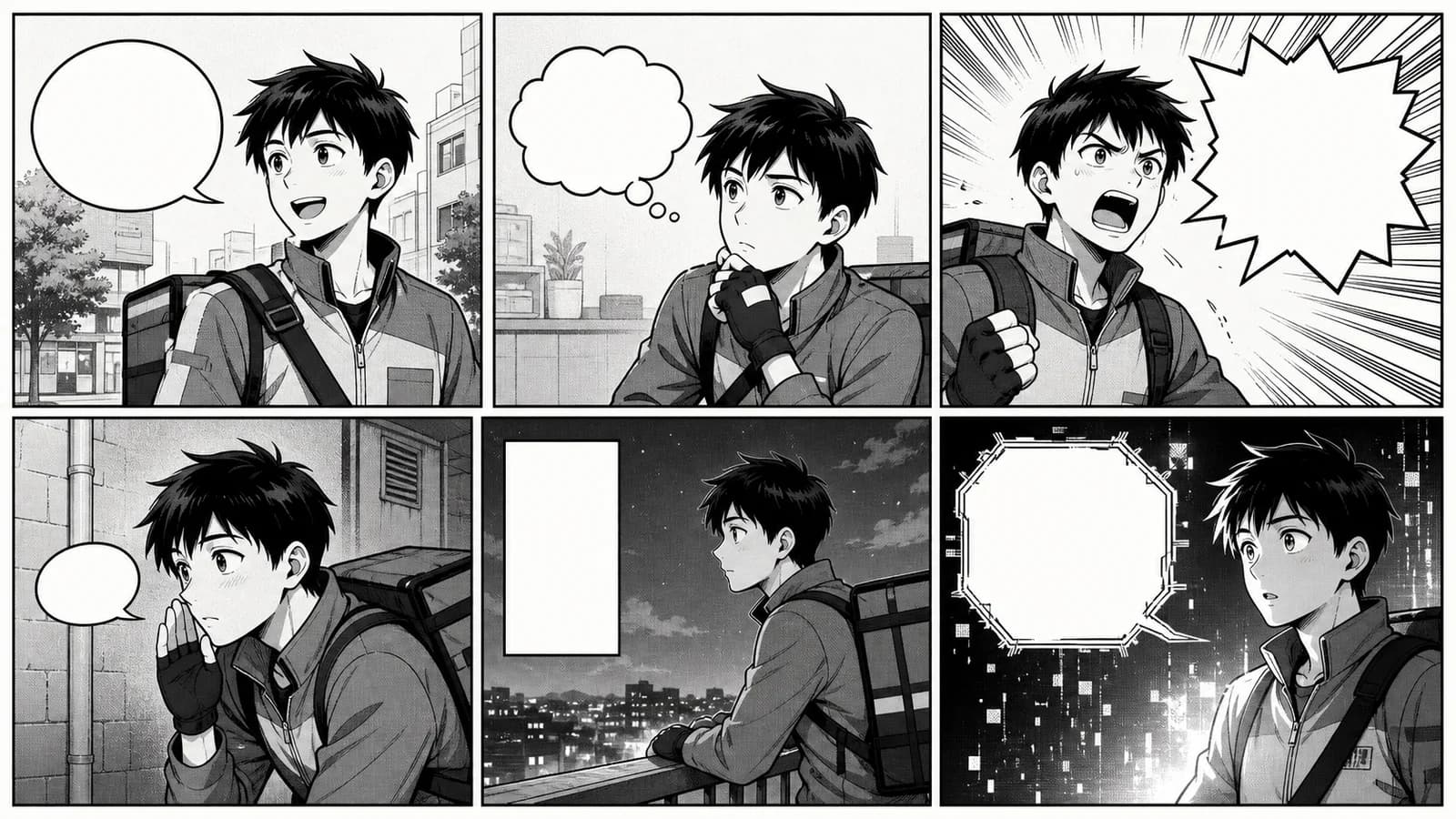
మాంగాలో సాధారణ dialogue, thought, whisper, jagged shout, narration box, electronic లేదా telepathic voice ప్రధాన speech bubble రకాలు. Shape మొదటి సంకేతం మాత్రమే; tail, placement, lettering, scene context, స్థిరమైన visual rule speaker, volume, orderను స్పష్టంగా చేస్తాయి.
Manga speech bubble generator prompt నుంచి visual reference ఇస్తుంది; upload చేసిన pageపై proofread editable dialogueను పెట్టదు. Final letteringను drawing లేదా layout editorలో చేయండి.
రకాలు మరియు ఉపయోగం
| రకం | రూపం | అర్థం |
|---|---|---|
| Dialogue | tail ఉన్న smooth oval | సాధారణ మాట |
| Thought | cloud, small circles లేదా tail లేని text | మనసులో మాట |
| Whisper | small, thin లేదా dashed line | మెల్లని స్వరం |
| Shout | jagged/burst edge | అరుపు, shock, command |
| Narration | tail లేని rectangle | time, place, narrator |
| Special voice | angular, double, black | radio, robot, spirit |
Universal code లేదు. ఒక shapeకు ఒక స్థిరమైన పని ఇవ్వండి. Normal dialogueకు ovalను defaultగా ఉంచండి. Whisperలో voice మెల్లగా ఉండొచ్చు, text మాత్రం phone sizeలో చదవాలి. Burstను climax లేదా నిజమైన volume changeకు మాత్రమే వాడండి. Narration ఇప్పటికే కనిపిస్తున్న actionను పునరావృతం చేయకుండా కొత్త సమాచారం ఇవ్వాలి.
Tail మరియు placement
Tail tip నోరు లేదా స్పష్టమైన deviceను చూపాలి, ఇద్దరి మధ్య ఖాళీని కాదు. Clip Studio Paint అధికారిక Balloons guide shape, tail, control points editableగా ఉండటం ఎందుకు అవసరమో చూపిస్తుంది.
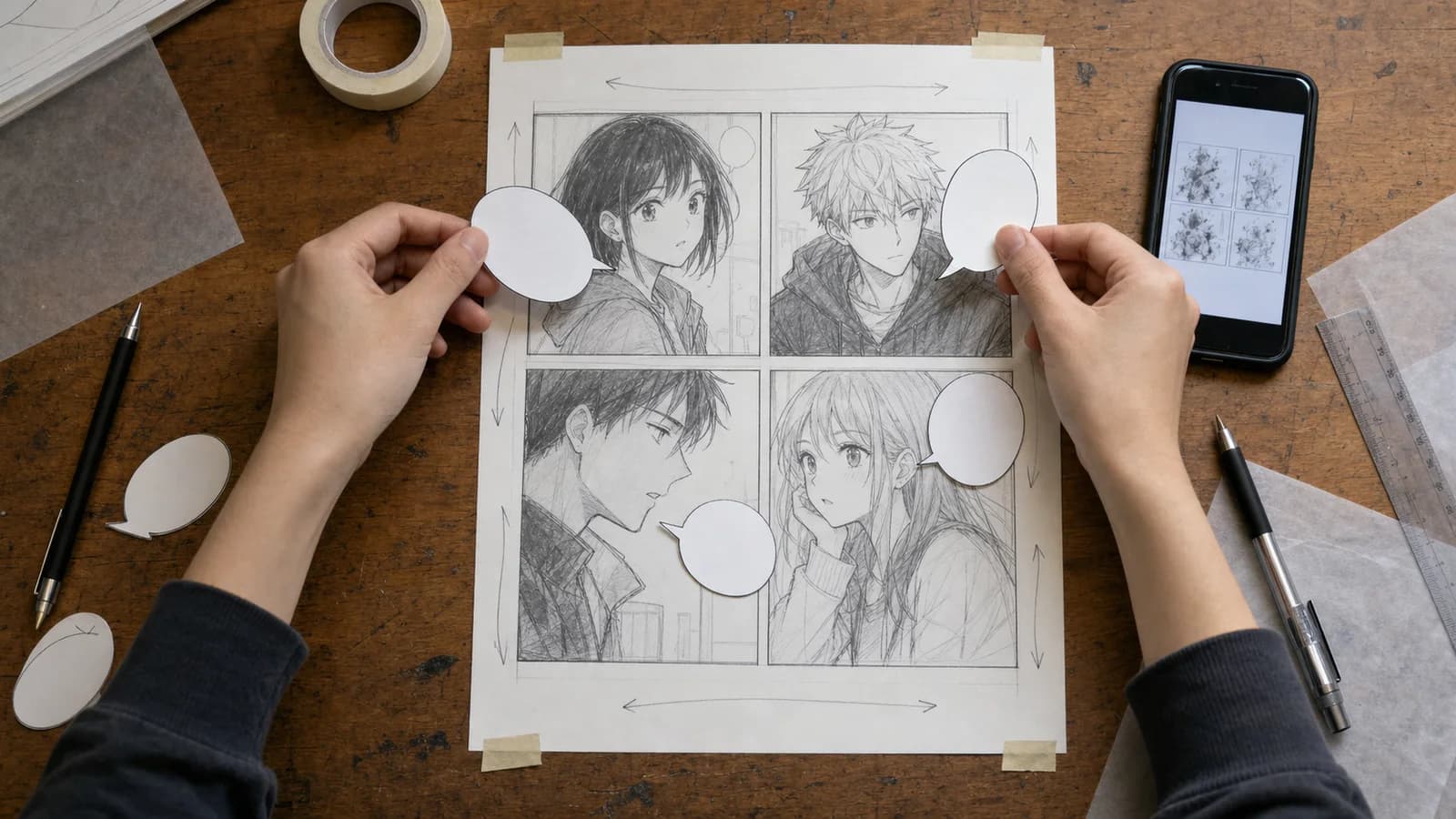
Temporary text, bubbleను ముందుగా ఉంచి, తర్వాత face, hands, clue అమర్చండి. Clear zigzag path ఉండాలి. Long tail panelను దాటితే placement మార్చండి. Gutter, trimను కాపాడండి; Frames and Panels horizontal/vertical spacingను విడిగా చూస్తుంది. Art దాచిపెట్టి bubbles మాత్రమే చదివి orderను పరీక్షించండి.
Production workflow
Scriptలో speaker, intent, length; thumbnailలో order, size; bubble systemలో dialogue, thought, whisper, shout; letteringలో font, line break; QAలో spelling, phone readability నిర్ణయించండి. Workshop sceneలో mechanic oval, apprentice thin line, phone voice deviceను చూపే angular shape, robot fixed geometry వాడవచ్చు. Spark సమయంలో ఒక్క burst contrast వల్ల loudగా అనిపిస్తుంది.
Comic Strip Maker 3–4 panel draftకు, AI Manga Generator black-and-white sceneకు, Anime Character Generator character directionకు ఉపయోగపడతాయి. Final text, vector bubblesను editorలో మళ్లీ నిర్మించండి.
Export check
- ప్రతి special shapeకు ఒక అర్థం.
- ప్రతి tail speaker/sourceను చూపుతుంది.
- Order locale reading directionకు సరిపోతుంది.
- Bubble face, hand, clueను కప్పదు.
- Font తగ్గించే ముందు sentence edit చేశారు.
- Art, text, bubbles వేరు editable layersలో ఉన్నాయి.
Accessibility మరియు translation
W3C Images Tutorial informative imageకు essential meaning తెలిపే text alternative అవసరమని చెబుతుంది. Action, dialogue orderను alt లేదా visible transcriptలో ఇవ్వండి. Translation word replacement కాదు; length, pause, punchline మారతాయి. Source textను flat image బయట ఉంచి line break, bubble size, tail directionను ప్రతి భాషకు మళ్లీ పరీక్షించండి.
FAQ
Jagged bubble అర్థం ఏమిటి?
సాధారణంగా shout, shock, anger, command లేదా interruption. Quiet ovalsతో contrast ఉంటే ప్రభావం ఎక్కువ.
Anime Maker final dialogue పెడుతుందా?
లేదు. Prompt reference ఇస్తుంది; uploaded pageపై proofread editable textను పెట్టదు.
Sources
- CELSYS, Balloons
- CELSYS, Frames and Panels
- W3C WAI, Images Tutorial
మరిన్ని పోస్టులు
ప్రొడక్షన్ గైడ్లు
అనిమే కెమెరా యాంగిల్స్: ప్రాక్టికల్ గైడ్
ఐదు షాట్ సీన్, పరీక్షించగల prompt, continuity checklistతో అనిమే కెమెరా యాంగిల్స్ మరియు shot sizesను ప్లాన్ చేయండి.

ప్రొడక్షన్ గైడ్లు
కామిక్ ప్యానెల్ లేఅవుట్: రీడింగ్ ఫ్లో, పేసింగ్ గైడ్
ప్యానెల్ క్రమం, పరిమాణం, gutter, dialogue, focusను ప్లాన్ చేసి print, mobile, vertical scrollలో పరీక్షించండి.
ప్రొడక్షన్ గైడ్లు
కామిక్, మాంగా, మన్హ్వా: ఆచరణాత్మక పోలిక
ప్రచురణ సంప్రదాయం, చదివే దిశ, రంగు, పేజీ లేదా స్క్రోల్, సీరియలైజేషన్ మరియు నిర్మాణం ఆధారంగా పోలిక.
వార్తాలేఖ
కమ్యూనిటీలో చేరండి
తాజా వార్తలు మరియు నవీకరణల కోసం మా వార్తాలేఖకు సభ్యత్వం పొందండి