
01
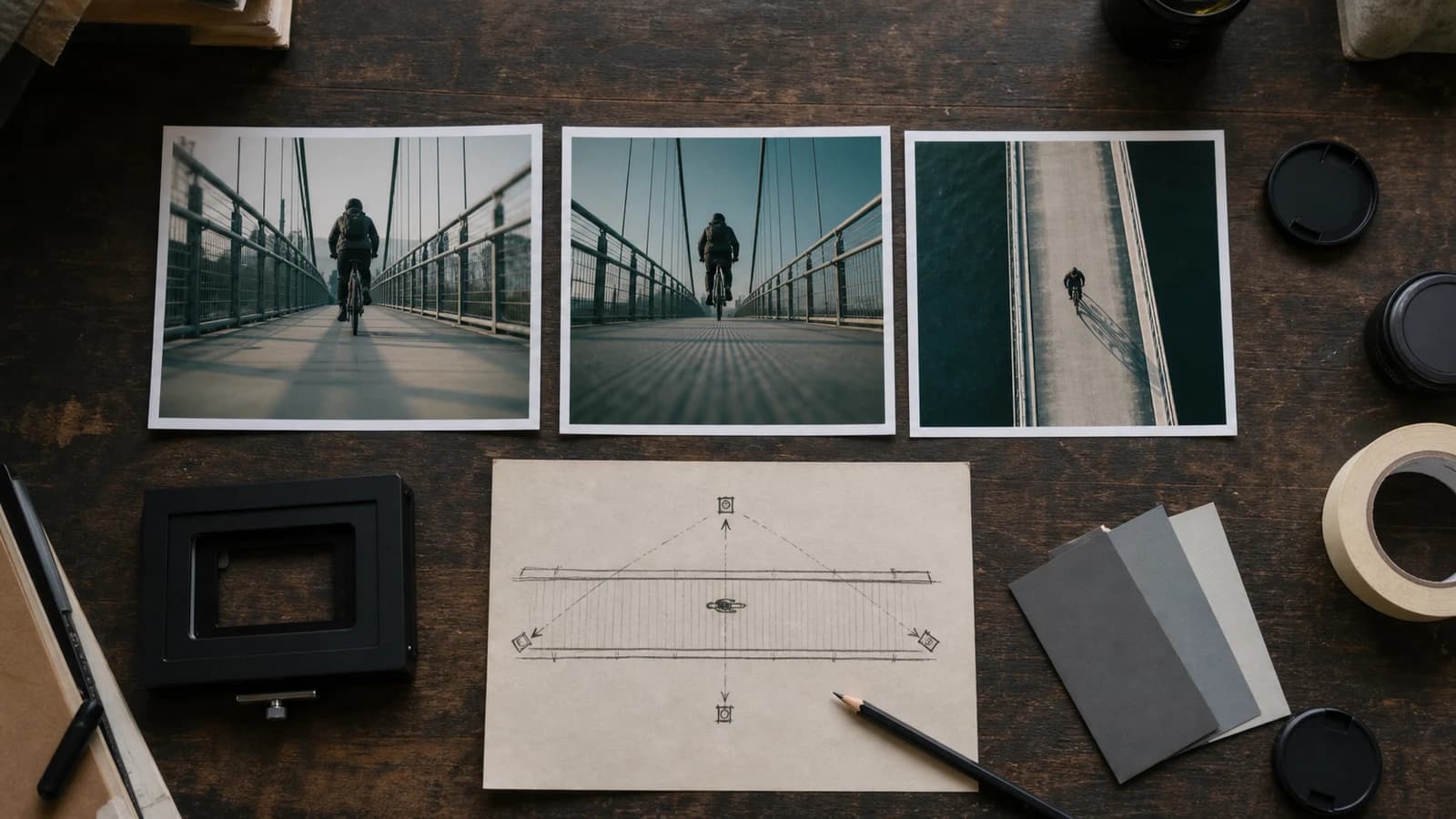
Camera angle, shot size और subject direction अलग करें
ऐसा reference चुनें जिसमें subject, ground और कम से कम दो spatial landmarks दिखें। पीछे, ऊपर और frame से बाहर की चीज़ें अनुमानित होंगी; extreme angle exploration है।
एनीमे कैमरा एंगल कंट्रोल
अधिकार वाली एक रेफ़रेंस इमेज अपलोड करें, कैमरा ऊँचाई, दिशा, शॉट साइज़ और पहचान-बिंदु बताएँ, फिर नए viewpoint की तुलना करें।
लॉगिन करके एक JPG, PNG या WebP दें; storage और APIMart reference edit configured होना चाहिए।
फ़ाइल चुनने से पहले साइन इन करें। वापस आने पर आपका लिखा प्रॉम्प्ट बहाल हो जाएगा।
सशुल्क योजनाओं के लिए उच्च-विवरण पीढ़ी
उदाहरण आउटपुट
एक केंद्रित इनपुट क्या उत्पन्न कर सकता है
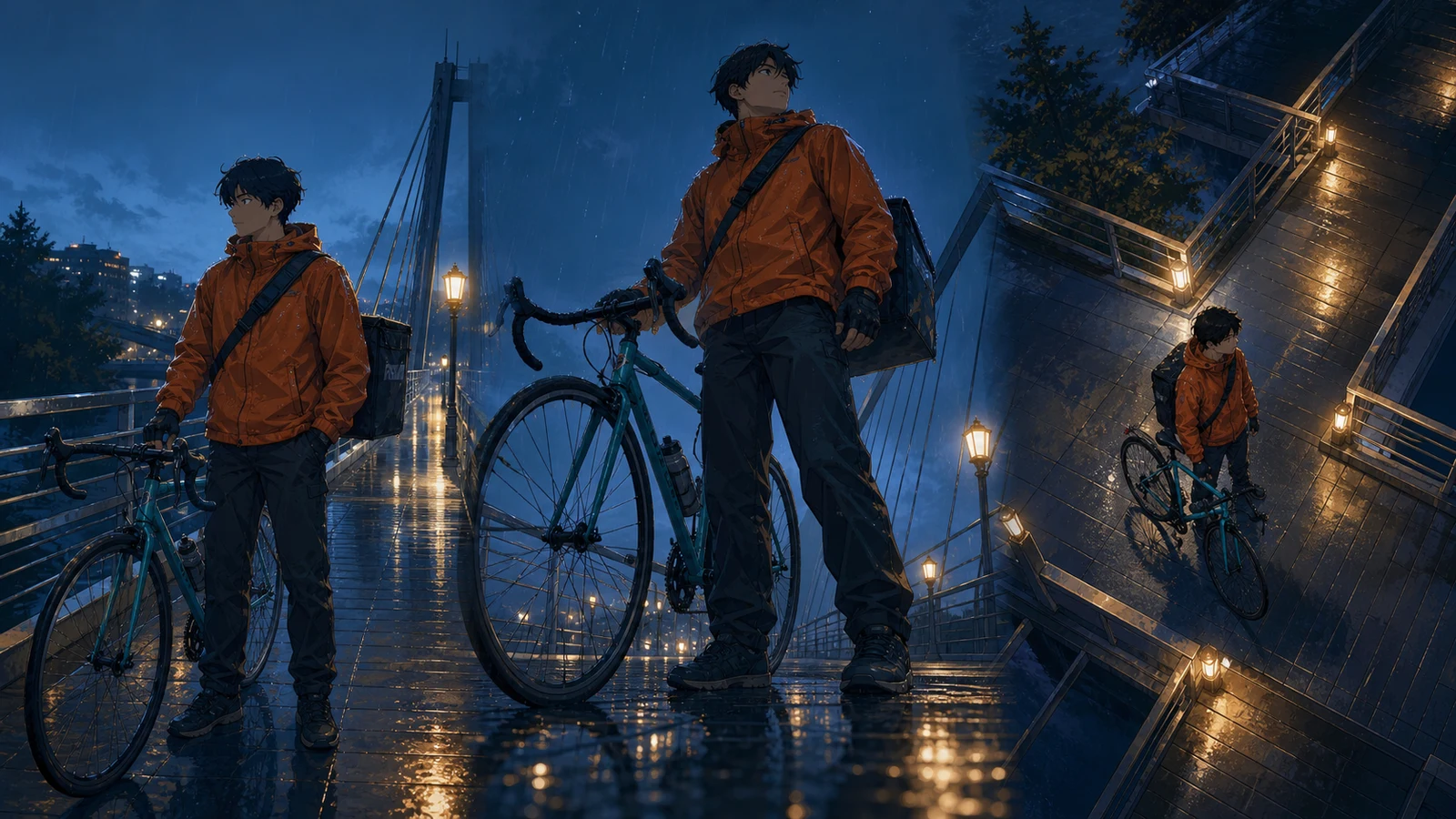
मानक छवि
उन्नत छवि
परिणाम को नई व्याख्या मानकर जाँचें
असल output एक नई 1024×1024 flattened raster image है, जो storyboard विकल्प, composition review, keyframe और शुरुआती visual development में उपयोगी है।
एक बार में एक camera decision बदलें
असल output एक नई 1024×1024 flattened raster image है, जो storyboard विकल्प, composition review, keyframe और शुरुआती visual development में उपयोगी है।
निर्धारित 3D घुमाव, पहचान या मुद्रा का सटीक स्थिरीकरण, अंशांकित लेंस, बीज मान, स्वचालित बहु-दृश्य, परतें, सामूहिक प्रसंस्करण या वीडियो उपलब्ध नहीं हैं।
निर्धारित 3D घुमाव, पहचान या मुद्रा का सटीक स्थिरीकरण, अंशांकित लेंस, बीज मान, स्वचालित बहु-दृश्य, परतें, सामूहिक प्रसंस्करण या वीडियो उपलब्ध नहीं हैं।
Viewpoint, perspective और continuity की practical guide 2026-07-22
Informative image के लिए छोटा contextual alt, decoration के लिए empty alt रखें। आधार Google Cloud, Adobe, Nikon, Blender और W3C के official docs हैं।
ऊँचाई, दिशा, shot size, दूरी और frame position अलग लिखें ताकि गलती का कारण साफ़ रहे।
01
ऐसा reference चुनें जिसमें subject, ground और कम से कम दो spatial landmarks दिखें। पीछे, ऊपर और frame से बाहर की चीज़ें अनुमानित होंगी; extreme angle exploration है।
02
क्रम रखें: camera position, direction और tilt, shot size, action, stable features, foreground/background geometry, light और exclusions। नया view और exact पुरानी composition साथ नहीं रह सकते।
03
पहले नई surfaces, horizon, convergence, foreground scale और overlaps देखें; फिर face, clothes, prop, action और light की continuity देखें।
01
असल output एक नई 1024×1024 flattened raster image है, जो storyboard विकल्प, composition review, keyframe और शुरुआती visual development में उपयोगी है।
02
निर्धारित 3D घुमाव, पहचान या मुद्रा का सटीक स्थिरीकरण, अंशांकित लेंस, बीज मान, स्वचालित बहु-दृश्य, परतें, सामूहिक प्रसंस्करण या वीडियो उपलब्ध नहीं हैं।
03
ऐसा reference चुनें जिसमें subject, ground और कम से कम दो spatial landmarks दिखें। पीछे, ऊपर और frame से बाहर की चीज़ें अनुमानित होंगी; extreme angle exploration है।
04
पहले नई surfaces, horizon, convergence, foreground scale और overlaps देखें; फिर face, clothes, prop, action और light की continuity देखें।
05
अपनी, licensed या permitted image ही दें; source, permission, prompt, result, selection और edits रखें तथा accidental marks और known character similarity जाँचें।
06
Informative image के लिए छोटा contextual alt, decoration के लिए empty alt रखें। आधार Google Cloud, Adobe, Nikon, Blender और W3C के official docs हैं।
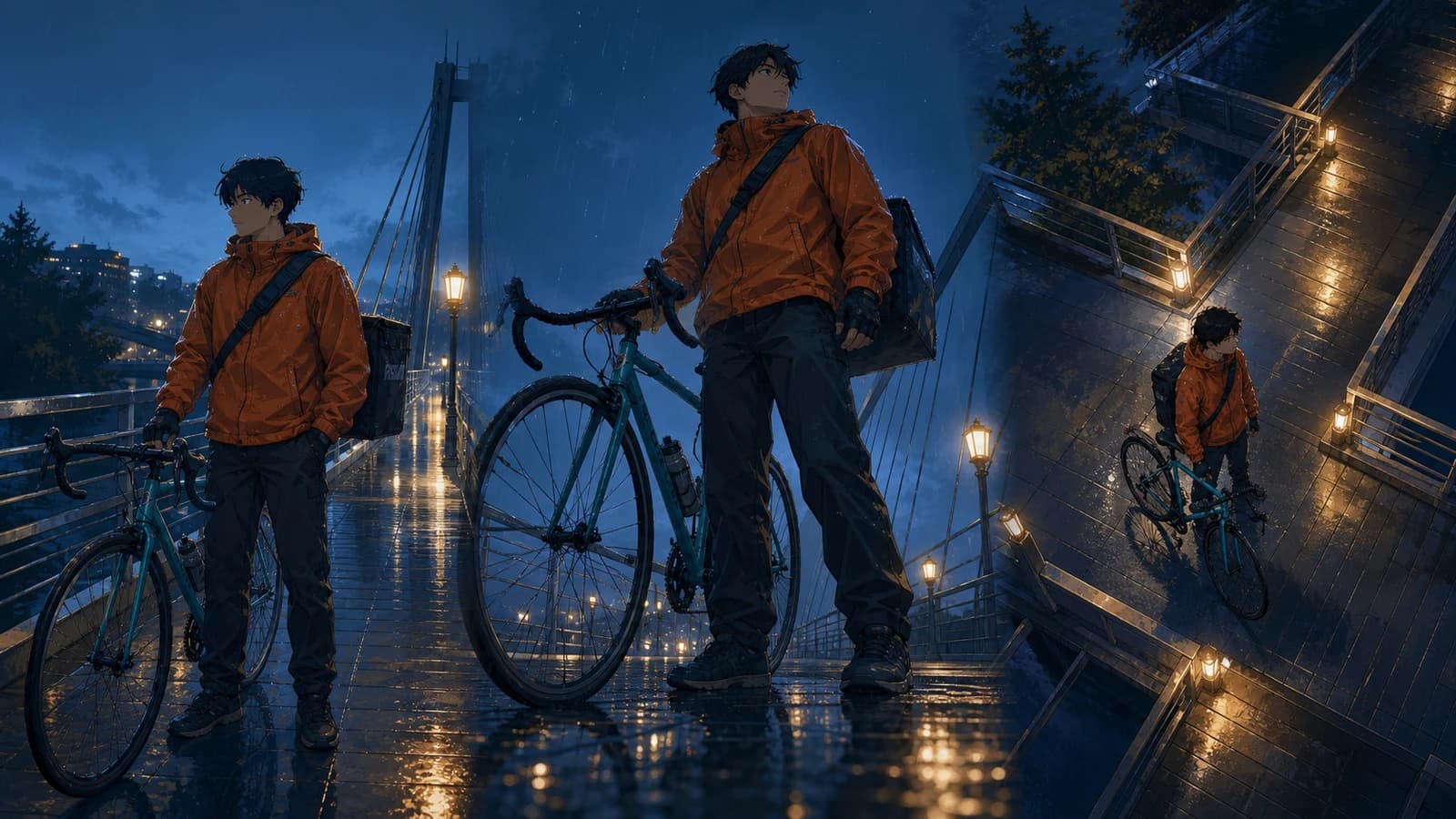
“अपलोड किए मूल दृश्य को गीले पुल के फ़र्श के पास low camera angle से थोड़ा ऊपर देखते हुए दोबारा समझें। उसी युवा bicycle courier की burnt-orange rain jacket, छोटे काले बाल, काला bag, teal bicycle, बारिश, bridge lamps और blue hour पहचानने योग्य रहें। Full-body three-quarter frame, आगे का wheel foreground में, रेलिंग की convergence और पैर व पहियों का ground contact विश्वसनीय हो। कोई text, logo या watermark नहीं। क्रम रखें: camera position, direction और tilt, shot size, action, stable features, foreground/background geometry, light और exclusions। नया view और exact पुरानी composition साथ नहीं रह सकते। असल output एक नई 1024×1024 flattened raster image है, जो storyboard विकल्प, composition review, keyframe और शुरुआती visual development में उपयोगी है।”
परिणाम को नई व्याख्या मानकर जाँचें क्रम रखें: camera position, direction और tilt, shot size, action, stable features, foreground/background geometry, light और exclusions। नया view और exact पुरानी composition साथ नहीं रह सकते। असल output एक नई 1024×1024 flattened raster image है, जो storyboard विकल्प, composition review, keyframe और शुरुआती visual development में उपयोगी है।
Reference, prompt, angle, perspective, composition, comparison, rights या handoff वाला भाग खोलें।
असल output एक नई 1024×1024 flattened raster image है, जो storyboard विकल्प, composition review, keyframe और शुरुआती visual development में उपयोगी है। अधिकार वाली एक रेफ़रेंस इमेज अपलोड करें, कैमरा ऊँचाई, दिशा, शॉट साइज़ और पहचान-बिंदु बताएँ, फिर नए viewpoint की तुलना करें।
क्रम रखें: camera position, direction और tilt, shot size, action, stable features, foreground/background geometry, light और exclusions। नया view और exact पुरानी composition साथ नहीं रह सकते। Lens words visual दिशा हैं, calibration नहीं। Distance size relationship बदलती है, focal length field of view और magnification; यह page optical data नहीं देता।
निर्धारित 3D घुमाव, पहचान या मुद्रा का सटीक स्थिरीकरण, अंशांकित लेंस, बीज मान, स्वचालित बहु-दृश्य, परतें, सामूहिक प्रसंस्करण या वीडियो उपलब्ध नहीं हैं। लॉगिन के बाद configured APIMart reference edit एक JPG, PNG या WebP से नई 1024×1024 flattened raster image बनाता है। यह calibrated 3D camera नहीं है और identity, pose, composition या perspective को ठीक-ठीक lock नहीं करता।
ऐसा reference चुनें जिसमें subject, ground और कम से कम दो spatial landmarks दिखें। पीछे, ऊपर और frame से बाहर की चीज़ें अनुमानित होंगी; extreme angle exploration है। लॉगिन के बाद configured APIMart reference edit एक JPG, PNG या WebP से नई 1024×1024 flattened raster image बनाता है। यह calibrated 3D camera नहीं है और identity, pose, composition या perspective को ठीक-ठीक lock नहीं करता।
क्रम रखें: camera position, direction और tilt, shot size, action, stable features, foreground/background geometry, light और exclusions। नया view और exact पुरानी composition साथ नहीं रह सकते। लॉगिन के बाद configured APIMart reference edit एक JPG, PNG या WebP से नई 1024×1024 flattened raster image बनाता है। यह calibrated 3D camera नहीं है और identity, pose, composition या perspective को ठीक-ठीक lock नहीं करता।
समीक्षा तिथि 2026-07-22 · Anime Maker उत्पाद और संपादकीय टीम
पेज की तस्वीरें संपादकीय उदाहरण हैं, आपके खाते के वास्तविक कार्य-रिकॉर्ड नहीं। टूल का आकलन अपने परिणाम पैनल में दिखने वाले आउटपुट से करें।
असल output एक नई 1024×1024 flattened raster image है, जो storyboard विकल्प, composition review, keyframe और शुरुआती visual development में उपयोगी है। ऐसा reference चुनें जिसमें subject, ground और कम से कम दो spatial landmarks दिखें। पीछे, ऊपर और frame से बाहर की चीज़ें अनुमानित होंगी; extreme angle exploration है।
निर्धारित 3D घुमाव, पहचान या मुद्रा का सटीक स्थिरीकरण, अंशांकित लेंस, बीज मान, स्वचालित बहु-दृश्य, परतें, सामूहिक प्रसंस्करण या वीडियो उपलब्ध नहीं हैं। क्रम रखें: camera position, direction और tilt, shot size, action, stable features, foreground/background geometry, light और exclusions। नया view और exact पुरानी composition साथ नहीं रह सकते।
ऐसा reference चुनें जिसमें subject, ground और कम से कम दो spatial landmarks दिखें। पीछे, ऊपर और frame से बाहर की चीज़ें अनुमानित होंगी; extreme angle exploration है। पहले नई surfaces, horizon, convergence, foreground scale और overlaps देखें; फिर face, clothes, prop, action और light की continuity देखें।
Horizon, convergence, overlap, ground contact और पहचान जाँचकर regenerate या manual fix करें।
नया angle बनाएँपहले नई surfaces, horizon, convergence, foreground scale और overlaps देखें; फिर face, clothes, prop, action और light की continuity देखें।
“अपलोड किए मूल दृश्य को गीले पुल के फ़र्श के पास low camera angle से थोड़ा ऊपर देखते हुए दोबारा समझें। उसी युवा bicycle courier की burnt-orange rain jacket, छोटे काले बाल, काला bag, teal bicycle, बारिश, bridge lamps और blue hour पहचानने योग्य रहें। Full-body three-quarter frame, आगे का wheel foreground में, रेलिंग की convergence और पैर व पहियों का ground contact विश्वसनीय हो। कोई text, logo या watermark नहीं। पहले नई surfaces, horizon, convergence, foreground scale और overlaps देखें; फिर face, clothes, prop, action और light की continuity देखें। निर्धारित 3D घुमाव, पहचान या मुद्रा का सटीक स्थिरीकरण, अंशांकित लेंस, बीज मान, स्वचालित बहु-दृश्य, परतें, सामूहिक प्रसंस्करण या वीडियो उपलब्ध नहीं हैं।”
परिणाम को नई व्याख्या मानकर जाँचें पहले नई surfaces, horizon, convergence, foreground scale और overlaps देखें; फिर face, clothes, prop, action और light की continuity देखें। निर्धारित 3D घुमाव, पहचान या मुद्रा का सटीक स्थिरीकरण, अंशांकित लेंस, बीज मान, स्वचालित बहु-दृश्य, परतें, सामूहिक प्रसंस्करण या वीडियो उपलब्ध नहीं हैं।
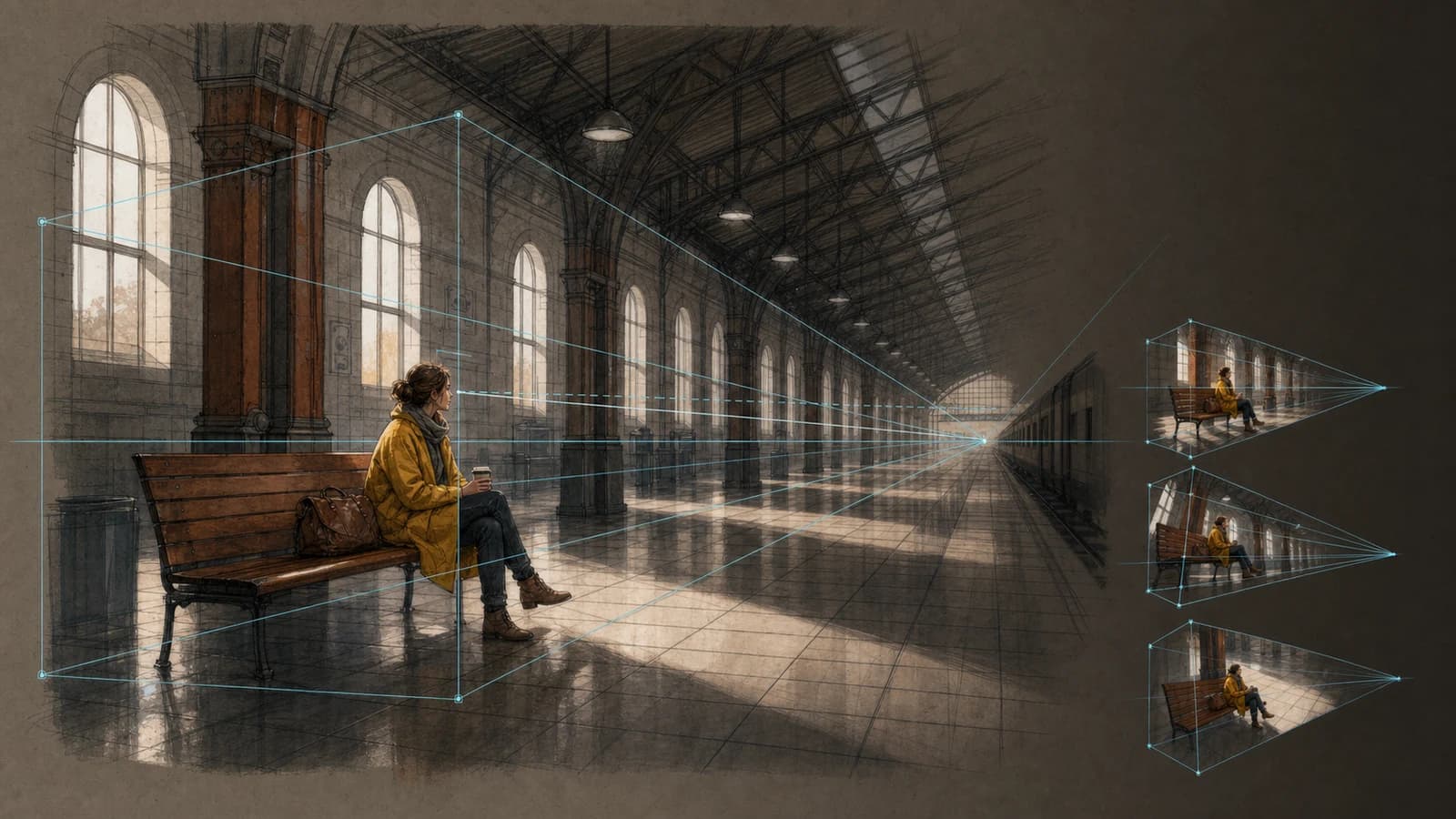
“अपलोड किए मूल दृश्य को गीले पुल के फ़र्श के पास low camera angle से थोड़ा ऊपर देखते हुए दोबारा समझें। उसी युवा bicycle courier की burnt-orange rain jacket, छोटे काले बाल, काला bag, teal bicycle, बारिश, bridge lamps और blue hour पहचानने योग्य रहें। Full-body three-quarter frame, आगे का wheel foreground में, रेलिंग की convergence और पैर व पहियों का ground contact विश्वसनीय हो। कोई text, logo या watermark नहीं। Lens words visual दिशा हैं, calibration नहीं। Distance size relationship बदलती है, focal length field of view और magnification; यह page optical data नहीं देता। ऐसा reference चुनें जिसमें subject, ground और कम से कम दो spatial landmarks दिखें। पीछे, ऊपर और frame से बाहर की चीज़ें अनुमानित होंगी; extreme angle exploration है।”
परिणाम को नई व्याख्या मानकर जाँचें Lens words visual दिशा हैं, calibration नहीं। Distance size relationship बदलती है, focal length field of view और magnification; यह page optical data नहीं देता। ऐसा reference चुनें जिसमें subject, ground और कम से कम दो spatial landmarks दिखें। पीछे, ऊपर और frame से बाहर की चीज़ें अनुमानित होंगी; extreme angle exploration है।
निर्धारित 3D घुमाव, पहचान या मुद्रा का सटीक स्थिरीकरण, अंशांकित लेंस, बीज मान, स्वचालित बहु-दृश्य, परतें, सामूहिक प्रसंस्करण या वीडियो उपलब्ध नहीं हैं। अधिकार वाली एक रेफ़रेंस इमेज अपलोड करें, कैमरा ऊँचाई, दिशा, शॉट साइज़ और पहचान-बिंदु बताएँ, फिर नए viewpoint की तुलना करें।
पहले नई surfaces, horizon, convergence, foreground scale और overlaps देखें; फिर face, clothes, prop, action और light की continuity देखें। अपनी, licensed या permitted image ही दें; source, permission, prompt, result, selection और edits रखें तथा accidental marks और known character similarity जाँचें।
ऐसा reference चुनें जिसमें subject, ground और कम से कम दो spatial landmarks दिखें। पीछे, ऊपर और frame से बाहर की चीज़ें अनुमानित होंगी; extreme angle exploration है। अधिकार वाली एक रेफ़रेंस इमेज अपलोड करें, कैमरा ऊँचाई, दिशा, शॉट साइज़ और पहचान-बिंदु बताएँ, फिर नए viewpoint की तुलना करें।
Lens words visual दिशा हैं, calibration नहीं। Distance size relationship बदलती है, focal length field of view और magnification; यह page optical data नहीं देता। Informative image के लिए छोटा contextual alt, decoration के लिए empty alt रखें। आधार Google Cloud, Adobe, Nikon, Blender और W3C के official docs हैं।
क्रम रखें: camera position, direction और tilt, shot size, action, stable features, foreground/background geometry, light और exclusions। नया view और exact पुरानी composition साथ नहीं रह सकते। अधिकार वाली एक रेफ़रेंस इमेज अपलोड करें, कैमरा ऊँचाई, दिशा, शॉट साइज़ और पहचान-बिंदु बताएँ, फिर नए viewpoint की तुलना करें।
अपनी, licensed या permitted image ही दें; source, permission, prompt, result, selection और edits रखें तथा accidental marks और known character similarity जाँचें। असल output एक नई 1024×1024 flattened raster image है, जो storyboard विकल्प, composition review, keyframe और शुरुआती visual development में उपयोगी है।
पहले नई surfaces, horizon, convergence, foreground scale और overlaps देखें; फिर face, clothes, prop, action और light की continuity देखें। अधिकार वाली एक रेफ़रेंस इमेज अपलोड करें, कैमरा ऊँचाई, दिशा, शॉट साइज़ और पहचान-बिंदु बताएँ, फिर नए viewpoint की तुलना करें।
Informative image के लिए छोटा contextual alt, decoration के लिए empty alt रखें। आधार Google Cloud, Adobe, Nikon, Blender और W3C के official docs हैं। निर्धारित 3D घुमाव, पहचान या मुद्रा का सटीक स्थिरीकरण, अंशांकित लेंस, बीज मान, स्वचालित बहु-दृश्य, परतें, सामूहिक प्रसंस्करण या वीडियो उपलब्ध नहीं हैं।
Lens words visual दिशा हैं, calibration नहीं। Distance size relationship बदलती है, focal length field of view और magnification; यह page optical data नहीं देता। अधिकार वाली एक रेफ़रेंस इमेज अपलोड करें, कैमरा ऊँचाई, दिशा, शॉट साइज़ और पहचान-बिंदु बताएँ, फिर नए viewpoint की तुलना करें।
असल output एक नई 1024×1024 flattened raster image है, जो storyboard विकल्प, composition review, keyframe और शुरुआती visual development में उपयोगी है। ऐसा reference चुनें जिसमें subject, ground और कम से कम दो spatial landmarks दिखें। पीछे, ऊपर और frame से बाहर की चीज़ें अनुमानित होंगी; extreme angle exploration है।
अपनी, licensed या permitted image ही दें; source, permission, prompt, result, selection और edits रखें तथा accidental marks और known character similarity जाँचें। अधिकार वाली एक रेफ़रेंस इमेज अपलोड करें, कैमरा ऊँचाई, दिशा, शॉट साइज़ और पहचान-बिंदु बताएँ, फिर नए viewpoint की तुलना करें।
निर्धारित 3D घुमाव, पहचान या मुद्रा का सटीक स्थिरीकरण, अंशांकित लेंस, बीज मान, स्वचालित बहु-दृश्य, परतें, सामूहिक प्रसंस्करण या वीडियो उपलब्ध नहीं हैं। क्रम रखें: camera position, direction और tilt, shot size, action, stable features, foreground/background geometry, light और exclusions। नया view और exact पुरानी composition साथ नहीं रह सकते।
Informative image के लिए छोटा contextual alt, decoration के लिए empty alt रखें। आधार Google Cloud, Adobe, Nikon, Blender और W3C के official docs हैं। लॉगिन के बाद configured APIMart reference edit एक JPG, PNG या WebP से नई 1024×1024 flattened raster image बनाता है। यह calibrated 3D camera नहीं है और identity, pose, composition या perspective को ठीक-ठीक lock नहीं करता।
ऐसा reference चुनें जिसमें subject, ground और कम से कम दो spatial landmarks दिखें। पीछे, ऊपर और frame से बाहर की चीज़ें अनुमानित होंगी; extreme angle exploration है। पहले नई surfaces, horizon, convergence, foreground scale और overlaps देखें; फिर face, clothes, prop, action और light की continuity देखें।
Lens words visual दिशा हैं, calibration नहीं। Distance size relationship बदलती है, focal length field of view और magnification; यह page optical data नहीं देता। लॉगिन के बाद configured APIMart reference edit एक JPG, PNG या WebP से नई 1024×1024 flattened raster image बनाता है। यह calibrated 3D camera नहीं है और identity, pose, composition या perspective को ठीक-ठीक lock नहीं करता।
अपनी, licensed या permitted image ही दें; source, permission, prompt, result, selection और edits रखें तथा accidental marks और known character similarity जाँचें। लॉगिन के बाद configured APIMart reference edit एक JPG, PNG या WebP से नई 1024×1024 flattened raster image बनाता है। यह calibrated 3D camera नहीं है और identity, pose, composition या perspective को ठीक-ठीक lock नहीं करता।
Informative image के लिए छोटा contextual alt, decoration के लिए empty alt रखें। आधार Google Cloud, Adobe, Nikon, Blender और W3C के official docs हैं। लॉगिन के बाद configured APIMart reference edit एक JPG, PNG या WebP से नई 1024×1024 flattened raster image बनाता है। यह calibrated 3D camera नहीं है और identity, pose, composition या perspective को ठीक-ठीक lock नहीं करता।
क्रम रखें: camera position, direction और tilt, shot size, action, stable features, foreground/background geometry, light और exclusions। नया view और exact पुरानी composition साथ नहीं रह सकते। Lens words visual दिशा हैं, calibration नहीं। Distance size relationship बदलती है, focal length field of view और magnification; यह page optical data नहीं देता।
पहले नई surfaces, horizon, convergence, foreground scale और overlaps देखें; फिर face, clothes, prop, action और light की continuity देखें। अपनी, licensed या permitted image ही दें; source, permission, prompt, result, selection और edits रखें तथा accidental marks और known character similarity जाँचें।
Lens words visual दिशा हैं, calibration नहीं। Distance size relationship बदलती है, focal length field of view और magnification; यह page optical data नहीं देता। Informative image के लिए छोटा contextual alt, decoration के लिए empty alt रखें। आधार Google Cloud, Adobe, Nikon, Blender और W3C के official docs हैं।
अपनी, licensed या permitted image ही दें; source, permission, prompt, result, selection और edits रखें तथा accidental marks और known character similarity जाँचें। असल output एक नई 1024×1024 flattened raster image है, जो storyboard विकल्प, composition review, keyframe और शुरुआती visual development में उपयोगी है।
Informative image के लिए छोटा contextual alt, decoration के लिए empty alt रखें। आधार Google Cloud, Adobe, Nikon, Blender और W3C के official docs हैं। निर्धारित 3D घुमाव, पहचान या मुद्रा का सटीक स्थिरीकरण, अंशांकित लेंस, बीज मान, स्वचालित बहु-दृश्य, परतें, सामूहिक प्रसंस्करण या वीडियो उपलब्ध नहीं हैं।