Anime Maker logoAnime Maker
  • Home
  • AI Anime Generator
  • Features
  • Cases
  • Pricing
  • Blog
Anime Maker logoAnime Maker

Create anime images, original characters, photo-based illustrations, and short videos from focused prompts.

Email
Product
  • Features
  • Pricing
  • FAQ
  • AI Anime Generator
  • Photo to Anime AI
  • Image to Video Anime AI
  • Anime Character Generator
  • Anime Logo Maker
Company
  • About
  • Contact
Legal
  • Cookie Policy
  • Privacy Policy
  • Terms of Service
© 2026 Anime Maker All Rights Reserved.

Sprite animation maker AI

Sprite Animation Maker AI for Frame Concepts

Draft one readable motion cycle as a square sprite-sheet concept, then rebuild, slice, time, and test the frames in the tools that control production assets.

Draft one motion cycle in the working generator

Start with a walk, idle, or attack—not all three. The current tool returns one square raster concept, so make the prompt answer one animation question before moving the selected direction into a sprite editor.

Generation mode
Output format
One image
1024 × 1024
Raster frame concept

Example outputs

What one focused input can produce

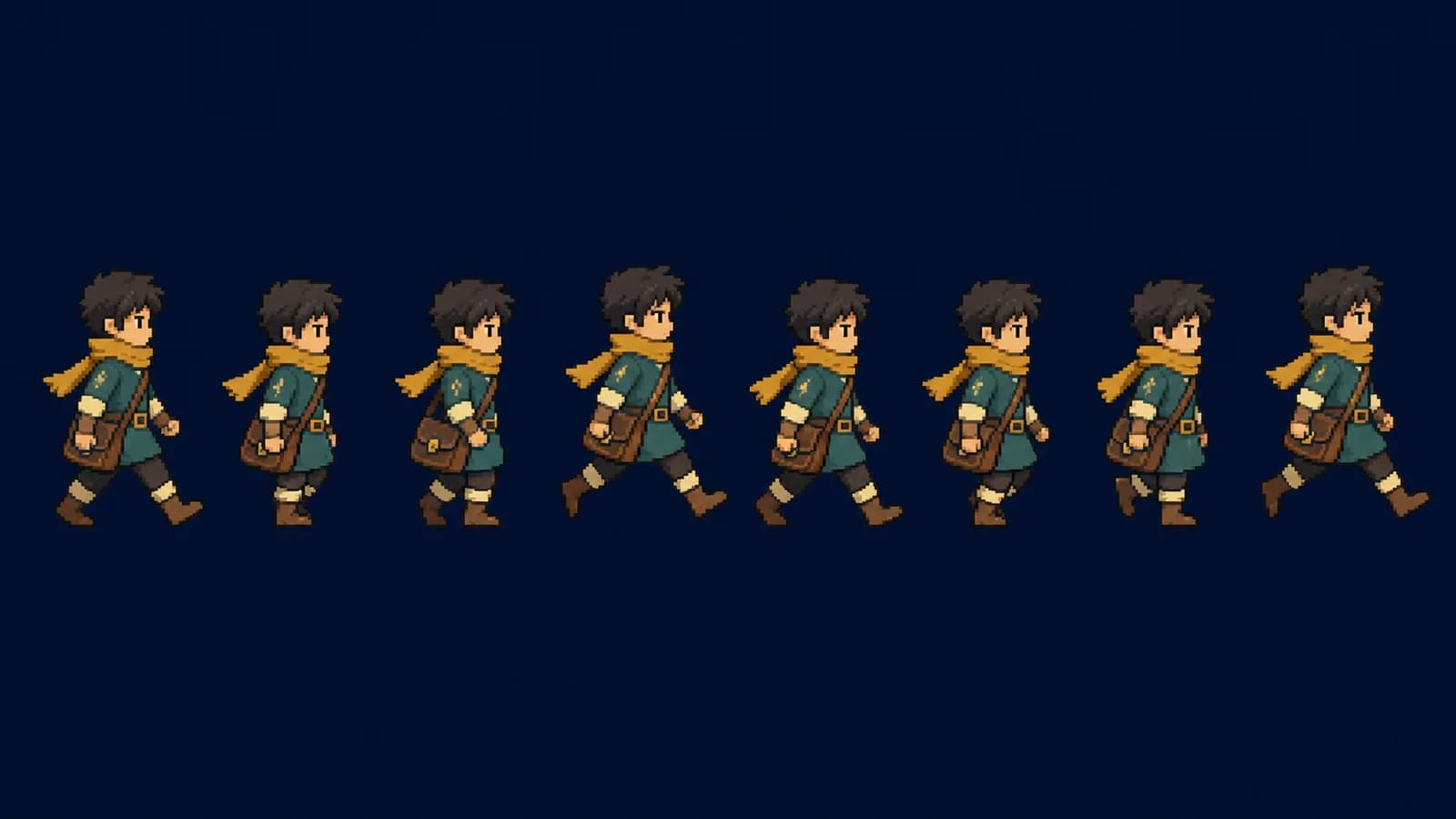
Eight evenly spaced side-view walk poses for an original courier on a plain navy background

Standard image

Advanced image

Output

one 1024 × 1024 flattened raster image containing a sprite-sheet or animation-frame concept

Best for

exploring an original character silhouette, walk-cycle poses, idle rhythm, attack staging, palette direction, and an early frame-sheet brief

Not designed for

direct GIF creation, separated editable frames, guaranteed transparency, exact grid slicing, deterministic character consistency, collision data, pivots, or engine-ready files

Content reviewed 2026-07-22

Product claims were checked against the current image generator and its sprite-animation prompt rule. Production guidance references official Aseprite, Godot Engine, and MDN documentation.

Plan motion that still reads as a silhouetteA five-stage sprite animation handoffSprite animation prompt examplesTurn a generated frame concept into a testable spriteKnow what the generated sheet does not guaranteeSprite animation maker AI questions

Plan motion that still reads as a silhouette

Frame count matters less than clear key poses, stable proportions, consistent ground contact, and enough separation to cut the sheet cleanly. Treat generated poses as evidence for the next editing decision, not finished game data.

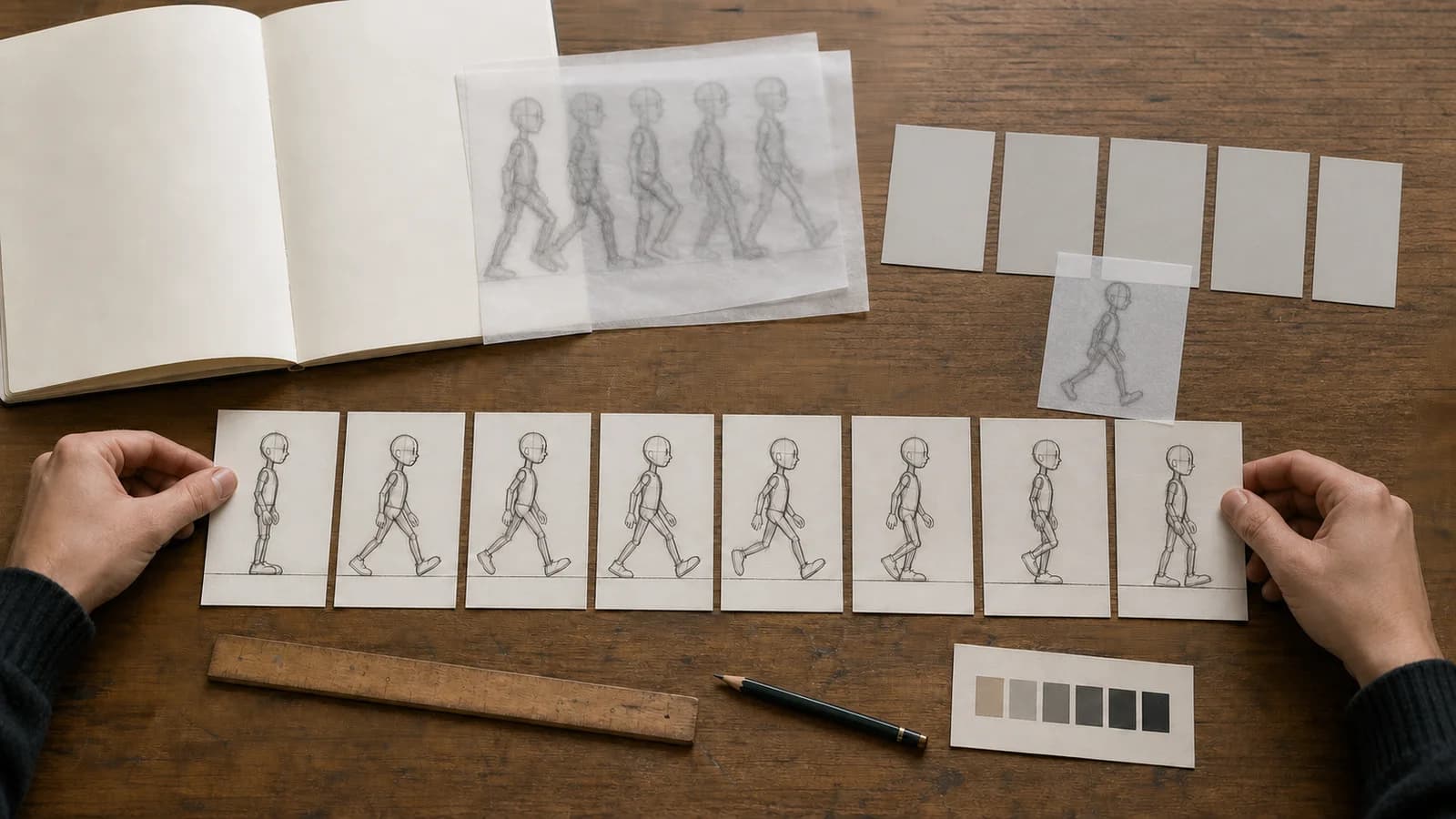
Artist arranging eight hand-drawn walk poses along one baseline with tracing-paper onion-skin studies

01

Choose one cycle and one viewing direction

A useful first request answers one question: how this character walks, breathes, or attacks from one camera direction. Mixing idle, walk, attack, turnarounds, portraits, and effects in a single square image reduces the space available for each pose and makes consistency harder to judge.

02

Lock silhouette before surface detail

Repeat the same height, hair mass, costume outline, carried object, ground line, and facing direction. At game size, the outer contour and large value groups survive before facial detail. Thin straps, fingers, and decorative trim often collapse during reduction.

03

Request space you can actually cut

Ask for one row, equal gaps, a plain contrasting background, and no labels. This improves the visual brief but does not guarantee mathematical cell boundaries. Measure, crop, align, and repair each frame in a sprite editor before treating the sheet as production material.

A five-stage sprite animation handoff

01

Define the motion

Write one cycle, camera direction, frame goal, character lock, baseline, and intended game scale.

02

Generate the concept

Create one flattened frame-sheet image and judge pose order, silhouette, spacing, and identity drift.

03

Rebuild the frames

Cut the useful poses into equal cells, redraw missing transitions, remove the background, and align a shared pivot.

04

Set timing

Preview the loop, adjust frame durations, add or remove holds, and check motion at actual display scale.

05

Import and test

Create engine animation data, verify order and filtering, and test the sprite against real backgrounds and movement speed.

Sprite animation prompt examples

Eight side-view walking poses for the same original courier arranged in one horizontal sequence
A pose-direction reference, not a playable animation. Each frame still needs equal canvas bounds, cleanup, background removal, pivot alignment, and timing.

Side-view courier walk cycle

“Original fantasy courier, side view, eight-pose walk cycle in one row. Contact, down, passing, up, then opposite-leg sequence. Same mustard scarf, teal tunic, brown satchel, head height, body scale, and baseline. Crisp hard-edged clusters, limited palette, plain navy background, equal gaps, no text or UI.”

Why this prompt is useful: The brief names one cycle, the meaningful pose changes, stable identity anchors, and a plain background. Review foot contact and body height first; redraw any duplicated or drifting pose before cutting cells.

Idle loop with a readable secondary action

“Original forest mechanic, side-view four-pose idle concept. Feet stay planted while the body settles, chest rises slightly, scarf tip lifts, then returns. Same hood, tool pouch, scale, baseline, and palette. Plain contrasting background, generous gaps, no text, no interface.”

Turn a generated frame concept into a testable sprite

Work through motion planning, silhouette cleanup, frame spacing, slicing, timing, engine import, failure diagnosis, rights, and accessible presentation.

Plan idle, walk, and attack cycles as different problems

An idle cycle protects the character’s resting identity. The feet and overall center should feel anchored while breathing, cloth, hair, ears, or a held object add restrained life. Start by deciding what must not move. If the entire body, costume, and accessories rise and fall together, the character can appear to change scale rather than breathe. A compact idle brief might ask for neutral, compression, release, and return poses, but the final loop may reuse or hold frames differently after you preview it. The generated sheet is useful for comparing those pose ideas; it cannot tell you the correct duration or whether the loop pops at the seam.

A walk cycle must communicate weight transfer. Contact, down, passing, and up are useful planning names because each pose has a different mechanical job: establish stride, absorb weight, move the free leg past the planted leg, and lift into the next contact. An eight-pose concept can show those stages for both legs, but more images do not guarantee better motion. Check the foot that should be planted, the movement of the hips and shoulders, the arc of the head, and whether the satchel or scarf follows rather than leads the body. If two generated poses are nearly identical, redraw one or remove it instead of preserving a weak frame count.

Know what the generated sheet does not guarantee

The output is a single flattened image

The page does not deliver separate PNG frames, layers, cels, animation tags, JSON metadata, pivots, or collision shapes. Save the concept, then rebuild the animation structure in a sprite editor and game engine.

It does not generate an animated GIF

A still sheet cannot prove timing or looping quality. GIF, video, frame-sequence, and engine animation export happen after you isolate frames and assign durations in another tool.

Transparency is not guaranteed

The generator may return PNG, JPEG, or WebP depending on the active provider, and a plain background is still part of the raster. Remove it carefully and inspect edge halos before export.

Spacing is visual, not grid-perfect

Even when the prompt asks for equal gaps, generated poses may vary in cell width, baseline, crop, or scale. Do not use automatic slicing until you have measured and corrected the sheet.

Sprite animation maker AI questions

Can this sprite animation maker AI create a GIF?

No. It creates one 1024 × 1024 raster frame-sheet concept. To make a GIF, first cut and clean the frames, set their order and duration in a sprite editor, preview the loop, and export the finished animation there.

How many frames should an idle, walk, or attack use?

Use the fewest frames that communicate the motion at the intended size and speed. A simple idle may start with 2–4 poses, a walk with 4–8, and an attack with anticipation, strike, follow-through, and recovery. These are planning ranges, not fixed production rules.

Will the frames have a transparent background?

Not reliably. Ask for a flat contrasting background to make later isolation easier, then remove it in an editor. Inspect hair, fabric, weapons, and semi-transparent effects for leftover halos before exporting a transparent PNG.

Can I automatically slice the generated sheet?

Continue the production workflow

Plan a pixel-art character directionCreate the base character conceptTurn one frame into an anime video conceptBuild a storyboard before animation

Draft one cycle, then make every frame earn its place

Choose one action, keep the character locked, leave clear space between poses, and reserve frame cutting and timing for a dedicated animation workflow.

Create a sprite-sheet concept

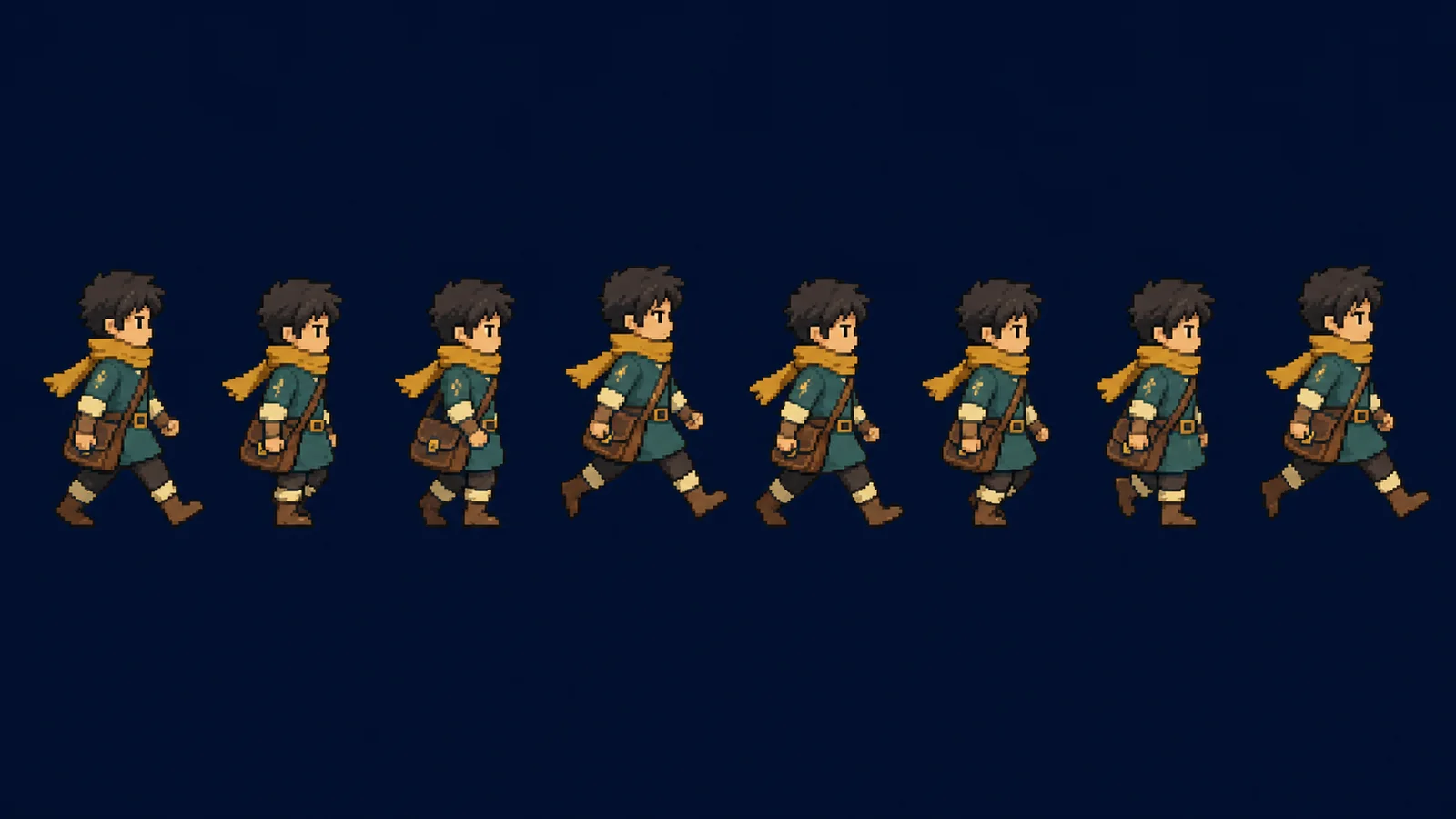
Representative walk-cycle concept: the current generator returns one flattened 1024 × 1024 raster image. The evenly spaced poses shown here still need manual cleanup, cutting, pivot alignment, timing, transparency work, and engine testing.

Why this prompt is useful: The body has a small primary motion and the scarf has a delayed secondary motion. Avoid moving every accessory at once; the idle should feel alive without making the character slide or pulse in size.

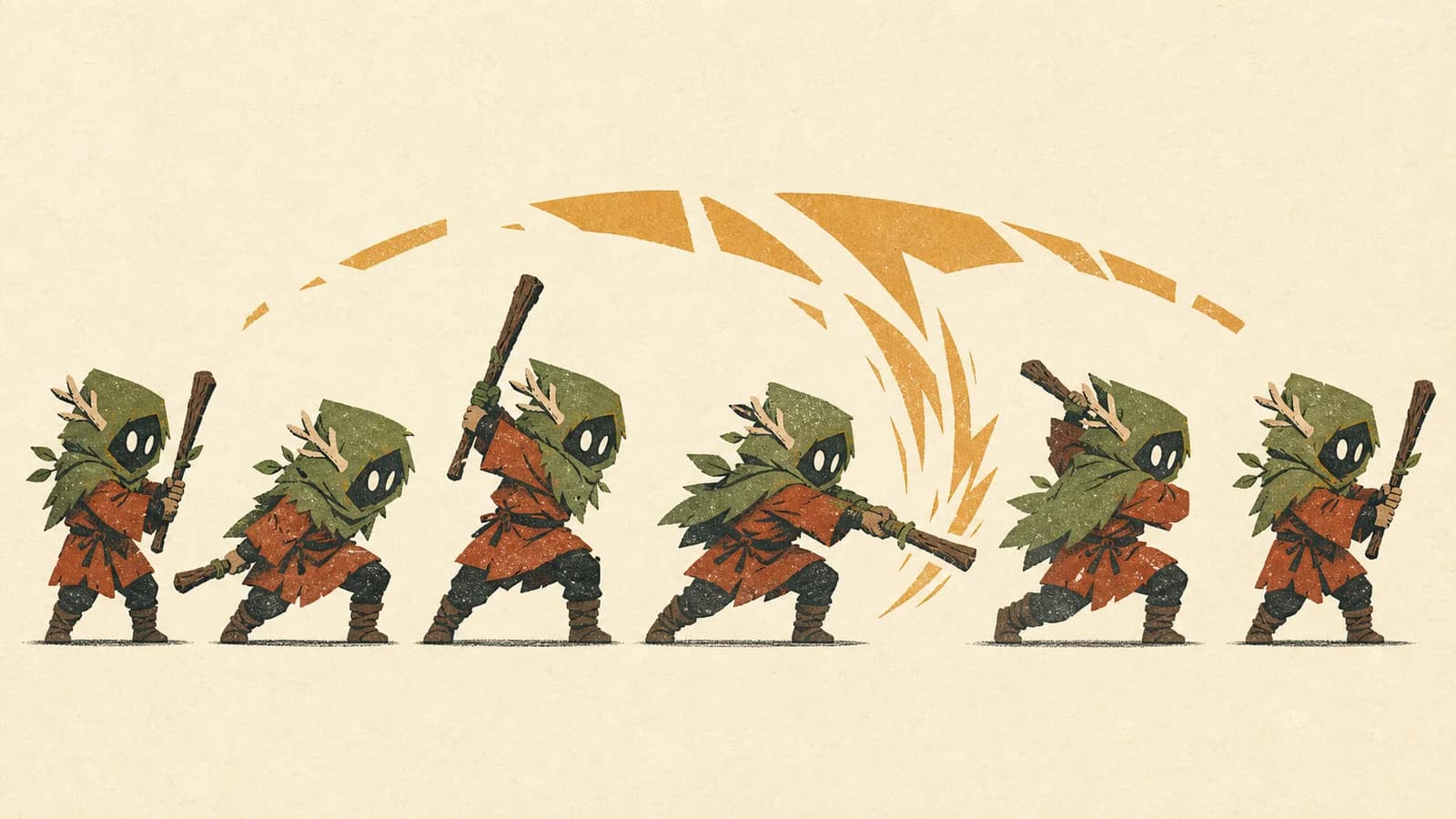
Six side-view staff attack poses for an original hooded forest guardian on a cream background
A stylized attack study showing anticipation through recovery. Production frames require manual spacing, cleanup, collision decisions, and duration settings.

Attack cycle built around anticipation

“Original small guardian with a short wooden staff, side view, six-pose attack concept. Neutral, anticipation, wind-up, strike, follow-through, recovery. Stable feet and body scale, clear weapon arc, limited moss and rust palette, plain cream background, equal gaps, no words or UI.”

Why this prompt is useful: The wind-up and recovery make the strike legible instead of presenting six unrelated action poses. Check that the weapon arc does not merge neighboring frames and that the character returns to a compatible stance.

An attack cycle needs readable anticipation, a decisive action, follow-through, and a route back to gameplay. The largest silhouette change usually belongs before or during the strike, not in every frame. Keep the weapon or effect far enough from neighboring poses that it can be cut cleanly. Decide whether the character returns to idle, chains into another move, or holds a recovery pose; that state-machine question affects the last frame. The current tool can suggest the arc and energy of the poses, but hit timing, damage windows, collision shapes, cancel frames, and gameplay balance belong in the engine and design specification.

Make identity survive before adding costume detail

Review each pose as a filled silhouette. At small game scale, the outer contour communicates facing direction, stance, limb separation, weapon orientation, and much of the character’s personality. Separate the feet from each other, keep arms from merging into the torso, and preserve a recognizable hair, hood, helmet, or shoulder shape. A scarf or long coat can support motion, but it should not become a different length in every frame. When the contour fails, adding eyes, buckles, or texture only makes the wrong pose busier.

Write a short identity lock and repeat its nouns exactly: character height, head-to-body proportion, hair mass, outfit silhouette, two or three major colors, signature object, facing direction, and baseline. Do not alternate between synonyms when the prompt is a production brief. After generation, place guide lines at the top of the head, hips, planted foot, and prop attachment. Variation can be part of motion, but unexplained changes in height, costume construction, or viewing angle are drift.

Color continuity should be judged by role, not just by sampled hue. Separate outline, deep shadow, local color, light, and accent so the same parts remain legible across poses. If a sleeve changes from teal to gray because of shading, decide whether that value still reads as the sleeve at gameplay size. A limited palette makes drift easier to detect. When converting a generated high-resolution concept to true pixel art, rebuild the palette and clusters manually rather than trusting a reduction filter to make design decisions.

Turn visual spacing into measured cells

A prompt can ask for even gaps, but generation does not enforce a mathematical grid. First duplicate the selected image and draw temporary bounds around every pose. Measure the widest reach, tallest silhouette, and lowest effect. Choose a cell that contains the complete motion with a consistent safety margin. Then move each pose onto the same canvas size and align a shared pivot. Cropping each frame tightly around its visible pixels may save space, but it makes a stable animation harder unless the engine uses reliable trim metadata and pivots.

Aseprite’s official sprite-sheet documentation defines a sheet as one large image containing several frames and describes import offsets, sprite width and height, padding, rows, columns, and matrix layouts. Its animation documentation separates frames, cels, duration, onion skinning, and tags. That distinction matters here: the generated result resembles a sheet concept, while production animation still needs actual frame and timing structure. References: https://www.aseprite.org/docs/sprite-sheet/ and https://www.aseprite.org/docs/animation/.

Remove the background only after choosing the poses worth keeping. A flat contrasting color is easier to isolate than scenery, gradients, cast shadows, or a checkerboard painted into the image. Inspect the edge at high zoom and on both light and dark test backgrounds. Semi-transparent halos around hair, cloth, or motion effects can become visible in-game. If the intended style is hard-edged pixel art, final edge pixels should be deliberate rather than the residue of anti-aliased removal.

Animation lives in duration, not in the sheet alone

A still sheet shows pose order but cannot prove rhythm. Import the cleaned frames into a timeline and assign durations. Aseprite’s official sprite structure notes that each frame has a duration in milliseconds, while its animation workflow supports preview, onion skinning, frame reuse, and tagged ranges. Start with an even tempo only to expose problems. Then hold a readable contact, shorten a fast passing pose, or extend a recovery when the action needs it. Avoid changing every duration at once; revise the most visible hitch and preview again.

Test the loop at 100% scale, at the actual camera zoom, and while the character moves through the game world. A walk that looks smooth while standing in a preview may slide when translation speed does not match stride. An idle can jump at the seam even when the middle frames feel natural. An attack can read clearly frame by frame but disappear at gameplay speed. Record the intended playback speed, which frames can be interrupted, and the return state instead of relying on an engine default.

Onion skinning helps compare adjacent poses, but also inspect the whole sequence as silhouettes and arcs. Track the head, hips, hands, feet, weapon tip, and major cloth point. Smooth arcs are not mandatory for every style—snappy animation can use deliberate holds and large jumps—but accidental jitter should be distinguished from designed spacing. If a generated intermediate creates a wobble, redraw it around the intended arc rather than averaging every neighboring shape into softness.

Build the animation resource after the artwork is clean

Godot’s official AnimatedSprite2D documentation explains that the node plays multiple textures as frames through a SpriteFrames resource. The resource stores animations and frames, while properties such as frame, frame progress, speed scale, offset, and flip affect playback. That engine structure is not embedded in the generated image. Reference: https://docs.godotengine.org/en/latest/classes/class_animatedsprite2d.html. Create or import the cleaned frames, set their order and speed, and verify the resource inside the actual scene.

For a web canvas implementation, MDN documents the nine-argument form of CanvasRenderingContext2D.drawImage(), which selects a source rectangle with sx, sy, sWidth, and sHeight and draws it into a destination rectangle. That source rectangle is why measured cells matter. Reference: https://developer.mozilla.org/en-US/docs/Web/API/CanvasRenderingContext2D/drawImage. A concept with uneven bounds can still be useful art direction, but code needs reliable coordinates or explicit metadata.

Choose filtering, pivot, atlas packing, and collision separately from visual approval. Pixel art commonly needs nearest-neighbor sampling and integer-aware placement, but the exact setting depends on the engine, camera, and scale. A visual effect may need a larger cell than the body. An attack hitbox should represent gameplay, not simply trace the painted weapon. Keep the source sprite file, cleaned frames, palette, timing notes, engine resource, and export version under clear revision names so an art change does not silently invalidate code or collision data.

Fix the largest motion error before regenerating everything

If the character changes identity, shorten the brief to the fixed silhouette, costume, palette, prop, facing direction, and one cycle. If the poses merge, request fewer frames, more space, one row, and a plain background. If motion is weak, describe the mechanical change—weight down, leg passing, staff winding back—rather than adding adjectives such as dynamic or epic. If the sheet is attractive but impossible to cut, keep it as reference and redraw the poses in measured cells instead of forcing automatic slicing.

Foot sliding usually comes from inconsistent contact points, mismatched pivot alignment, or playback speed that disagrees with world movement. Body pulsing comes from changing head height or overall scale without a controlled squash-and-stretch plan. Costume flicker comes from unstable small details. A weapon arc that flashes may need clearer anticipation and a longer readable impact, not extra blur. Diagnose the symptom in motion, then change one frame, one duration, or one alignment rule and test again.

Keep a reject log with the prompt, image, dominant problem, and next single change. This turns generation into a controlled exploration instead of a slot machine. Useful categories are identity drift, duplicated pose, missing transition, merged silhouettes, background contamination, uneven spacing, cropped effect, malformed limb, and false text. When the same failure repeats, stop adding prompt detail and change the production plan: fewer poses, a simpler character, a separate effect sheet, or manual animation from the strongest keys.

Use original characters and describe the result truthfully

Use an original character or references you have permission to transform. Do not request a protected game hero, copy a studio’s distinctive sprite set, or name a living artist to imitate their style. A small raster character can still reproduce recognizable costume, logo, weapon, or silhouette elements. Keep the prompt, references, selected output, redraw notes, and licenses with the project so collaborators know which parts were generated and which were rebuilt.

Do not display the still concept as though it were an animated demo. Label it as a frame-sheet concept and state the missing steps: slicing, cleanup, transparency, pivot, timing, and engine test. If you publish an animation preview, provide an option that does not autoplay indefinitely when the surrounding product requires user control, and avoid flashes that can cause harm. For an informative still image, write alt text that identifies the character, motion, number and arrangement of poses, and the production point the image demonstrates.

Commercial use depends on the current plan, provider terms, input rights, contracts, platform rules, and applicable law. No generator can clear those rights automatically. Before shipping, inspect accidental symbols, letter-like marks, visual similarity, and source permissions. Separate art approval from technical approval: an original and attractive pose sheet can still fail because its pivots, timing, transparency, or import data are wrong.

Run a concrete handoff before calling the sprite finished

Creative check: one cycle has a clear purpose; the character remains recognizable; key poses differ; silhouette reads at target scale; palette roles stay consistent; effects do not merge with neighboring frames; the first and last poses connect. Technical check: every frame uses measured bounds; the chosen pivot is stable; transparent edges are clean; ordering is recorded; duration is set; filtering is appropriate; source and exported files are versioned.

Gameplay check: the walk matches movement speed; the idle does not drift; the attack communicates anticipation and recovery; state transitions do not pop; collision and hit data follow design intent; the sprite remains readable against representative bright and dark backgrounds. Delivery check: the animation resource opens in the target engine, no frame is missing, scale is correct, file names are predictable, and the team knows which file is editable source versus generated reference.

The practical value of a sprite animation maker AI is early visual exploration. It can place several plausible poses in one image and help a creator compare silhouette, costume motion, palette, and action staging. Reliability enters later through measured cells, redrawn transitions, controlled pixels, timing, metadata, and testing. Keeping those roles separate produces a more useful page, a more honest result, and a production handoff that another artist or developer can actually understand.

Identity and anatomy can drift

Hair, accessories, limbs, clothing, and face proportions can change between poses. Use the concept as a selection and redraw reference, not as proof of deterministic frame consistency.

Game behavior still needs engineering

Movement speed, root motion, pivots, state transitions, hitboxes, collision, filtering, atlas packing, memory, and import settings are outside this generator. Test those decisions in the actual engine.

Only after inspection. Generated poses may not occupy mathematically equal cells even when they look evenly spaced. Measure frame bounds, normalize each canvas, align the same pivot, and then use grid slicing or export tools.

How do I keep the character consistent between frames?

Repeat a compact identity lock: silhouette, height, facing direction, hair mass, outfit colors, signature prop, ground line, and camera. After generation, compare each pose as a silhouette and redraw drift rather than trying to hide it with more detail.

Can I import the result directly into Unity or Godot?

Not as a finished animation. First create clean frame images or a measured sheet, then configure slicing, order, pivots, timing, filtering, and animation resources in the engine. Test the result at actual gameplay scale.

Is the generated concept pixel art?

It can be pixel-art-inspired, but it begins as a high-resolution raster image rather than a controlled low-resolution pixel grid. Reduce and redraw it with nearest-neighbor scaling, a deliberate palette, clean clusters, and exact pixels if production pixel art is required.