
01
Drawingను ఎలా సిద్ధం చేయాలి?
Borders, notes crop చేసి orientation సరిచేయండి; face, hands, props, overlaps స్పష్టంగా ఉంచి original save చేయండి.
line artకు రంగులు
హక్కున్న స్పష్టమైన drawing upload చేసి local colors, light, materials పేర్కొని review, manual finish కోసం square color proposal పొందండి.
Sign in చేసి ఒక file upload చేయండి; configured APIMart reference workflow అవసరం.
ఫైల్ ఎంచుకునే ముందు సైన్ ఇన్ చేయండి. తిరిగి వచ్చినప్పుడు మీరు రాసిన ప్రాంప్ట్ పునరుద్ధరించబడుతుంది.
పెయిడ్ ప్లాన్ ల కొరకు హై డిటైల్ జనరేషన్
ఉదాహరణ అవుట్ పుట్ లు
ఒక ఫోకస్డ్ ఇన్ పుట్ ఏమి ఉత్పత్తి చేయగలదు
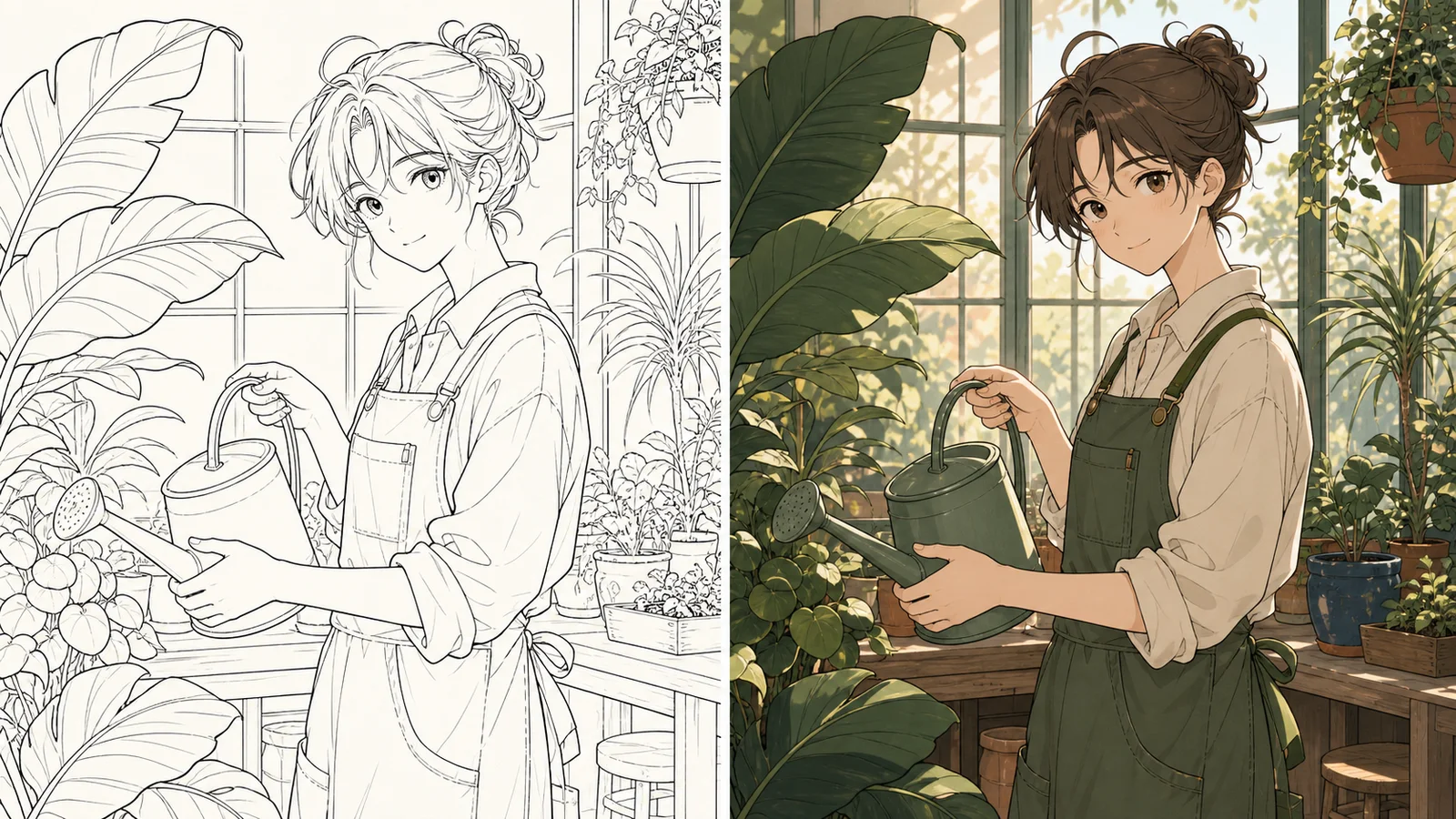
ప్రామాణిక చిత్రం
అధునాతన చిత్రం
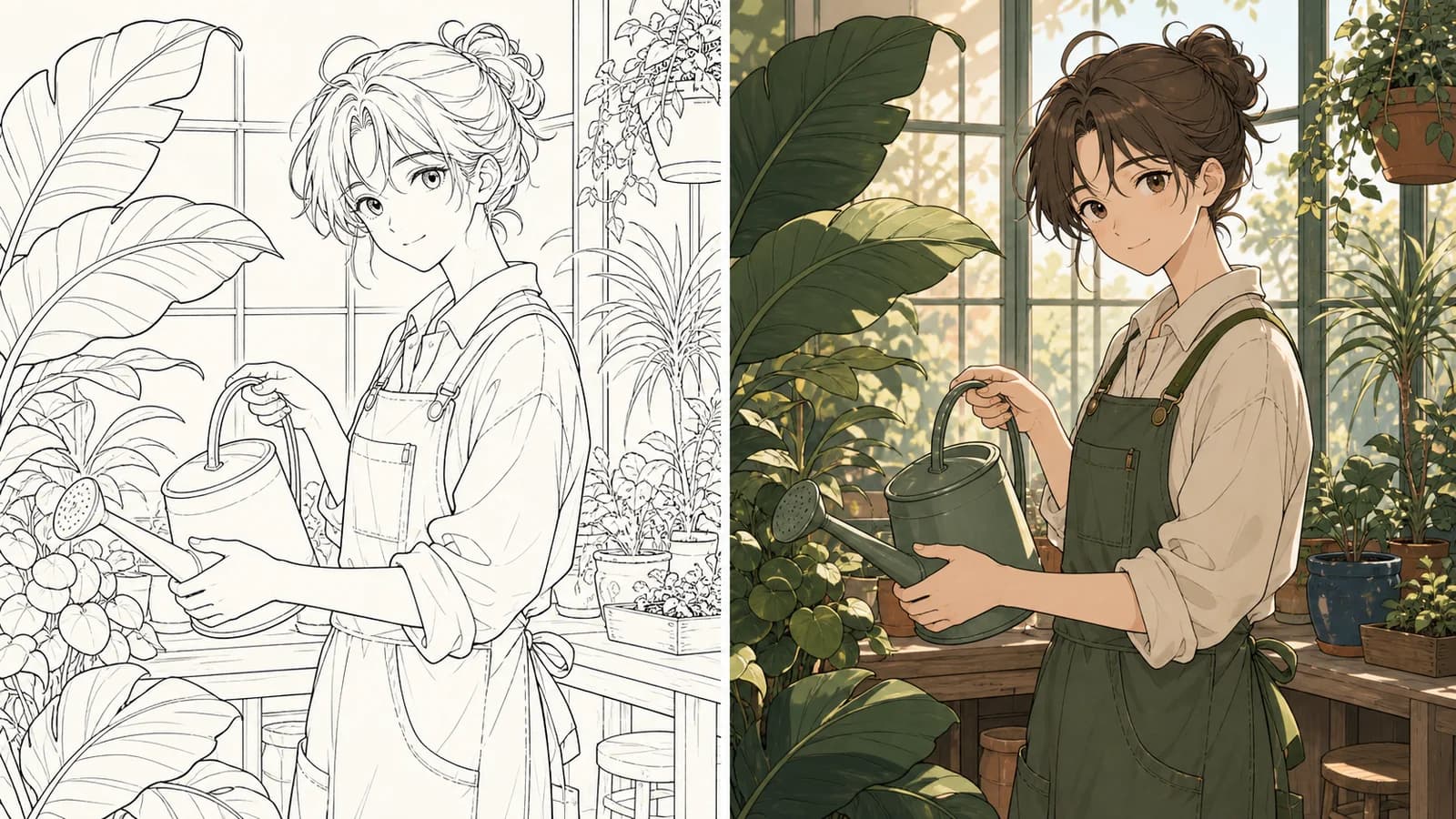
Resultను originalతో పోల్చండి
కొత్తగా తయారయ్యే ఒక 1024×1024 flattened raster color interpretation
ప్రతి colorకు object ఇవ్వండి
palette tests, color keys, lighting direction, paint-over base
పిక్సెల్ స్థాయిలో మారని గీతలు, లేయర్లతో కూడిన PSD, పారదర్శక నేపథ్యం, వెక్టర్ లేదా బ్యాచ్ ప్రాసెసింగ్
పిక్సెల్ స్థాయిలో మారని గీతలు, లేయర్లతో కూడిన PSD, పారదర్శక నేపథ్యం, వెక్టర్ లేదా బ్యాచ్ ప్రాసెసింగ్
Source నుంచి manual finish వరకు 2026-07-22
Sign in చేసి ఒక file upload చేయండి; configured APIMart reference workflow అవసరం. కొత్తగా తయారయ్యే ఒక 1024×1024 flattened raster color interpretation
ముందు local colors, తర్వాత ఒక key light, shadow family, visible materials.
01
Borders, notes crop చేసి orientation సరిచేయండి; face, hands, props, overlaps స్పష్టంగా ఉంచి original save చేయండి.
02
Moodకు ముందు మూడు నుంచి ఆరు colorsను objectsకు కేటాయించి master paletteను generator బయట ఉంచండి.
03
ఒక key light, ఒక shadow family చెప్పి grayscaleలో subject separation చూడండి.
01
Borders, notes crop చేసి orientation సరిచేయండి; face, hands, props, overlaps స్పష్టంగా ఉంచి original save చేయండి.
02
Moodకు ముందు మూడు నుంచి ఆరు colorsను objectsకు కేటాయించి master paletteను generator బయట ఉంచండి.
03
ఒక key light, ఒక shadow family చెప్పి grayscaleలో subject separation చూడండి.
04
Face, gesture, seams, propsకు priority ఇవ్వండి; thin lines మారవచ్చు, overlay compare చేయండి.
05
Resultను color keyగా తీసుకుని flats, shadows, light, correctionsను editable layersలో మళ్లీ నిర్మించండి.
“ఈ original line art composition, face, hand gesture, clothing seams, main propsను recognizableగా ఉంచి colorize చేయండి. Sage green, cream, muted terracotta, little indigo; upper-left warm window light, soft cool shadows. Cotton, ceramic, metal, leaves వేరు కనిపించాలి. Text, logo, watermark వద్దు. Moodకు ముందు మూడు నుంచి ఆరు colorsను objectsకు కేటాయించి master paletteను generator బయట ఉంచండి. కొత్తగా తయారయ్యే ఒక 1024×1024 flattened raster color interpretation”
ప్రతి colorకు object ఇవ్వండి Moodకు ముందు మూడు నుంచి ఆరు colorsను objectsకు కేటాయించి master paletteను generator బయట ఉంచండి. కొత్తగా తయారయ్యే ఒక 1024×1024 flattened raster color interpretation
“ఈ original line art composition, face, hand gesture, clothing seams, main propsను recognizableగా ఉంచి colorize చేయండి. Sage green, cream, muted terracotta, little indigo; upper-left warm window light, soft cool shadows. Cotton, ceramic, metal, leaves వేరు కనిపించాలి. Text, logo, watermark వద్దు. ఒక key light, ఒక shadow family చెప్పి grayscaleలో subject separation చూడండి. palette tests, color keys, lighting direction, paint-over base”
Input, palette, light, lines, errors, rights, export guidance చూడండి.
Borders, notes crop చేసి orientation సరిచేయండి; face, hands, props, overlaps స్పష్టంగా ఉంచి original save చేయండి. కొత్తగా తయారయ్యే ఒక 1024×1024 flattened raster color interpretation
Cotton, ceramic, metal, leavesను highlight shape, edge, translucencyతో వివరించండి. పిక్సెల్ స్థాయిలో మారని గీతలు, లేయర్లతో కూడిన PSD, పారదర్శక నేపథ్యం, వెక్టర్ లేదా బ్యాచ్ ప్రాసెసింగ్
Moodకు ముందు మూడు నుంచి ఆరు colorsను objectsకు కేటాయించి master paletteను generator బయట ఉంచండి. palette tests, color keys, lighting direction, paint-over base
Face, gesture, seams, propsకు priority ఇవ్వండి; thin lines మారవచ్చు, overlay compare చేయండి. Reference composition, contours ఇస్తుంది; result color, light సూచిస్తుంది, pixels lock కాదు.
Face, gesture, seams, propsకు priority ఇవ్వండి; thin lines మారవచ్చు, overlay compare చేయండి. పిక్సెల్ స్థాయిలో మారని గీతలు, లేయర్లతో కూడిన PSD, పారదర్శక నేపథ్యం, వెక్టర్ లేదా బ్యాచ్ ప్రాసెసింగ్
Line gaps, overlaps, conflicting prompt, configurationను విడిగా పరీక్షించి ఒక variable మార్చండి. పిక్సెల్ స్థాయిలో మారని గీతలు, లేయర్లతో కూడిన PSD, పారదర్శక నేపథ్యం, వెక్టర్ లేదా బ్యాచ్ ప్రాసెసింగ్
Resultను color keyగా తీసుకుని flats, shadows, light, correctionsను editable layersలో మళ్లీ నిర్మించండి. పిక్సెల్ స్థాయిలో మారని గీతలు, లేయర్లతో కూడిన PSD, పారదర్శక నేపథ్యం, వెక్టర్ లేదా బ్యాచ్ ప్రాసెసింగ్
మీది లేదా అనుమతి ఉన్న drawing మాత్రమే వాడి source, permission, prompt, result, edits save చేయండి. పిక్సెల్ స్థాయిలో మారని గీతలు, లేయర్లతో కూడిన PSD, పారదర్శక నేపథ్యం, వెక్టర్ లేదా బ్యాచ్ ప్రాసెసింగ్
సమీక్ష తేదీ 2026-07-22 · Anime Maker ఉత్పత్తి మరియు సంపాదక బృందం
పేజీలోని చిత్రాలు సంపాదకీయ ఉదాహరణలు మాత్రమే; అవి మీ ఖాతాలోని ప్రత్యక్ష పని రికార్డులు కావు. మీ ఫలితాల ప్యానెల్లో కనిపించే అవుట్పుట్తో సాధనాన్ని అంచనా వేయండి.
Borders, notes crop చేసి orientation సరిచేయండి; face, hands, props, overlaps స్పష్టంగా ఉంచి original save చేయండి. కొత్తగా తయారయ్యే ఒక 1024×1024 flattened raster color interpretation
Moodకు ముందు మూడు నుంచి ఆరు colorsను objectsకు కేటాయించి master paletteను generator బయట ఉంచండి. palette tests, color keys, lighting direction, paint-over base
ఒక key light, ఒక shadow family చెప్పి grayscaleలో subject separation చూడండి. పిక్సెల్ స్థాయిలో మారని గీతలు, లేయర్లతో కూడిన PSD, పారదర్శక నేపథ్యం, వెక్టర్ లేదా బ్యాచ్ ప్రాసెసింగ్
కొన్ని colors, ఒక lightతో మొదలుపెట్టి original, notes save చేయండి.
ఈ line artకు రంగులుReference composition, contours ఇస్తుంది; result color, light సూచిస్తుంది, pixels lock కాదు.
ప్రతి colorకు object ఇవ్వండి ఒక key light, ఒక shadow family చెప్పి grayscaleలో subject separation చూడండి. palette tests, color keys, lighting direction, paint-over base
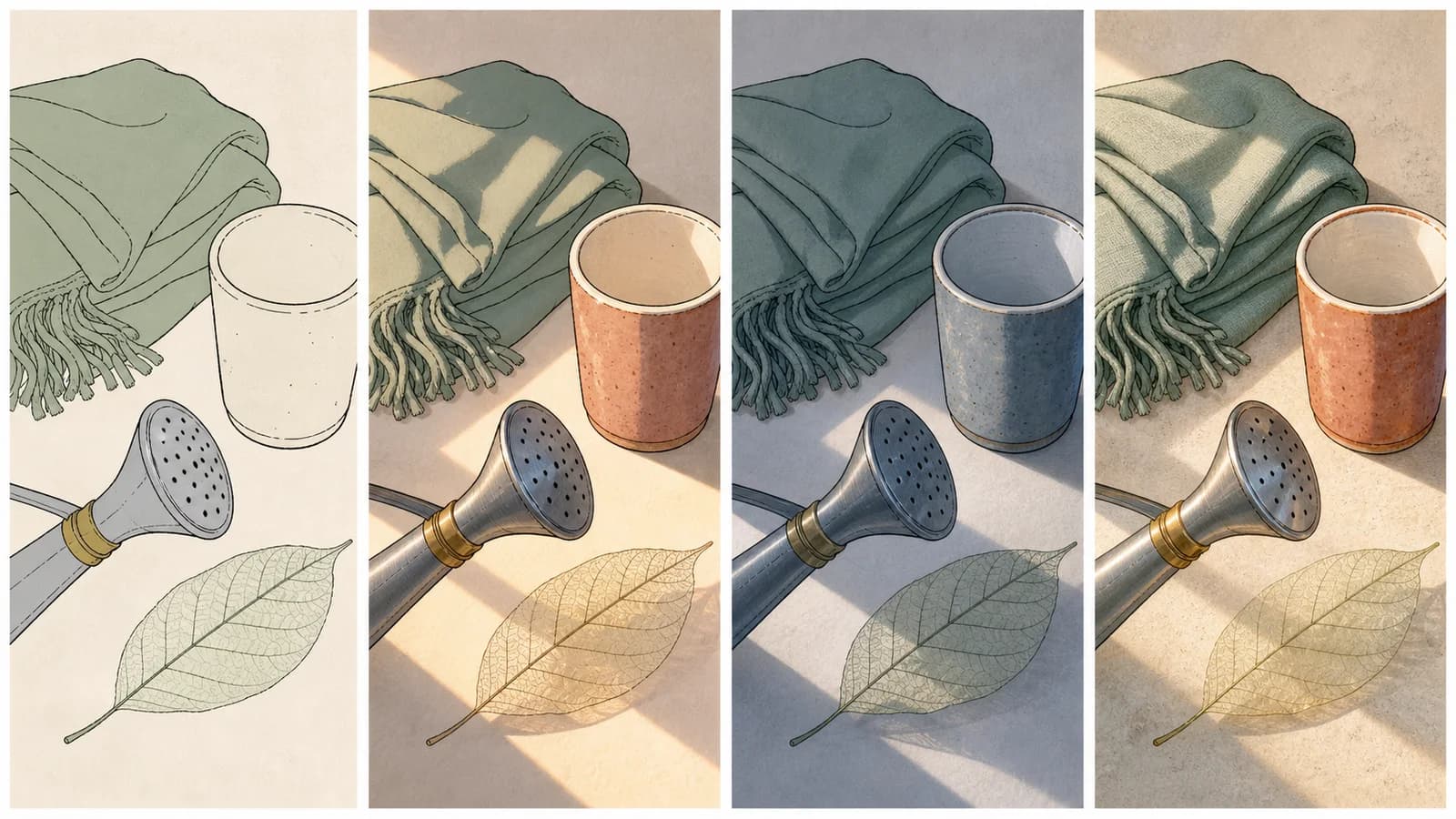
“ఈ original line art composition, face, hand gesture, clothing seams, main propsను recognizableగా ఉంచి colorize చేయండి. Sage green, cream, muted terracotta, little indigo; upper-left warm window light, soft cool shadows. Cotton, ceramic, metal, leaves వేరు కనిపించాలి. Text, logo, watermark వద్దు. Cotton, ceramic, metal, leavesను highlight shape, edge, translucencyతో వివరించండి. పిక్సెల్ స్థాయిలో మారని గీతలు, లేయర్లతో కూడిన PSD, పారదర్శక నేపథ్యం, వెక్టర్ లేదా బ్యాచ్ ప్రాసెసింగ్”
ప్రతి colorకు object ఇవ్వండి Cotton, ceramic, metal, leavesను highlight shape, edge, translucencyతో వివరించండి. పిక్సెల్ స్థాయిలో మారని గీతలు, లేయర్లతో కూడిన PSD, పారదర్శక నేపథ్యం, వెక్టర్ లేదా బ్యాచ్ ప్రాసెసింగ్
ఒక key light, ఒక shadow family చెప్పి grayscaleలో subject separation చూడండి. పిక్సెల్ స్థాయిలో మారని గీతలు, లేయర్లతో కూడిన PSD, పారదర్శక నేపథ్యం, వెక్టర్ లేదా బ్యాచ్ ప్రాసెసింగ్
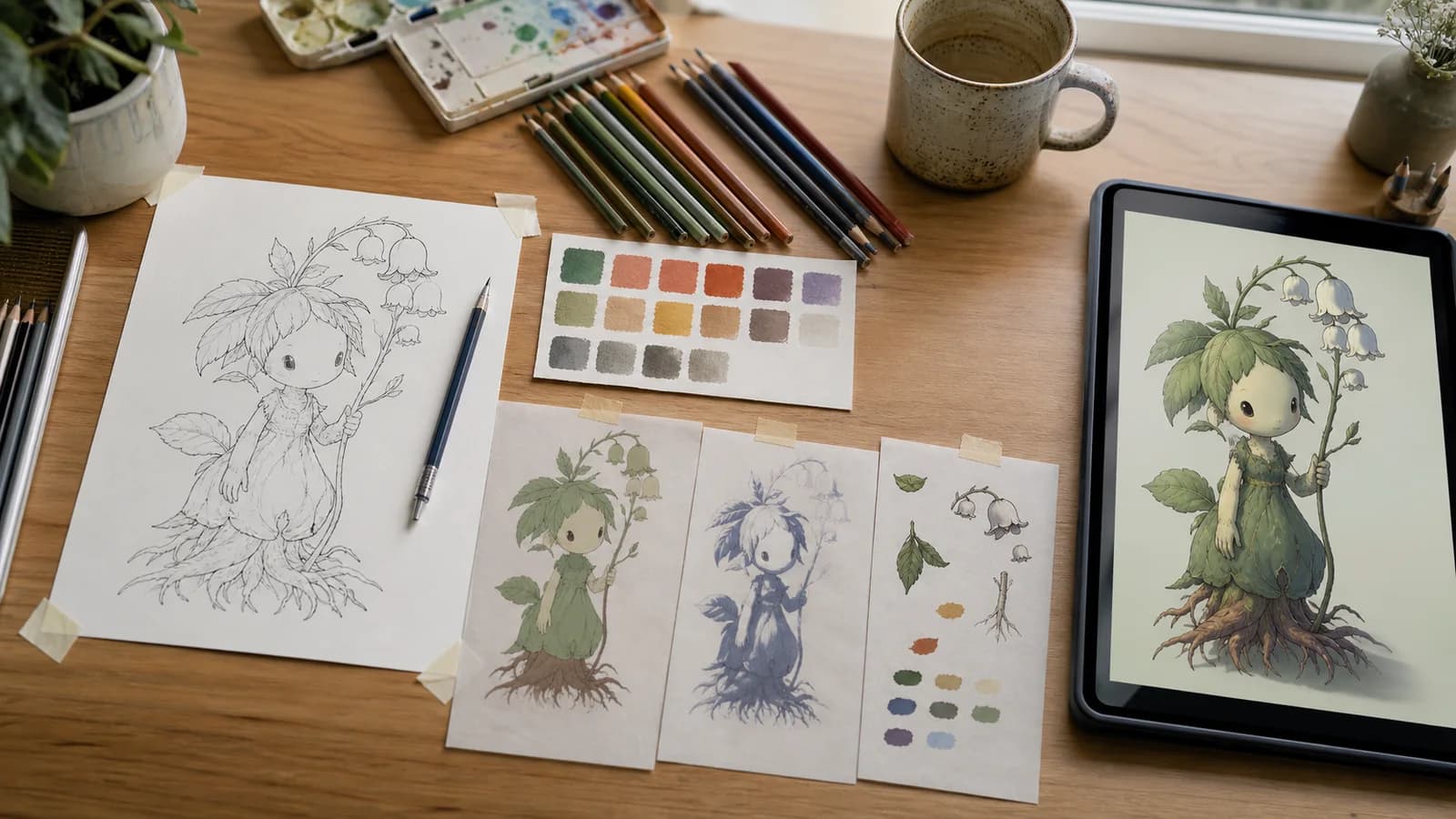
Line gaps, overlaps, conflicting prompt, configurationను విడిగా పరీక్షించి ఒక variable మార్చండి. నిజమైన desk drawing, swatches, light, materials, final previewను కలుపుతుంది.
Cotton, ceramic, metal, leavesను highlight shape, edge, translucencyతో వివరించండి. Reference composition, contours ఇస్తుంది; result color, light సూచిస్తుంది, pixels lock కాదు.
Resultను color keyగా తీసుకుని flats, shadows, light, correctionsను editable layersలో మళ్లీ నిర్మించండి. కొత్తగా తయారయ్యే ఒక 1024×1024 flattened raster color interpretation
Face, gesture, seams, propsకు priority ఇవ్వండి; thin lines మారవచ్చు, overlay compare చేయండి. నిజమైన desk drawing, swatches, light, materials, final previewను కలుపుతుంది.
మీది లేదా అనుమతి ఉన్న drawing మాత్రమే వాడి source, permission, prompt, result, edits save చేయండి. palette tests, color keys, lighting direction, paint-over base
Line gaps, overlaps, conflicting prompt, configurationను విడిగా పరీక్షించి ఒక variable మార్చండి. కొత్తగా తయారయ్యే ఒక 1024×1024 flattened raster color interpretation
Borders, notes crop చేసి orientation సరిచేయండి; face, hands, props, overlaps స్పష్టంగా ఉంచి original save చేయండి. పిక్సెల్ స్థాయిలో మారని గీతలు, లేయర్లతో కూడిన PSD, పారదర్శక నేపథ్యం, వెక్టర్ లేదా బ్యాచ్ ప్రాసెసింగ్
Resultను color keyగా తీసుకుని flats, shadows, light, correctionsను editable layersలో మళ్లీ నిర్మించండి. palette tests, color keys, lighting direction, paint-over base
Moodకు ముందు మూడు నుంచి ఆరు colorsను objectsకు కేటాయించి master paletteను generator బయట ఉంచండి. Reference composition, contours ఇస్తుంది; result color, light సూచిస్తుంది, pixels lock కాదు.
మీది లేదా అనుమతి ఉన్న drawing మాత్రమే వాడి source, permission, prompt, result, edits save చేయండి. పిక్సెల్ స్థాయిలో మారని గీతలు, లేయర్లతో కూడిన PSD, పారదర్శక నేపథ్యం, వెక్టర్ లేదా బ్యాచ్ ప్రాసెసింగ్
ఒక key light, ఒక shadow family చెప్పి grayscaleలో subject separation చూడండి. నిజమైన desk drawing, swatches, light, materials, final previewను కలుపుతుంది.
Reference composition, contours ఇస్తుంది; result color, light సూచిస్తుంది, pixels lock కాదు.
Krita: Krita Manual · Adobe Layers: helpx.adobe.com · U.S. Copyright Office: U.S. Copyright Office
Borders, notes crop చేసి orientation సరిచేయండి; face, hands, props, overlaps స్పష్టంగా ఉంచి original save చేయండి. పిక్సెల్ స్థాయిలో మారని గీతలు, లేయర్లతో కూడిన PSD, పారదర్శక నేపథ్యం, వెక్టర్ లేదా బ్యాచ్ ప్రాసెసింగ్
Moodకు ముందు మూడు నుంచి ఆరు colorsను objectsకు కేటాయించి master paletteను generator బయట ఉంచండి. పిక్సెల్ స్థాయిలో మారని గీతలు, లేయర్లతో కూడిన PSD, పారదర్శక నేపథ్యం, వెక్టర్ లేదా బ్యాచ్ ప్రాసెసింగ్
Cotton, ceramic, metal, leavesను highlight shape, edge, translucencyతో వివరించండి. Reference composition, contours ఇస్తుంది; result color, light సూచిస్తుంది, pixels lock కాదు.
Face, gesture, seams, propsకు priority ఇవ్వండి; thin lines మారవచ్చు, overlay compare చేయండి. నిజమైన desk drawing, swatches, light, materials, final previewను కలుపుతుంది.
Line gaps, overlaps, conflicting prompt, configurationను విడిగా పరీక్షించి ఒక variable మార్చండి. కొత్తగా తయారయ్యే ఒక 1024×1024 flattened raster color interpretation
Resultను color keyగా తీసుకుని flats, shadows, light, correctionsను editable layersలో మళ్లీ నిర్మించండి. palette tests, color keys, lighting direction, paint-over base
మీది లేదా అనుమతి ఉన్న drawing మాత్రమే వాడి source, permission, prompt, result, edits save చేయండి. పిక్సెల్ స్థాయిలో మారని గీతలు, లేయర్లతో కూడిన PSD, పారదర్శక నేపథ్యం, వెక్టర్ లేదా బ్యాచ్ ప్రాసెసింగ్
Reference composition, contours ఇస్తుంది; result color, light సూచిస్తుంది, pixels lock కాదు.