
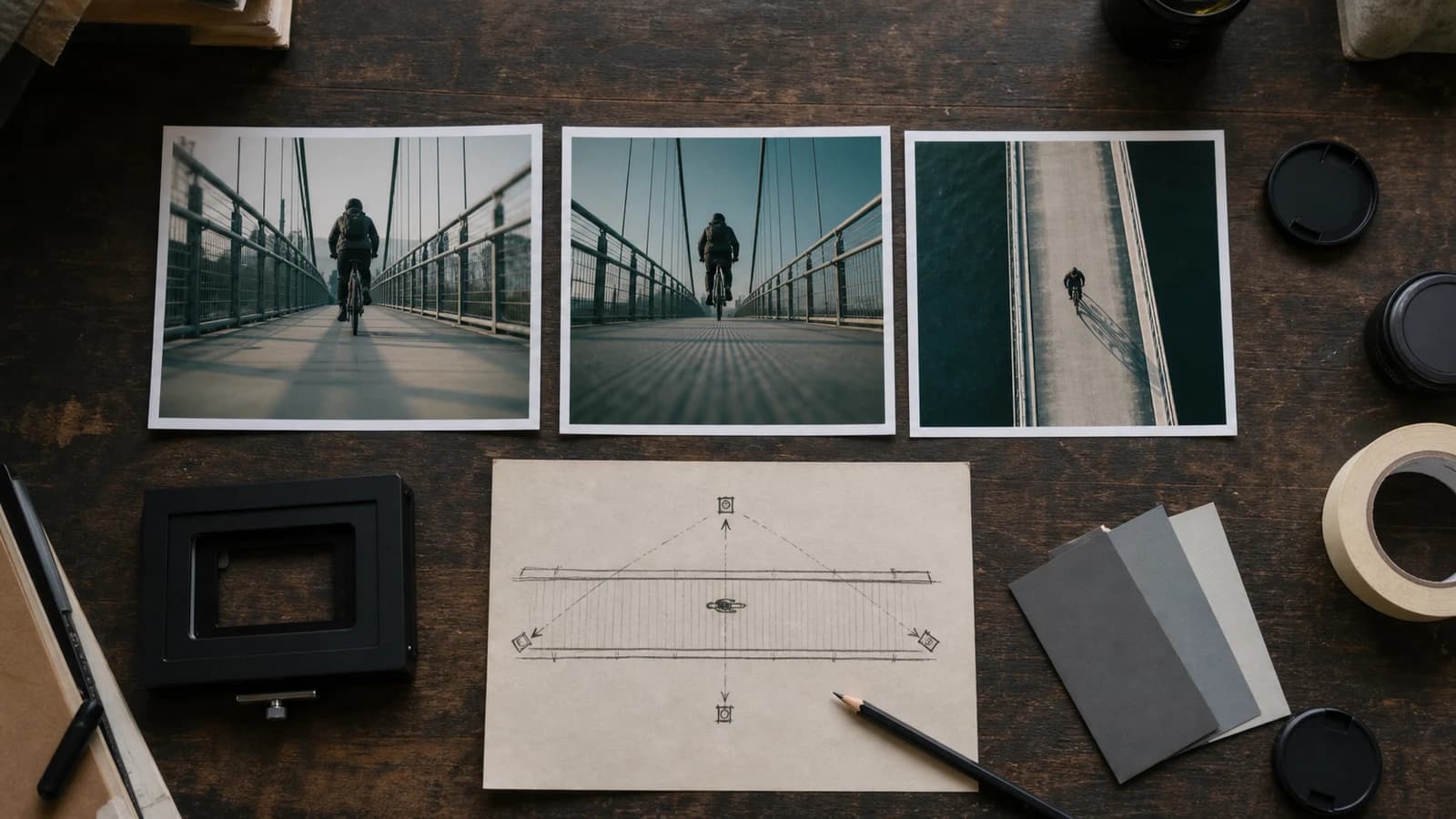
01
Ihiwalay ang angle, shot size, at subject direction
Pumili ng reference na kita ang subject, ground, at dalawang spatial landmark. Iimbentuhin ang likod, ibabaw, at off-frame; exploratory ang extreme angle.
anime camera angle control
Mag-upload ng pinahihintulutang reference, tukuyin ang taas, direksiyon, shot size, at makikilalang katangian, saka ihambing ang bagong viewpoint.
Mag-login at mag-upload ng JPG, PNG, o WebP; kailangan ang storage at APIMart reference edit setup.
Mag-sign in bago pumili ng file. Ibabalik ang prompt na isinulat mo pagbalik.
Mas mataas na detalye ng henerasyon para sa mga bayad na plano
Mga halimbawa ng output
Ano ang maaaring magawa ng isang nakatuon na input
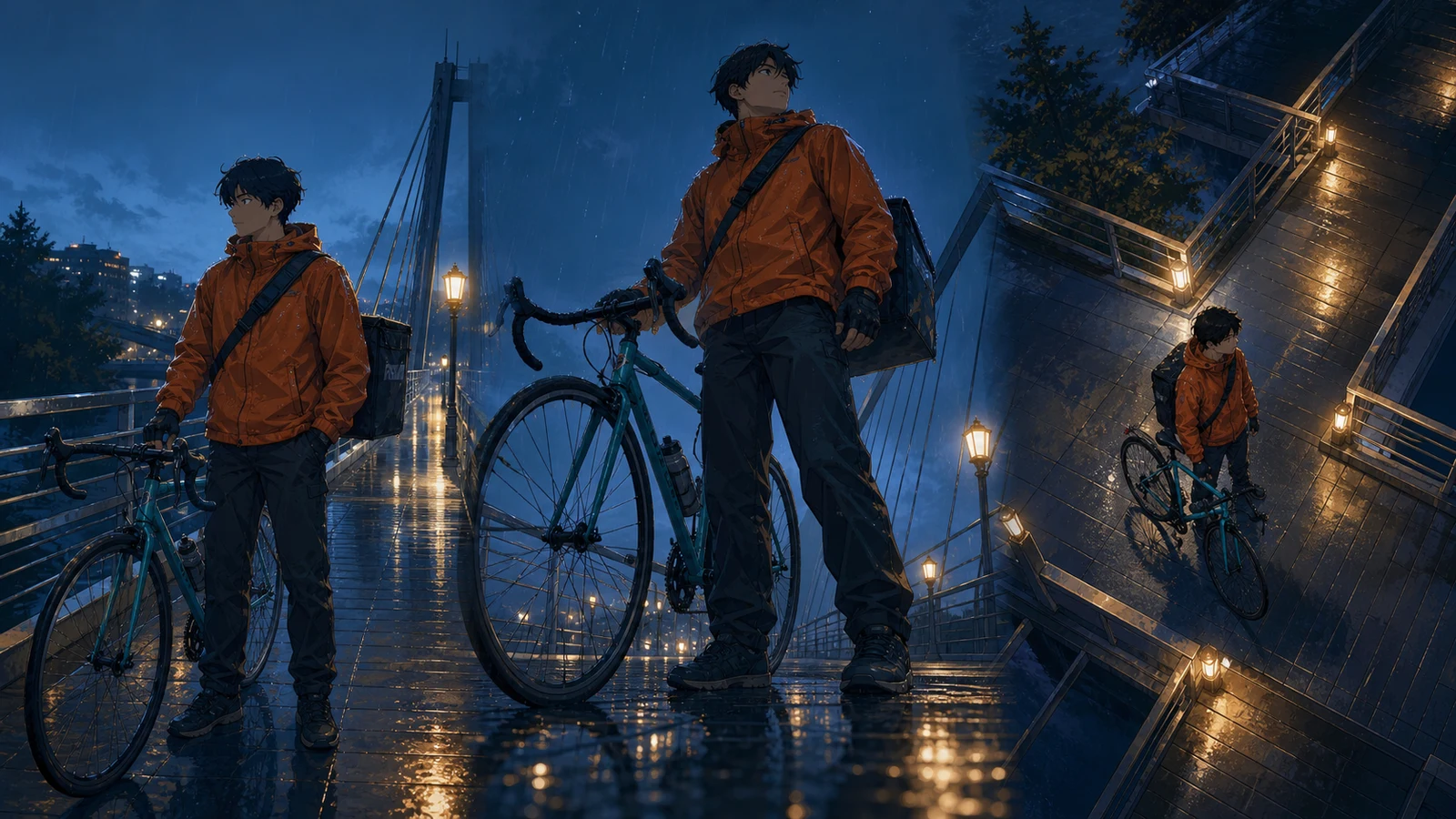
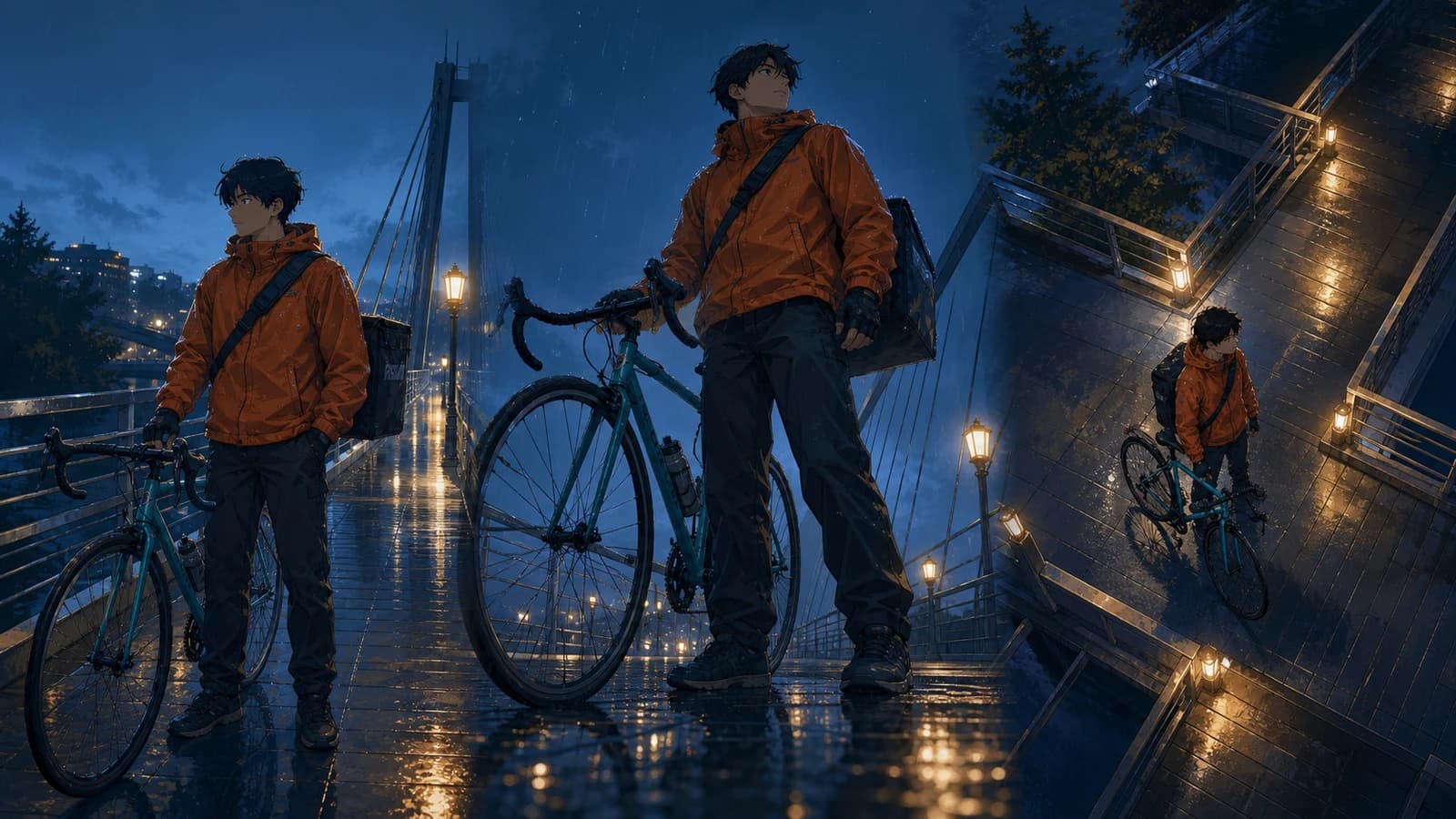
Pamantayang imahe
Advanced na imahe
Suriin bilang bagong interpretation
Ang output ay isang bagong 1024×1024 flattened raster image para sa storyboard options, composition review, keyframe, at early visual development.
Isang camera decision lang kada test
Ang output ay isang bagong 1024×1024 flattened raster image para sa storyboard options, composition review, keyframe, at early visual development.
Wala itong nakatakdang 3D na pag-ikot, eksaktong pag-lock ng pagkakakilanlan o pose, naka-calibrate na lente, seed value, awtomatikong maramihang anggulo, mga layer, maramihang pagproseso, o video.
Wala itong nakatakdang 3D na pag-ikot, eksaktong pag-lock ng pagkakakilanlan o pose, naka-calibrate na lente, seed value, awtomatikong maramihang anggulo, mga layer, maramihang pagproseso, o video.
Praktikal na gabay sa viewpoint, perspective, at continuity 2026-07-22
Contextual short alt para sa informative image, empty alt para sa decoration. Batay sa official docs ng Google Cloud, Adobe, Nikon, Blender, at W3C.
Ihiwalay ang taas, direksiyon, shot size, distance, at frame position para makita ang sanhi ng drift.
01
Pumili ng reference na kita ang subject, ground, at dalawang spatial landmark. Iimbentuhin ang likod, ibabaw, at off-frame; exploratory ang extreme angle.
02
Ayusin ang prompt: camera position, direction/tilt, shot size, action, stable features, foreground/background geometry, light, exclusions. Hindi eksaktong mananatili ang lumang composition sa bagong view.
03
Suriin muna ang new surfaces, horizon, convergence, foreground scale, at overlap; saka ang face, clothes, prop, action, at light.
01
Ang output ay isang bagong 1024×1024 flattened raster image para sa storyboard options, composition review, keyframe, at early visual development.
02
Wala itong nakatakdang 3D na pag-ikot, eksaktong pag-lock ng pagkakakilanlan o pose, naka-calibrate na lente, seed value, awtomatikong maramihang anggulo, mga layer, maramihang pagproseso, o video.
03
Pumili ng reference na kita ang subject, ground, at dalawang spatial landmark. Iimbentuhin ang likod, ibabaw, at off-frame; exploratory ang extreme angle.
04
Suriin muna ang new surfaces, horizon, convergence, foreground scale, at overlap; saka ang face, clothes, prop, action, at light.
05
Gumamit lang ng sarili, licensed, o permitted na image; itago source, permission, prompt, result, selection, at edits at tingnan ang accidental similarity.
06
Contextual short alt para sa informative image, empty alt para sa decoration. Batay sa official docs ng Google Cloud, Adobe, Nikon, Blender, at W3C.
“I-interpret muli ang uploaded original scene mula sa mababang camera malapit sa basang bridge deck, bahagyang nakatingala sa parehong batang bicycle courier. Panatilihing makikilala ang burnt-orange rain jacket, maikling maitim na buhok, black bag, teal bicycle, ulan, bridge lamps, at blue hour. Full-body three-quarter frame, front wheel sa foreground, maayos na convergence ng railings at kapanipaniwalang ground contact. Walang text, logo, o watermark. Ayusin ang prompt: camera position, direction/tilt, shot size, action, stable features, foreground/background geometry, light, exclusions. Hindi eksaktong mananatili ang lumang composition sa bagong view. Ang output ay isang bagong 1024×1024 flattened raster image para sa storyboard options, composition review, keyframe, at early visual development.”
Suriin bilang bagong interpretation Ayusin ang prompt: camera position, direction/tilt, shot size, action, stable features, foreground/background geometry, light, exclusions. Hindi eksaktong mananatili ang lumang composition sa bagong view. Ang output ay isang bagong 1024×1024 flattened raster image para sa storyboard options, composition review, keyframe, at early visual development.
Buksan ang reference, prompt, angle, perspective, composition, comparison, rights, o handoff na bahagi.
Ang output ay isang bagong 1024×1024 flattened raster image para sa storyboard options, composition review, keyframe, at early visual development. Mag-upload ng pinahihintulutang reference, tukuyin ang taas, direksiyon, shot size, at makikilalang katangian, saka ihambing ang bagong viewpoint.
Ayusin ang prompt: camera position, direction/tilt, shot size, action, stable features, foreground/background geometry, light, exclusions. Hindi eksaktong mananatili ang lumang composition sa bagong view. Visual direction lang ang lens words. Binabago ng distance ang size relationship at ng focal length ang field at magnification; walang optical metadata.
Wala itong nakatakdang 3D na pag-ikot, eksaktong pag-lock ng pagkakakilanlan o pose, naka-calibrate na lente, seed value, awtomatikong maramihang anggulo, mga layer, maramihang pagproseso, o video. Pagkatapos mag-login, pinoproseso ng configured APIMart reference edit ang isang JPG, PNG, o WebP at nagbibigay ng bagong 1024×1024 flattened raster interpretation. Hindi ito calibrated 3D camera at hindi eksaktong nagla-lock ng identity, pose, composition, o perspective.
Pumili ng reference na kita ang subject, ground, at dalawang spatial landmark. Iimbentuhin ang likod, ibabaw, at off-frame; exploratory ang extreme angle. Pagkatapos mag-login, pinoproseso ng configured APIMart reference edit ang isang JPG, PNG, o WebP at nagbibigay ng bagong 1024×1024 flattened raster interpretation. Hindi ito calibrated 3D camera at hindi eksaktong nagla-lock ng identity, pose, composition, o perspective.
Ayusin ang prompt: camera position, direction/tilt, shot size, action, stable features, foreground/background geometry, light, exclusions. Hindi eksaktong mananatili ang lumang composition sa bagong view. Pagkatapos mag-login, pinoproseso ng configured APIMart reference edit ang isang JPG, PNG, o WebP at nagbibigay ng bagong 1024×1024 flattened raster interpretation. Hindi ito calibrated 3D camera at hindi eksaktong nagla-lock ng identity, pose, composition, o perspective.
Sinuri 2026-07-22 · Product at editorial team ng Anime Maker
Ang mga larawan sa pahina ay mga halimbawang editoryal, hindi aktuwal na tala ng gawain sa account. Suriin ang tool batay sa resultang nasa sarili mong output panel.
Ang output ay isang bagong 1024×1024 flattened raster image para sa storyboard options, composition review, keyframe, at early visual development. Pumili ng reference na kita ang subject, ground, at dalawang spatial landmark. Iimbentuhin ang likod, ibabaw, at off-frame; exploratory ang extreme angle.
Wala itong nakatakdang 3D na pag-ikot, eksaktong pag-lock ng pagkakakilanlan o pose, naka-calibrate na lente, seed value, awtomatikong maramihang anggulo, mga layer, maramihang pagproseso, o video. Ayusin ang prompt: camera position, direction/tilt, shot size, action, stable features, foreground/background geometry, light, exclusions. Hindi eksaktong mananatili ang lumang composition sa bagong view.
Pumili ng reference na kita ang subject, ground, at dalawang spatial landmark. Iimbentuhin ang likod, ibabaw, at off-frame; exploratory ang extreme angle. Suriin muna ang new surfaces, horizon, convergence, foreground scale, at overlap; saka ang face, clothes, prop, action, at light.
Tingnan ang horizon, convergence, overlap, ground contact, at identity anchors bago mag-regenerate o mag-ayos.
Gumawa ng bagong angleSuriin muna ang new surfaces, horizon, convergence, foreground scale, at overlap; saka ang face, clothes, prop, action, at light.
“I-interpret muli ang uploaded original scene mula sa mababang camera malapit sa basang bridge deck, bahagyang nakatingala sa parehong batang bicycle courier. Panatilihing makikilala ang burnt-orange rain jacket, maikling maitim na buhok, black bag, teal bicycle, ulan, bridge lamps, at blue hour. Full-body three-quarter frame, front wheel sa foreground, maayos na convergence ng railings at kapanipaniwalang ground contact. Walang text, logo, o watermark. Suriin muna ang new surfaces, horizon, convergence, foreground scale, at overlap; saka ang face, clothes, prop, action, at light. Wala itong nakatakdang 3D na pag-ikot, eksaktong pag-lock ng pagkakakilanlan o pose, naka-calibrate na lente, seed value, awtomatikong maramihang anggulo, mga layer, maramihang pagproseso, o video.”
Suriin bilang bagong interpretation Suriin muna ang new surfaces, horizon, convergence, foreground scale, at overlap; saka ang face, clothes, prop, action, at light. Wala itong nakatakdang 3D na pag-ikot, eksaktong pag-lock ng pagkakakilanlan o pose, naka-calibrate na lente, seed value, awtomatikong maramihang anggulo, mga layer, maramihang pagproseso, o video.
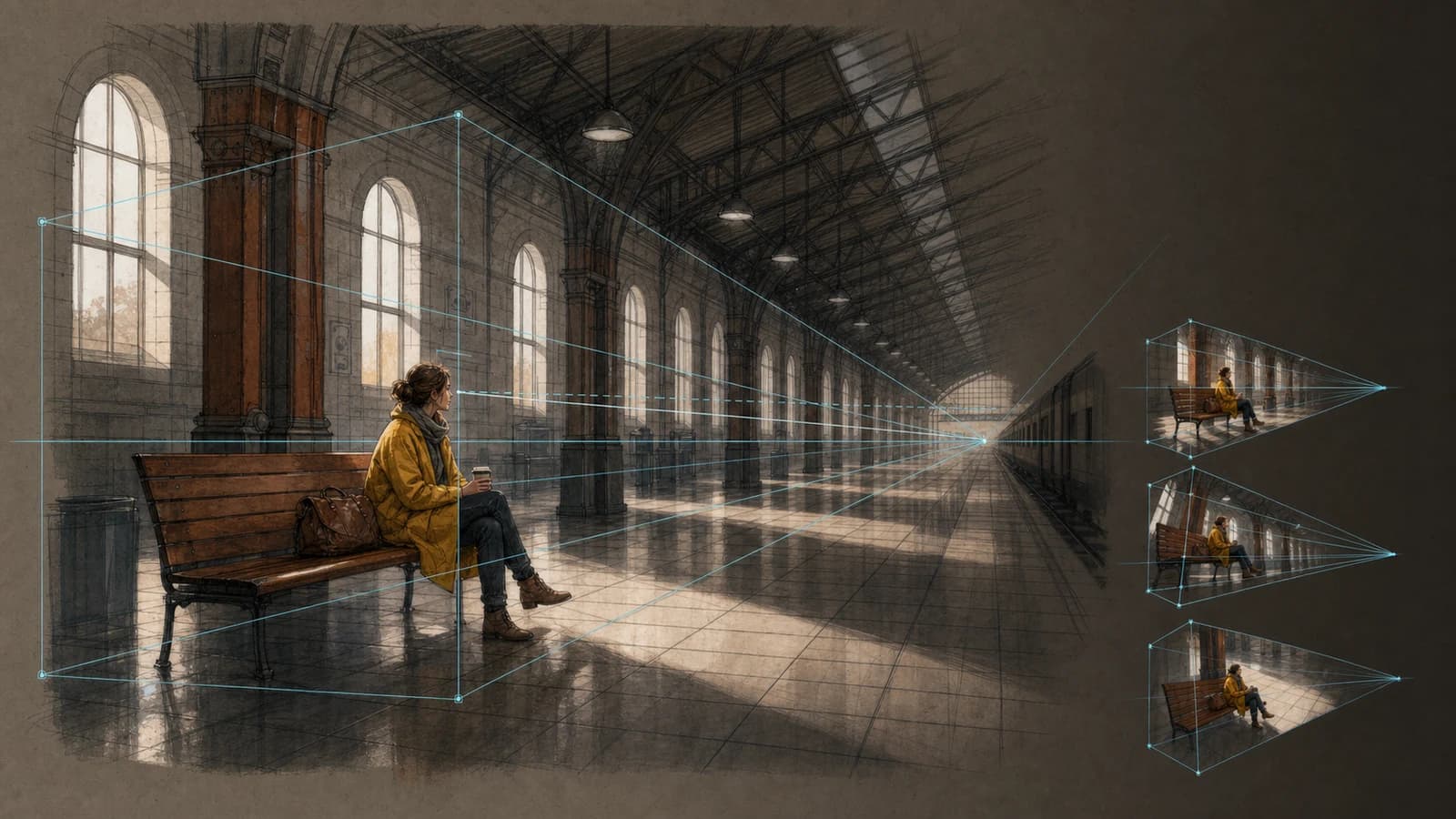
“I-interpret muli ang uploaded original scene mula sa mababang camera malapit sa basang bridge deck, bahagyang nakatingala sa parehong batang bicycle courier. Panatilihing makikilala ang burnt-orange rain jacket, maikling maitim na buhok, black bag, teal bicycle, ulan, bridge lamps, at blue hour. Full-body three-quarter frame, front wheel sa foreground, maayos na convergence ng railings at kapanipaniwalang ground contact. Walang text, logo, o watermark. Visual direction lang ang lens words. Binabago ng distance ang size relationship at ng focal length ang field at magnification; walang optical metadata. Pumili ng reference na kita ang subject, ground, at dalawang spatial landmark. Iimbentuhin ang likod, ibabaw, at off-frame; exploratory ang extreme angle.”
Suriin bilang bagong interpretation Visual direction lang ang lens words. Binabago ng distance ang size relationship at ng focal length ang field at magnification; walang optical metadata. Pumili ng reference na kita ang subject, ground, at dalawang spatial landmark. Iimbentuhin ang likod, ibabaw, at off-frame; exploratory ang extreme angle.
Wala itong nakatakdang 3D na pag-ikot, eksaktong pag-lock ng pagkakakilanlan o pose, naka-calibrate na lente, seed value, awtomatikong maramihang anggulo, mga layer, maramihang pagproseso, o video. Mag-upload ng pinahihintulutang reference, tukuyin ang taas, direksiyon, shot size, at makikilalang katangian, saka ihambing ang bagong viewpoint.
Suriin muna ang new surfaces, horizon, convergence, foreground scale, at overlap; saka ang face, clothes, prop, action, at light. Gumamit lang ng sarili, licensed, o permitted na image; itago source, permission, prompt, result, selection, at edits at tingnan ang accidental similarity.
Pumili ng reference na kita ang subject, ground, at dalawang spatial landmark. Iimbentuhin ang likod, ibabaw, at off-frame; exploratory ang extreme angle. Mag-upload ng pinahihintulutang reference, tukuyin ang taas, direksiyon, shot size, at makikilalang katangian, saka ihambing ang bagong viewpoint.
Visual direction lang ang lens words. Binabago ng distance ang size relationship at ng focal length ang field at magnification; walang optical metadata. Contextual short alt para sa informative image, empty alt para sa decoration. Batay sa official docs ng Google Cloud, Adobe, Nikon, Blender, at W3C.
Ayusin ang prompt: camera position, direction/tilt, shot size, action, stable features, foreground/background geometry, light, exclusions. Hindi eksaktong mananatili ang lumang composition sa bagong view. Mag-upload ng pinahihintulutang reference, tukuyin ang taas, direksiyon, shot size, at makikilalang katangian, saka ihambing ang bagong viewpoint.
Gumamit lang ng sarili, licensed, o permitted na image; itago source, permission, prompt, result, selection, at edits at tingnan ang accidental similarity. Ang output ay isang bagong 1024×1024 flattened raster image para sa storyboard options, composition review, keyframe, at early visual development.
Suriin muna ang new surfaces, horizon, convergence, foreground scale, at overlap; saka ang face, clothes, prop, action, at light. Mag-upload ng pinahihintulutang reference, tukuyin ang taas, direksiyon, shot size, at makikilalang katangian, saka ihambing ang bagong viewpoint.
Contextual short alt para sa informative image, empty alt para sa decoration. Batay sa official docs ng Google Cloud, Adobe, Nikon, Blender, at W3C. Wala itong nakatakdang 3D na pag-ikot, eksaktong pag-lock ng pagkakakilanlan o pose, naka-calibrate na lente, seed value, awtomatikong maramihang anggulo, mga layer, maramihang pagproseso, o video.
Visual direction lang ang lens words. Binabago ng distance ang size relationship at ng focal length ang field at magnification; walang optical metadata. Mag-upload ng pinahihintulutang reference, tukuyin ang taas, direksiyon, shot size, at makikilalang katangian, saka ihambing ang bagong viewpoint.
Ang output ay isang bagong 1024×1024 flattened raster image para sa storyboard options, composition review, keyframe, at early visual development. Pumili ng reference na kita ang subject, ground, at dalawang spatial landmark. Iimbentuhin ang likod, ibabaw, at off-frame; exploratory ang extreme angle.
Gumamit lang ng sarili, licensed, o permitted na image; itago source, permission, prompt, result, selection, at edits at tingnan ang accidental similarity. Mag-upload ng pinahihintulutang reference, tukuyin ang taas, direksiyon, shot size, at makikilalang katangian, saka ihambing ang bagong viewpoint.
Wala itong nakatakdang 3D na pag-ikot, eksaktong pag-lock ng pagkakakilanlan o pose, naka-calibrate na lente, seed value, awtomatikong maramihang anggulo, mga layer, maramihang pagproseso, o video. Ayusin ang prompt: camera position, direction/tilt, shot size, action, stable features, foreground/background geometry, light, exclusions. Hindi eksaktong mananatili ang lumang composition sa bagong view.
Contextual short alt para sa informative image, empty alt para sa decoration. Batay sa official docs ng Google Cloud, Adobe, Nikon, Blender, at W3C. Pagkatapos mag-login, pinoproseso ng configured APIMart reference edit ang isang JPG, PNG, o WebP at nagbibigay ng bagong 1024×1024 flattened raster interpretation. Hindi ito calibrated 3D camera at hindi eksaktong nagla-lock ng identity, pose, composition, o perspective.
Pumili ng reference na kita ang subject, ground, at dalawang spatial landmark. Iimbentuhin ang likod, ibabaw, at off-frame; exploratory ang extreme angle. Suriin muna ang new surfaces, horizon, convergence, foreground scale, at overlap; saka ang face, clothes, prop, action, at light.
Visual direction lang ang lens words. Binabago ng distance ang size relationship at ng focal length ang field at magnification; walang optical metadata. Pagkatapos mag-login, pinoproseso ng configured APIMart reference edit ang isang JPG, PNG, o WebP at nagbibigay ng bagong 1024×1024 flattened raster interpretation. Hindi ito calibrated 3D camera at hindi eksaktong nagla-lock ng identity, pose, composition, o perspective.
Gumamit lang ng sarili, licensed, o permitted na image; itago source, permission, prompt, result, selection, at edits at tingnan ang accidental similarity. Pagkatapos mag-login, pinoproseso ng configured APIMart reference edit ang isang JPG, PNG, o WebP at nagbibigay ng bagong 1024×1024 flattened raster interpretation. Hindi ito calibrated 3D camera at hindi eksaktong nagla-lock ng identity, pose, composition, o perspective.
Contextual short alt para sa informative image, empty alt para sa decoration. Batay sa official docs ng Google Cloud, Adobe, Nikon, Blender, at W3C. Pagkatapos mag-login, pinoproseso ng configured APIMart reference edit ang isang JPG, PNG, o WebP at nagbibigay ng bagong 1024×1024 flattened raster interpretation. Hindi ito calibrated 3D camera at hindi eksaktong nagla-lock ng identity, pose, composition, o perspective.
Ayusin ang prompt: camera position, direction/tilt, shot size, action, stable features, foreground/background geometry, light, exclusions. Hindi eksaktong mananatili ang lumang composition sa bagong view. Visual direction lang ang lens words. Binabago ng distance ang size relationship at ng focal length ang field at magnification; walang optical metadata.
Suriin muna ang new surfaces, horizon, convergence, foreground scale, at overlap; saka ang face, clothes, prop, action, at light. Gumamit lang ng sarili, licensed, o permitted na image; itago source, permission, prompt, result, selection, at edits at tingnan ang accidental similarity.
Visual direction lang ang lens words. Binabago ng distance ang size relationship at ng focal length ang field at magnification; walang optical metadata. Contextual short alt para sa informative image, empty alt para sa decoration. Batay sa official docs ng Google Cloud, Adobe, Nikon, Blender, at W3C.
Gumamit lang ng sarili, licensed, o permitted na image; itago source, permission, prompt, result, selection, at edits at tingnan ang accidental similarity. Ang output ay isang bagong 1024×1024 flattened raster image para sa storyboard options, composition review, keyframe, at early visual development.
Contextual short alt para sa informative image, empty alt para sa decoration. Batay sa official docs ng Google Cloud, Adobe, Nikon, Blender, at W3C. Wala itong nakatakdang 3D na pag-ikot, eksaktong pag-lock ng pagkakakilanlan o pose, naka-calibrate na lente, seed value, awtomatikong maramihang anggulo, mga layer, maramihang pagproseso, o video.