
01
Name the emotional beat and its cause
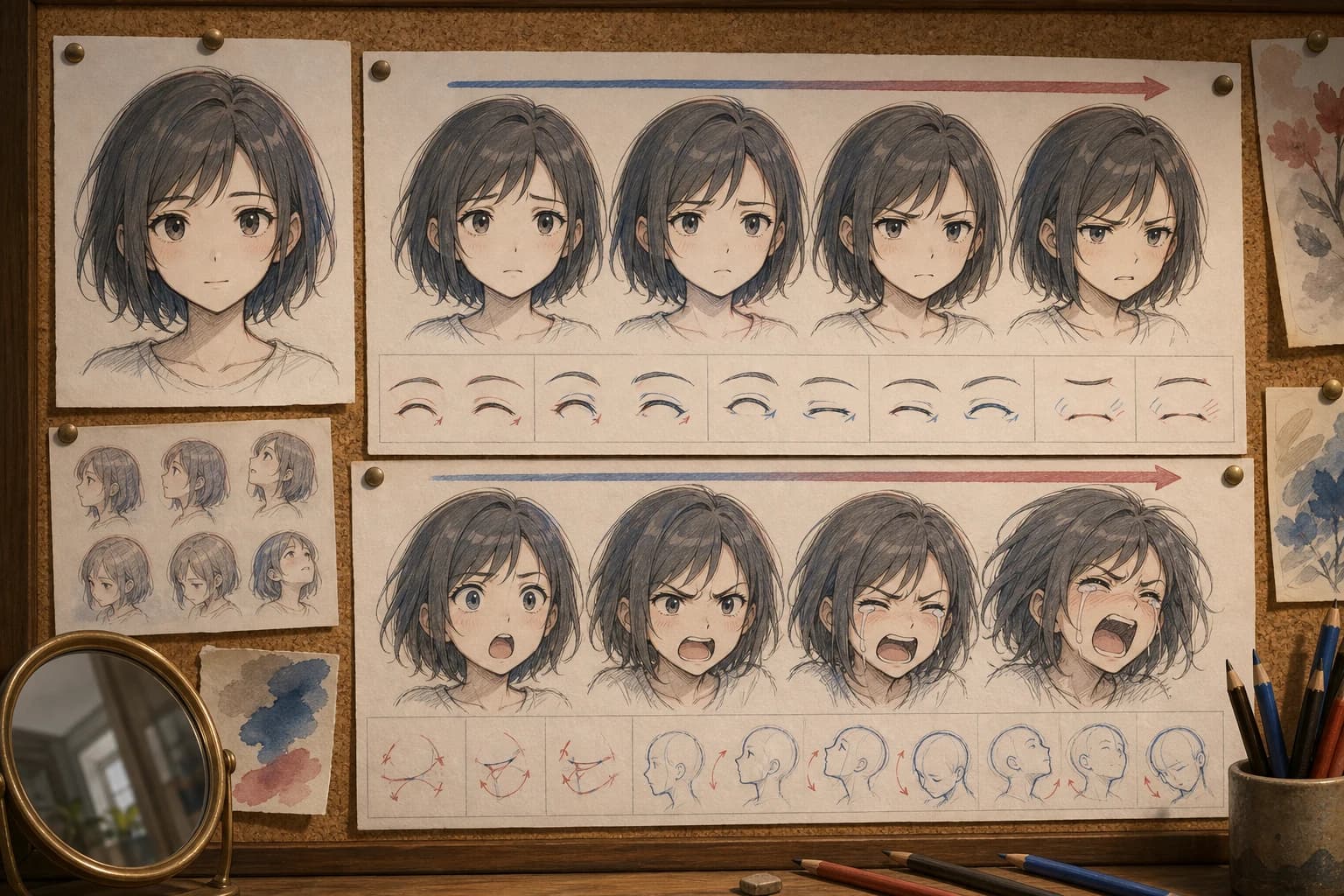
“Sad” is a category. “Trying not to show disappointment after reading the message” gives the expression a social purpose and helps choose intensity, gaze, mouth tension, and head movement.
Anime expression changer
Upload one authorized anime or illustration reference, name the emotional beat and visible facial changes, then generate a square reinterpretation. Review identity drift, gaze, mouth, hands, and context before using the result.
The working reference-image tool is in the first viewport. Upload one authorized JPG, PNG, or WebP, then describe the emotion, intensity, gaze, brow, eyelids, mouth, head movement, and the visible anchors that should remain recognizable.
Sign in before choosing a file. Your prompt will be restored when you return.
Higher-detail generation for paid plans
Example outputs
What one focused input can produce

Standard image
Advanced image
Representative single-output proof: one square portrait makes the brow, eyelid, gaze, mouth, and jaw changes visible. A reference edit can still redraw identity anchors or background details, so compare the result with the source.
Actual output
one newly generated 1024×1024 flattened raster reinterpretation from the reference and prompt
Useful for
facial-acting exploration, storyboard alternatives, character reaction studies, thumbnail concepts, visual-development reviews, and early scene planning
Not provided
exact identity preservation, pixel-only face editing, facial rigs, blendshapes, sliders, masks, editable layers, automatic expression sheets, batch work, or video
Product and guidance reviewed 2026-07-22
Capability wording was checked against the current required-reference upload, sign-in return, configured reference-image edit route, 1024×1024 single result, and visible error states. The page does not claim a face mask, identity lock, expression slider, seed, layers, batch output, or video.
A reference-guided generation can propose a new expression, but it may redraw more than the face. Keep the request narrow and compare the output with the source before accepting identity, costume, pose, or setting continuity.
01
“Sad” is a category. “Trying not to show disappointment after reading the message” gives the expression a social purpose and helps choose intensity, gaze, mouth tension, and head movement.
02
Direct the inner brows, eyelids, gaze, mouth corners, jaw, cheeks, head angle, and shoulder tension. Avoid claiming that one face proves a person’s real mental state or intent.
03
The reference route can redraw hair, face shape, clothing, hands, props, light, and background. An expression that works is not enough if the character or scene no longer matches the source.
01
Use an image you created or are authorized to transform. Select a face that is large enough to read and not heavily obscured.
02
Write what just happened, what the character wants to reveal or conceal, and whether the change is subtle, medium, or strong.
03
Name brow shape, eyelid opening, gaze, mouth, jaw, cheek tension, head angle, and any shoulder response.
04
Upload the reference, submit the narrow brief, and wait for one flattened square result on the same page.
05
Inspect identity, expression, anatomy, crop, clothing, props, light, and background; then regenerate, retouch, redraw, or reject.

“Restrained concern at low intensity: slightly raised inner brows, lowered upper eyelids, off-camera gaze, lips pressed softly, small jaw tension, minimal head dip. Keep the original adult subject and scene recognizable.”
Why this acting brief is reviewable: The request connects emotional restraint to small, inspectable feature changes and explicitly avoids tears or a total redesign.
“Create a medium-strength surprised reaction: brows rise with slight asymmetry, upper eyelids open, pupils remain directed toward the off-screen event, mouth parts without an extreme oval, jaw drops only a little, head moves back a few degrees.”
Why this acting brief is reviewable: Limiting the jaw and mouth prevents “surprise” from defaulting to a caricature while the eye direction keeps the reaction tied to an event.
“Warm restrained relief: brow tension releases, eyes soften, mouth corners lift into a closed small smile, jaw and shoulders relax, head returns toward level, gaze meets the person just off camera. Preserve the original crop and light.”
Why this acting brief is reviewable: Relief reads through the release of earlier tension, so the prompt directs the brow, eyes, mouth, jaw, shoulders, and gaze as one acting change.
Use the section that matches your decision: emotional beat, intensity, feature changes, reference preparation, prompt order, continuity, dialogue, difficult expressions, repair, rights, or accessibility.
An expression becomes specific when it belongs to a moment. “Sad” could mean a private loss, embarrassment in public, exhausted resignation, or an attempt to comfort someone else while upset. Write what has just happened and what the character wants the other person to notice. The social purpose changes gaze, symmetry, mouth tension, head movement, and intensity. Keep the event brief enough that it can affect the visible face rather than turning the prompt into a plot synopsis.
Choose an intensity before listing features. Low intensity might use a small inner-brow lift and pressed lips; medium intensity can add more eyelid and jaw movement; strong intensity may involve tears, teeth, deep compression, and large head motion. Stronger is not automatically clearer. It can push a result toward caricature, distort identity, or break anatomy. Start lower than the maximum when the character must remain recognizable, then increase one feature group at a time.
Avoid treating a single expression as proof of a real person’s inner state. In fiction, the director decides what the face communicates. In life, the same brow or gaze can have many causes. Write and review these outputs as character acting, not emotion detection, medical diagnosis, deception analysis, or evidence. This distinction belongs in both the prompt and the way the final image is captioned or presented.
The brow can lift, lower, pull together, flatten, or move asymmetrically. The eyelids can open, narrow, compress, or soften, while the gaze has a direction and target. Describe these separately. Raised brows with narrowed eyelids do not necessarily mean the same thing as raised brows with wide eyes. Anime simplification makes each shape more graphic, so a small change can carry more weight than a long emotional adjective.
The mouth needs more than “smile” or “frown.” State whether it is open or closed, whether both corners move equally, whether lips press together, whether teeth are visible, and whether the jaw relaxes or clenches. Teeth and large open mouths are frequent failure points, so ask for them only when the beat requires them. For a restrained expression, a tiny corner change and jaw tension may be more believable and more identity-safe than a dramatic mouth replacement.
Head and shoulders complete the acting. A slight dip can make an off-camera gaze feel guarded; a backward movement can support surprise; released shoulders can help relief. Keep these movements small when preserving the source composition matters. A request to change expression while also rotating the head, changing camera angle, moving the body, and replacing the background is no longer a narrow expression test. Split those decisions into separate revisions.
Use a source you created, licensed, or are authorized and appropriately consented to transform. The face should be large enough to inspect, with eyes and mouth visible and enough resolution to distinguish linework from compression. Heavy hair, hands, masks, glare, deep shadow, extreme perspective, and very small faces increase ambiguity. Crop unrelated borders or interface elements before upload, but preserve context when it affects light or storytelling.
Record the source facts that matter: apparent adult age, face angle, hairstyle and color, eye color, key accessory, clothing palette, crop, light direction, and background motif. Repeat only the visible anchors needed for comparison. A long list can conflict with the requested change and does not create an identity lock. If a specific face must remain exact, use a controlled manual edit or production system designed for that requirement rather than treating a generative reinterpretation as deterministic.
The browser upload accepts JPG, PNG, or WebP through the current storage flow after sign-in. The uploaded reference becomes an input to the configured external generation service, so do not upload sensitive, confidential, or unauthorized material. Keep a local original and permission record. If upload fails, resolve sign-in, file, storage, or network problems before rewriting the expression prompt; prompt wording cannot fix a missing reference.
A practical order is: emotional beat, intensity, feature movement, gaze target, small head or shoulder response, recognizable anchors, scene and light, then exclusions. This keeps the central edit near the beginning while reminding the model what should not drift. Use visible language such as “inner brows rise slightly” rather than “look more emotional.” Avoid contradictory pairs such as wide eyes and tightly closed lids, broad grin and pressed lips, or exact head angle with a major head turn.
Add exclusions only for likely failures: no extra person, no text, no watermark, no exaggerated tears, no horror distortion, no age change. A negative catalogue cannot guarantee preservation and may crowd out the actual acting brief. If the result changes the background, keep the expression instruction and add one clear continuity sentence. If the face drifts, lower the intensity and restate two or three identity anchors instead of describing every facial measurement.
Save prompt versions. When one result has the right expression but the wrong crop, adjust framing without replacing the emotional language. When the expression is too strong, change the intensity and the specific feature that caused it. Controlled iteration lets collaborators see what produced an improvement. It also prevents an attractive but unrelated variation from being accepted simply because the entire prompt changed and comparison became impossible.
First evaluate the requested expression: emotional beat, intensity, gaze, brows, eyelids, mouth, jaw, cheeks, head, and shoulders. Then check identity and apparent age: face shape, eye spacing, nose, hairline, skin tone, accessories, and distinctive marks. Finally inspect the rest of the frame: hands, clothing construction, props, crop, light direction, background geometry, accidental symbols, and line style. This order prevents a successful smile from hiding an unacceptable redesign.
Use side-by-side images at the same displayed size. Flip between them and also view each independently at the destination crop. A face may look consistent when large but change at thumbnail size because eye shape, mouth contrast, or silhouette moved. Mark differences as acceptable acting deformation, repairable drift, or rejection. The category should reflect the production requirement rather than how polished the result looks.
Do not call a generated face “the same character” solely because hair and clothing match. Identity perception depends on several relationships, and the system does not verify them. For a recurring cast, choose one approved anchor, keep the source and prompts, and redraw later frames to a model sheet. A generative result can suggest acting, but continuity becomes accountable only after a person reviews and corrects it.
Open-mouth laughter, shouting, crying, disgust, and fear expose teeth, tongue, gums, deep folds, and large shape changes. These details can distort the face or create malformed anatomy. State whether teeth are visible, how far the jaw opens, and whether the expression should remain natural or stylized. Generate a medium version before the extreme one, then compare which features actually need additional intensity.
Tears and wet eyes interact with light, cheeks, lashes, and makeup. If tears are not essential, use glistening lower lids or a held expression instead. If they are essential, inspect the path, reflections, and whether the image accidentally turns restrained emotion into melodrama. Avoid using tears to imply a real person’s experience or consent. The result is an invented visual proposal, not documentary evidence.
Hands touching the face create complex overlaps. A hand wiping an eye, covering a mouth, or pressing a cheek can fuse fingers with hair or facial features. Describe the exact hand, contact area, and visible fingers, then inspect both anatomy and emotional readability. If the hand is not central to the beat, remove it from the first generation. Solve the expression before adding an occlusion that makes comparison harder.
Regenerate when the emotional direction is wrong, identity drift is broad, anatomy is broken, or the composition no longer supports the scene. Retouch when the acting works and the issue is local, such as a mouth corner, stray mark, hair edge, or background artifact. Redraw when the image is a useful reference but production needs exact line, model-sheet continuity, layered files, or a known style. Reject when rights, consent, safety, or misleading-context risk cannot be resolved.
For manual repair, work from an authorized source and preserve an untouched copy. Align the eyes, nose, mouth, and jaw before painting detail. Check both the source light and the new facial geometry so shadows and highlights remain coherent. If you composite only the changed face, inspect hairline, ears, neck, color, grain, and edge transitions. A technically seamless patch can still fail acting if gaze and head movement do not agree.
Store the source, permission, prompt, generated result, review notes, edits, and final export together. Record what was generated and what was corrected by a person. When the asset moves from private development to marketing, merchandise, education, or a public profile, recheck provider terms, client policy, disclosure, and consent. Approval for one context does not automatically transfer to another.
Avoid protected characters, named living artist imitation, and unauthorized images. If the reference depicts a real person, obtain appropriate permission and do not use the output for impersonation, harassment, sexualization, political persuasion, fraud, or evidence. A generated expression can falsely imply emotion or endorsement. In sensitive contexts, choose clearly fictional subjects and explain that the image is an AI-generated reinterpretation when viewers could mistake it for a record of a real person or event.
Alt text should describe visible expression and context without diagnosing the character. “Illustration of an adult conductor looking off camera with slightly raised brows and pressed lips” is more observable than “a dishonest conductor hiding guilt.” Include the expression when it carries story information; omit decorative production details. Test the final crop because a face shown without surrounding context can change the meaning of the image and its accessibility description.
Complete a release check for accidental text, signatures, logos, uniforms, symbols, age ambiguity, cultural stereotypes, unintended resemblance, and inconsistent disclosure. Review the final caption and placement with the image. Keep the record attached when it is handed to another team, because later cropping or reposting can separate the asset from its source, permission, and explanation. If the use becomes consequential, seek qualified review rather than relying on visual plausibility.
The system generates a new image. Face shape, apparent age, eye spacing, nose, mouth, hairline, skin tone, head angle, or identity cues may change.
Clothing, hands, props, crop, lighting, background, line style, and composition can be reinterpreted even when the prompt asks for a narrow facial change.
The page does not expose facial landmarks, region masks, intensity values, FACS controls, animation curves, editable layers, or model-ready blendshapes.
Wide mouths, squeezed eyes, tears, teeth, tongue, hands touching the face, and heavy foreshortening can produce anatomy and continuity errors.
Do not use generated expressions to diagnose emotion, intent, honesty, health, or risk in a real person. This is fictional visual development.
Upload and generation require sign-in, storage, a working reference-edit provider, and account access. A visible failure may need sign-in, credit, configuration, safety, or timeout recovery.
Reviewed 2026-07-22 · Anime Maker product and editorial team
Page illustrations are editorial examples, not live account task logs. Judge the tool by the result shown in your own output panel.
After sign-in, you upload one JPG, PNG, or WebP and submit a text brief. The configured reference-image route creates one new 1024×1024 raster reinterpretation and displays it on this page.
No pixel-only guarantee is provided. The new image may also alter facial proportions, head angle, hair, clothes, hands, light, background, or crop. Compare the complete output with the source.
No exact identity lock is available. Restating a compact set of visible anchors may improve recognizability, but production-critical continuity still requires manual correction and approval.
State the emotional beat, intensity, gaze target, brow movement, eyelid opening, mouth corners and opening, jaw tension, cheek change, head movement, and the source details that must remain recognizable.
The live tool returns one square image per run and does not batch or lock a face. You can plan a list of emotions, but generate and review each result separately and expect manual normalization.
A strong expression changes folds, cheeks, eyelids, jaw, teeth, and apparent face shape, and the generation route can also drift. Reduce intensity, repeat visual anchors, and reject any result that changes identity or age cues beyond the brief.
Use only an image you have the right and appropriate consent to transform. Do not use the tool for impersonation, identity claims, harassment, or misleading evidence, and follow provider and local requirements.
Read the visible error first. Sign-in, upload storage, unsupported file, missing reference, insufficient credit, provider configuration, safety rejection, and timeout require different recovery steps. Preserve the prompt during authentication and retry after the actual cause is resolved.
Use one readable reference, request one emotional change, compare all identity anchors, and retouch or redraw any production-critical detail.
Change the anime expression