2026/07/26
Anime Camera Angles: A Practical Storytelling Guide
Plan anime camera angles that clarify story, emotion, and screen direction. Compare shot sizes, build a shot list, and write prompts you can test.
Anime camera angles work when they answer a story question. A wide shot can tell us where a character is trapped. A close-up can show the instant a decision changes. A low angle may make a figure feel imposing, while a high angle can expose distance, vulnerability, or the layout of a location. None of these meanings is automatic. The angle gains meaning from the action, composition, lighting, and the shots around it.
This guide is for writers, storyboard artists, comic creators, indie animation teams, and social-video makers who need a practical way to plan anime shots. It also explains how to use camera language with Anime Maker honestly. The current AI anime image generator creates a single flattened 1024 × 1024 raster image from a text prompt. Camera words can guide framing and viewpoint, but they are creative directions rather than exact virtual-camera controls. You cannot enter a lens, lock coordinates, or guarantee identical staging across separate generations.
Quick answer: which anime camera angle should you use?
Choose the shot from the information the audience needs right now:
- Use a wide or establishing shot when place, distance, or spatial relationships matter.
- Use a medium shot when body language and conversation must share attention.
- Use a close-up when a face, hand, or object carries the turning point.
- Use a low angle when height, resistance, danger, or awe serves the scene.
- Use a high angle when an overview, exposure, isolation, or spatial clarity matters.
- Use an over-the-shoulder shot to connect two people while preserving one character's viewpoint.
- Use a point-of-view shot only when seeing what the character sees changes our understanding.
- Use a Dutch angle sparingly, when visible imbalance is part of the story rather than decoration.
Adobe's overview of camera shots separates distance-based framing, camera angle, movement, and foundational shots. That distinction is useful: “close-up” describes how much we see, while “low angle” describes where we look from. A prompt such as “low-angle close-up” combines two decisions; it does not name one special shot.
Contents
- Separate shot size from camera angle
- Build a useful shot vocabulary
- Choose an angle from the dramatic beat
- Compose the frame
- Plan a complete scene
- Write camera-aware prompts
- Keep continuity readable
- Turn stills into a workflow
- Use the checklist
- Read the FAQ
Separate shot size from camera angle
Creators often use “camera angle” as a catch-all, but a shot has several independent parts. Naming them separately makes a storyboard clearer and a generation prompt easier to diagnose.
| Decision | What it controls | Examples | Review question |
|---|---|---|---|
| Shot size | How much of the subject and setting we see | extreme wide, wide, medium, close-up, extreme close-up | Is the important information large enough? |
| Vertical angle | Whether we look level, up, or down | eye level, low angle, high angle, overhead | Does the viewpoint support the relationship? |
| Horizontal position | Where we stand around the subject | front, three-quarter, profile, rear, over the shoulder | Whose experience are we closest to? |
| Composition | Where elements sit inside the frame | centered, thirds, symmetry, negative space, foreground frame | Does the eye reach the story point first? |
| Focus and depth | Which plane appears visually dominant | deep scene, shallow background, foreground obstruction | Is the story information separated from clutter? |
| Movement | How the viewpoint changes over time | locked, pan, tilt, push-in, tracking, orbit | Does motion reveal something a cut would not? |
For a still-image generator, movement terms only suggest a frozen cinematic impression. “Tracking shot” may produce motion blur or a side-on action composition, but it cannot deliver an actual camera path in one still. If you need motion, establish a readable source frame first, then use the site's image-to-video anime workflow with one restrained motion instruction. Even there, the prompt guides a generated result; it is not a keyframed 3D camera rig.
A useful test before every shot
Finish this sentence: The audience needs this shot because…
- “…we must understand how far the courier is from the exit.” Choose a wide shot.
- “…we must notice that the courier recognizes the envelope.” Choose a close-up or insert.
- “…we need the courier and supervisor's body language together.” Choose a two-shot or medium over-the-shoulder view.
- “…the room should suddenly feel larger than the courier.” Consider a high wide shot.
If the sentence ends with “because it looks cinematic,” the shot is not planned yet.
Build a useful anime shot vocabulary
The terms below are conventions, not formulas. Learn the visible effect first; then decide whether it suits the scene.
Extreme wide and establishing shots
An extreme wide shot makes the environment dominant. Use it to establish a city district, reveal the scale of a machine, show the distance between rivals, or reset geography after a confusing action passage. The character may be small, so facial acting cannot carry the moment.
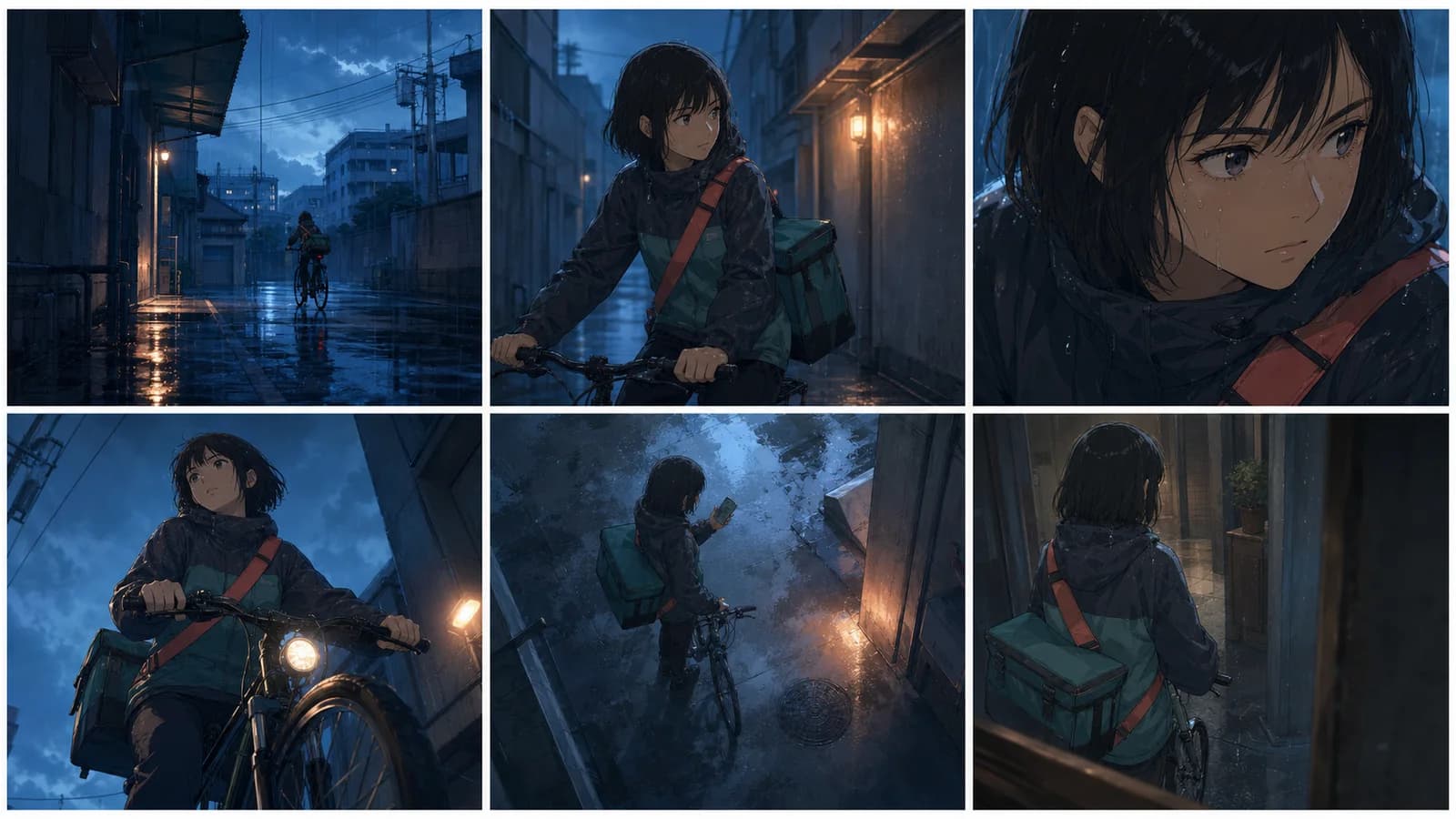
Practical anime example: a lone cyclist enters a rain-dark service alley. The destination door is a warm rectangle at the far end. The frame establishes route, weather, and isolation before any dialogue.
Prompt core:
Extreme wide establishing view of a narrow delivery alley after rain, one original bicycle courier small in the lower third, warm doorway far ahead, clear depth from foreground pipes to distant apartment blocks, eye-level viewpoint, no signs or text.Wide and full shots
A wide shot keeps the full figure readable while preserving enough setting for action. It is useful for entrances, exits, fights, dance, physical comedy, and any beat where feet, balance, or distance matter. If the character's shoes are important, say that the full body is visible with margin below the feet.
Do not ask one wide shot to show delicate eye movement, tiny jewelry, and a complex crowd at equal clarity. Move closer for the reaction.
Medium shots
A medium shot usually balances face, torso, hands, and nearby context. That makes it a dependable choice for dialogue, work, and cause-and-effect actions. A waist-up three-quarter view of a courier opening a package can show the package, posture, and guarded expression without wasting most of the frame on the room.
Medium shots can become visually flat if every scene uses the same centered distance. Vary staging, foreground, gaze, and relationship—not simply the angle for novelty.
Close-ups and extreme close-ups
A close-up isolates a face or important object. It removes spatial information in exchange for emotional or factual emphasis. An extreme close-up should earn its intensity: a pupil tightening, a cracked seal, or a thumb stopping above a send button.
The most useful close-up often shows a change, not a general mood. “Worried face” is static. “Her eyes move from the envelope to the locked door; her mouth stops mid-breath” gives the shot a before-and-after implication.
Eye-level views
Eye level is not neutral in every context, but it avoids an obvious vertical hierarchy. It works for direct observation, conversation, portraits, and scenes where performance should carry the judgment. A front-facing eye-level view can feel confrontational or intimate; a three-quarter eye-level view often feels less direct.
Low-angle shots
A low angle looks upward. It can enlarge a character, expose architecture above them, or make the viewer feel physically lower. Film education resource Learn About Film notes that low angles are commonly used to make people or objects appear bigger or more powerful. Treat that as a tendency, not a guaranteed emotion.
A low angle can also reveal insecurity: a frightened courier dwarfed by leaning buildings may look overwhelmed rather than heroic. Context decides whether size reads as power, threat, awe, or pressure.
High-angle and overhead shots
A high angle looks down from above the subject. It may make someone look exposed, show an obstacle pattern, or provide an overview. An overhead or bird's-eye view goes closer to straight down and can clarify paths, spacing, and graphic shapes.
Use height with a concrete purpose. In the alley scene, a high angle can show that the courier has been boxed in by two closing gates. A high-angle portrait with no spatial reason may simply make the face and body harder to read.
Over-the-shoulder and point-of-view shots
An over-the-shoulder shot includes part of one character while looking toward another person or object. It preserves relationship and scale. Decide whose shoulder anchors the frame and where each eyeline goes.
A point-of-view shot removes that visible anchor and presents what the character sees. Follow it with a reaction only when the connection matters. A random POV image is not automatically immersive; the audience needs a clear owner for the viewpoint.
Dutch angles
A Dutch angle tilts the horizon. Learn About Film recommends making the tilt obvious when using it for a strange or unsettling effect; a slight accidental-looking tilt can read as a framing error. Reserve it for instability, disorientation, imbalance, or stylized energy already present in the scene.
If every confrontation is tilted, the device loses contrast. A level frame before the discovery and a clearly tilted frame after it creates a more legible break.
Choose the angle from the dramatic beat
Start with the change in the scene, not a catalog of shots. Here is a simple beat:
A courier arrives with a sealed envelope. She expects an empty office, but someone is waiting inside. She decides not to run.
The same beat can be staged in several ways:
| Story priority | Shot choice | What the audience learns | Trade-off |
|---|---|---|---|
| Isolation | extreme wide alley and tiny figure | the trip feels exposed and lonely | facial emotion is unreadable |
| Suspicion | medium profile with courier listening | body tension and doorway share attention | less location context |
| Recognition | close-up as gaze fixes off frame | the exact moment she sees someone | we do not yet know who |
| Threat | restrained low angle on waiting figure | the figure occupies visual authority | can become melodramatic |
| Trap | high wide shot of courier between doors | escape routes and distance are clear | intimate acting becomes small |
| Resolve | eye-level close-up after she stops | choice comes from performance, not spectacle | needs prior spatial setup |
Notice that “high angle equals weak” is too simple. A high view of the entire office may give the courier tactical knowledge and make her decision feel controlled. A low close-up of the same courier could feel trapped if the ceiling and shadows press into the frame.
Use contrast across the cut
A shot becomes expressive partly because it differs from the previous one. Try these pairs:
- wide, level order → tight, slightly low interruption;
- symmetrical two-shot → isolated profile close-up;
- stable eye level → overhead reveal;
- distant observer view → direct reaction close-up.
The change should follow a story event. Cutting closer because the envelope opens gives the edit a reason. Cutting closer every few seconds because the frame feels boring treats the symptom, not the scene.
Compose for eyeline, depth, and negative space
Angle alone does not organize the frame. Composition decides what viewers notice first and whether adjacent shots will connect.
Protect the eyeline
Give a character more room in the direction they look or move unless deliberate compression supports the mood. This “look room” helps the frame imply an off-screen subject. Learn About Film's composition guide also advises paying attention to eye height, frame edges, and matching the direction of looks between people.
In generated images, check the result rather than trusting the prompt. If the courier looks screen right in shot A, the next image of the person she sees should usually support that relationship. Separate generations may flip body direction, accessories, door positions, or lighting. Correct or regenerate before treating them as a sequence.
Build three depth layers
Foreground, subject plane, and background can turn a flat frame into a place:
- Foreground: a blurred bicycle handle, door edge, hanging cable, or another character's shoulder.
- Subject plane: the action and readable silhouette.
- Background: one location clue, kept quieter than the story point.
Foreground should frame or locate the action, not cover hands and faces by accident. Background detail should answer a question—where are we, what just happened, where can someone move?—instead of filling every empty patch.
Use symmetry and negative space on purpose
Symmetry can feel formal, controlled, ritualized, or unnerving. Off-center composition can feel observational or create room for a gaze, movement, title, or threat. Negative space is not unused space when it creates anticipation.
For vertical social crops, keep the face and action away from fragile edges. Anime Maker currently returns a square image, so decide whether the square itself is the final composition or a source for later cropping. Do not place essential story information in all four corners and expect one asset to survive 16:9, 9:16, and square crops.
Plan a five-shot anime scene
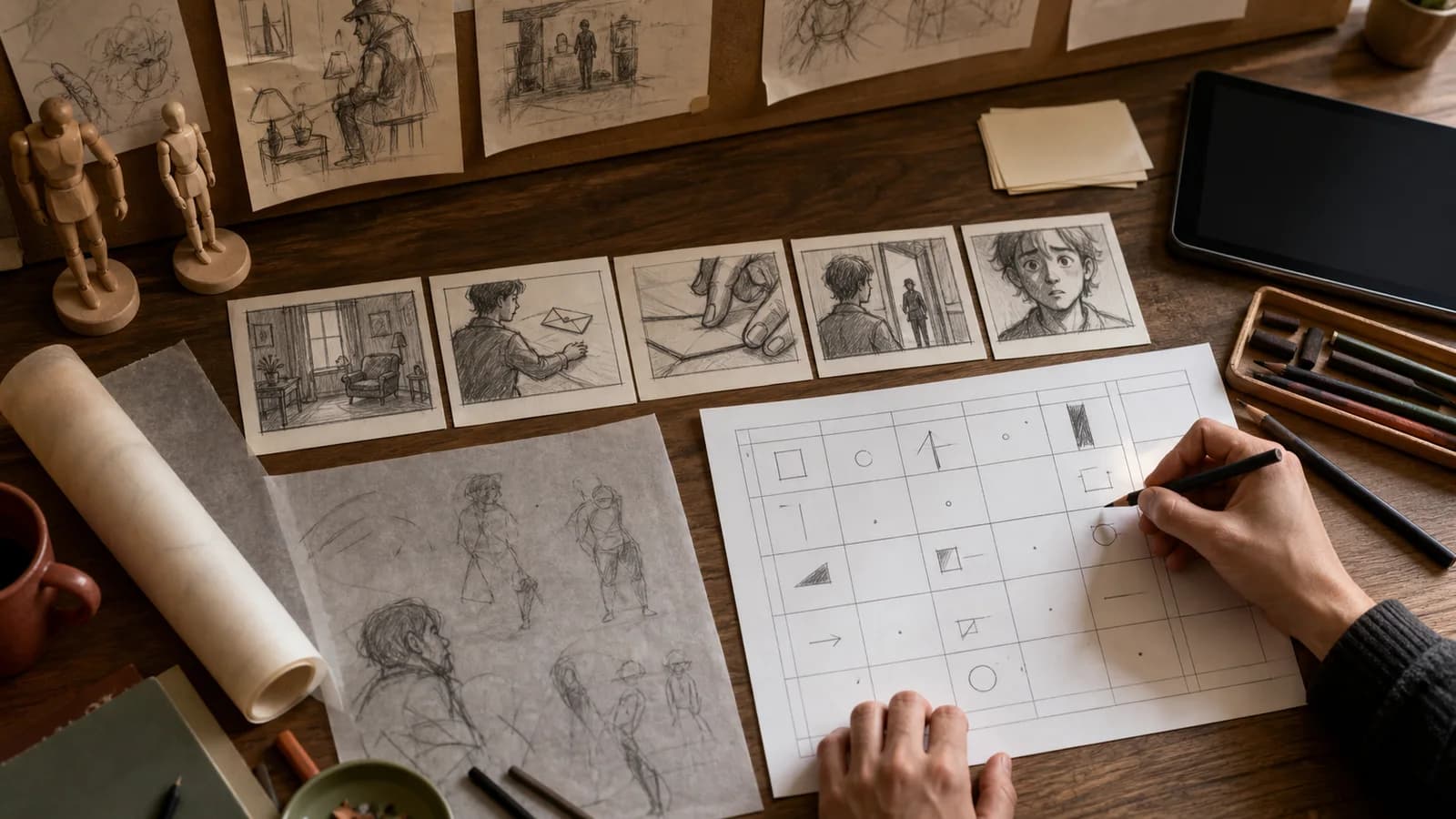
Adobe's sequence-shooting guide recommends at least wide, medium, and close coverage, while its shot-list guide stresses a scannable plan rather than excessive detail. For a generated anime sequence, use the same discipline but add continuity checks because each image is sampled independently.
Here is a five-shot plan for the envelope scene:
| Shot | Beat | Size and angle | Composition | Continuity anchor |
|---|---|---|---|---|
| 1 | Courier arrives | wide, eye level | bicycle enters left; warm doorway right | charcoal jacket, coral strap, rain direction |
| 2 | Envelope appears | medium over shoulder | supervisor's hand extends into frame | envelope seal, desk position, screen direction |
| 3 | She hesitates | insert close-up | fingers stop above the seal | left hand, wet cuff, same envelope |
| 4 | Someone waits | courier POV, restrained low angle | figure framed by doorway | doorway shape, warm backlight |
| 5 | She stays | eye-level close-up | gaze held just off lens; quiet background | wet hair, split brow, coral strap edge |
Read the plan without the images. The location arrives before the object, the object before the hidden person, and the hidden person before the decision. Each closer shot removes information but adds emphasis.
A compact shot-list template
Scene / shot:
Story beat:
Subject and action:
Shot size:
Vertical angle:
Horizontal position:
Frame position and eyeline:
Foreground / background:
Light direction and time:
Continuity anchors:
What may change:
Why this shot exists:
Keep one row per shot in a spreadsheet or production note. Adobe's shot-list guidance includes shot number, scene number, location, shot type, angle, movement, description, and audio notes. For still generation, replace equipment details with identity and continuity anchors that can be checked visually.
Write anime camera angle prompts that can be reviewed
Camera prompts improve when the instructions appear in a stable order. Use this structure:
- Story moment: one visible action at a precise instant.
- Stable subject: face, hair, outfit, and signature details visible in this shot.
- Shot size: wide, medium, close-up, or insert.
- Viewpoint: eye level, high, low, overhead, front, profile, or over the shoulder.
- Composition: frame position, gaze, depth layers, and negative space.
- Light and setting: one main light plus essential location cues.
- Constraints: what must stay absent or unchanged.
Establishing-shot prompt
Original anime story keyframe: a bicycle courier arrives alone at a service alley after rain, one hand braking as she notices a warm office doorway at the far end.
Stable design: young adult, chin-length black bob, charcoal matte rain jacket with muted teal panels, coral messenger strap, dark bicycle.
Camera: extreme wide establishing shot, eye level, long view down the alley.
Composition: courier small in the lower-left third, doorway in the distant right third, wet pipes in the foreground, clear path between them.
Lighting: blue-hour ambient light, one warm doorway reflection on the pavement.
No lettering, no logos, no crowd, no watermark. Keep the full bicycle visible.
Reaction close-up prompt
Original anime reaction keyframe: the same courier has just recognized someone beyond the doorway and decides not to flee.
Visible identity: soft square face, gray-blue eyes, straight brows with a small split in the left brow, wet chin-length black bob, edge of coral strap.
Camera: eye-level close-up, three-quarter view, face filling most of the square frame.
Composition: eyes aimed just right of camera, extra space in the gaze direction, doorway reduced to a soft warm shape behind her.
Expression: breath held, jaw settling, fear changing into deliberate focus.
Lighting: cool rain light on the face, restrained warm rim from behind.
No text, no dramatic tears, no exaggerated lens distortion, no watermark.
High-angle spatial prompt
Original anime suspense keyframe: the courier stands between a bicycle and a closing gate while the office door remains open ahead.
Camera: high wide shot from above at a clear diagonal, not straight overhead.
Composition: gate, bicycle, courier, and doorway form a readable path; character fully visible; strong separation between objects.
Keep the same charcoal jacket, teal panels, coral strap, black bob, envelope in left hand, rain direction, and blue-hour palette.
The angle exists to show the narrowing escape route. No signs, logos, extra people, or watermark.
These prompts state an intention, but the generated image may not follow every spatial relationship. Review the actual frame. If the important relationship fails, shorten the scene detail and strengthen only the shot instruction. Do not add five lens specifications, three contradictory angles, and several movements to compensate.
Keep screen direction and continuity readable
Continuity rules are tools for audience orientation, not laws that ban creative cuts. They matter most when the viewer must understand who faces whom, where an exit sits, or which way a character moves.
The 180-degree principle
Imagine an axis through two characters or along a character's path. Keeping adjacent camera positions on one side of that axis usually preserves left-right relationships. Crossing it can flip those relationships. Adobe's sequence-shot guide describes the 180-degree rule as a foundation of continuity, while Learn About Film explains how camera position and eyeline work together across an edit.
You can cross the line when the audience sees the transition, the geography has been re-established, or disorientation is intentional. For independent generated stills, accidental crossing is common. A prompt may say “courier on the left looking right,” yet the result reverses it. Use the output, not the prose, as the source of truth.
The 30-degree guideline
Two images with almost the same subject size and a slightly shifted viewpoint can produce an awkward jump. Learn About Film and Adobe's jump-cut guide describe the traditional 30-degree guideline: change camera position enough, often along with shot size, when you want a conventional continuous cut. Deliberate jump cuts can break this expectation for urgency or elapsed time.
Do not chase a literal measured 30 degrees in Anime Maker; the interface does not expose a calibrated camera. The practical lesson is to make adjacent shots meaningfully different. Move from medium profile to close three-quarter reaction, not from one nearly identical medium view to another.
Match the action and the world
For every generated sequence, check:
- Which hand holds the prop?
- Which direction does the character face and move?
- Where are doors, windows, furniture, and horizon lines?
- Is the key light still on the same side?
- Did clothing, hair, weather, or time of day change?
- Did the close-up invent a symbol that was absent in the wide shot?
If exact continuity matters, one-shot regeneration may be inefficient. Use selected generations as boards or keyframes, then redraw, composite, or correct them in a production tool. The anime character generator can help explore a character design, but it does not lock an identity model across every new image.
Turn generated stills into a real shot-planning workflow
The American Society of Cinematographers' coverage of Pixar's Onward describes a Camera and Staging team translating storyboard moments into finished shots through lens, movement, staging, composition, and editorial choices. A Pixar technical paper on Win or Lose likewise discusses cinematography choices built around character perspective. The useful takeaway is not that every creator needs a studio pipeline. It is that camera work belongs to story, staging, editing, and lighting together.
Use Anime Maker at the concept and planning stages where a flattened image is useful:
- Write the beat. State what changes emotionally or factually.
- Make thumbnail boxes. Test three sizes or angles with rough marks before writing long prompts.
- Generate one anchor frame. Use the AI anime image generator to explore the strongest composition.
- Record what worked. Save the exact prompt, chosen image, visible identity anchors, palette, and screen direction.
- Generate alternate coverage. Change one camera decision at a time.
- Assemble a board. Put selected frames in order with shot numbers, action notes, dialogue, and timing outside the images.
- Audit continuity. Mark flips, changed props, missing exits, inconsistent light, and identity drift.
- Correct for production. Redraw, paint over, composite, or rebuild key shots as needed.
- Test motion cautiously. If a still reads clearly, send a suitable frame to image-to-video anime AI with one subject action and one camera direction.
For a comic rather than a video, cuts become panel transitions. The same questions still apply: what information belongs in the wide panel, where should the close detail land, and how does the reader follow eyelines? The AI comic generator can help explore comic imagery, while the comic strip maker is better suited to a short panel-based concept. Final balloon placement, typography, panel rhythm, and continuity still need human layout and review.
Anime camera angle checklist
Before generating
- Write the beat in one sentence.
- Name the one piece of information the shot must deliver.
- Choose shot size separately from vertical angle.
- Define subject position, gaze, and movement direction.
- Keep two to five visible continuity anchors.
- Decide what the background must explain.
- Remove camera terms you cannot visualize.
- Avoid protected characters, studio imitation, logos, and generated dialogue text.
After generating
- Confirm the frame actually matches the intended size and viewpoint.
- Check whether the face, hands, prop, and action are readable.
- Compare left-right relationships with adjacent shots.
- Inspect doors, furniture, weather, clothing, and light direction.
- Crop a copy for the final format before approving edge placement.
- Record the prompt and what changed from the previous version.
- Reject accidental symbols, unreadable marks, or close resemblance to known IP.
- Add captions and accessibility text as real text outside the image.
A one-variable revision log
Shot: 04, waiting figure reveal
Story job: reveal presence without showing identity clearly
Kept: doorway, warm backlight, courier POV, office layout
Changed: eye level to restrained low angle
Result: figure feels larger, but doorway was cropped
Next test: widen framing only; keep angle and all identity details
This log prevents a common failure: rewriting everything after one weak image and losing the parts that already worked.
Rights, accessibility, and honest use
Camera technique is not a substitute for rights review. Use original characters and references you made, licensed, or have permission to use. Inspect generated images for signatures, logo-like marks, copied costume cues, and close resemblance to existing characters. Add real dialogue, credits, and branding in a layout tool rather than asking an image model to paint small final text.
Alternative text should describe the image's purpose on the page. The W3C Web Accessibility Initiative's alt decision tree distinguishes informative, functional, and decorative images. A useful alt description here would be “Six storyboard frames compare wide, medium, close, low, high, and over-the-shoulder views of the same bicycle courier.” It should not reproduce the entire prompt.
Sources and further reading
- Adobe: Different types of shots and camera angles in film — shot size, angle, movement, composition, and narrative use.
- Adobe: How to make a shot list — practical shot-list fields and keeping the plan scannable.
- Adobe: How to get started on storyboarding — using shot choices to establish tone, character, and a later shot list.
- Learn About Film: Camera position and angle — high, low, overhead, frontal, profile, rear, and eyeline examples.
- Learn About Film: Composition for filmmakers — look room, frame edges, symmetry, thirds, Dutch angles, and background control.
- Learn About Film: Continuity — 180-degree, 30-degree, eyeline, point-of-view, and match-on-action concepts.
- American Cinematographer: Onward — Quest for Magic — how cinematography, camera staging, editorial, animation, and lighting meet in an animated production.
- Pixar: Cinematography of Win or Lose — a technical production account of cinematography shaped around character perspective.
- W3C WAI: Alt decision tree — choosing informative, functional, or empty alternative text.
Frequently asked questions
What are the most useful anime camera angles for beginners?
Start with eye-level, low-angle, high-angle, over-the-shoulder, and overhead views, then combine them with wide, medium, and close shot sizes. Learn what information each combination reveals. Five intentional choices are more useful than twenty terms copied into every prompt.
What is the difference between a camera angle and a shot size?
Shot size describes how much of the subject appears in frame, such as wide, medium, or close-up. Camera angle describes the viewpoint, such as eye level, low, or high. A “high-angle close-up” combines a vertical viewpoint with tight framing.
Which camera angle makes an anime character look powerful?
A restrained low angle often makes a figure appear larger, but lighting, posture, environment, and context decide whether that size reads as power, danger, pressure, or even vulnerability. Test the angle against the previous shot instead of treating it as an emotion button.
How do I prompt a specific anime camera angle?
State one story action, then specify shot size, viewpoint, subject position, gaze, foreground, background, and light. Keep the directions visible and non-contradictory. Review the generated frame because camera language guides the image but does not provide exact coordinate control.
Can Anime Maker keep the same camera and character across several shots?
Not exactly. Reusing the same identity block, palette, screen direction, setting, and composition notes can reduce drift, but separate generations may change the character and staging. Save an anchor image and prompt, compare every result, and correct production-critical continuity manually.
Should every anime scene include a Dutch angle?
No. A Dutch angle is most readable when imbalance or disorientation matters and nearby shots are level. Repeating it without a story change turns emphasis into visual habit. Use a clearly intentional tilt, then return to level when stability returns.
How many shots should I plan for a short scene?
Plan only the coverage needed to communicate the beat. A useful starting set is a wide view, a medium action view, a close detail, a point-of-view or relationship shot, and a reaction. Remove any shot that repeats information without changing rhythm or understanding.
Make the next shot answer one question
Do not begin with “Which angle looks coolest?” Begin with “What must the audience understand, and why do they need to understand it now?” Choose a shot size, add one meaningful viewpoint, and test it as a frame. Then compare it with the shots before and after.
Open the AI anime image generator with one of the prompt templates above. Treat the output as a visual proposal, not a locked camera setup. The strongest anime camera angles are not the most extreme; they are the ones that make the story easier to see.
Author

Categories
Quick answer: which anime camera angle should you use?ContentsSeparate shot size from camera angleA useful test before every shotBuild a useful anime shot vocabularyExtreme wide and establishing shotsWide and full shotsMedium shotsClose-ups and extreme close-upsEye-level viewsLow-angle shotsHigh-angle and overhead shotsOver-the-shoulder and point-of-view shotsDutch anglesChoose the angle from the dramatic beatUse contrast across the cutCompose for eyeline, depth, and negative spaceProtect the eyelineBuild three depth layersUse symmetry and negative space on purposePlan a five-shot anime sceneA compact shot-list templateWrite anime camera angle prompts that can be reviewedEstablishing-shot promptReaction close-up promptHigh-angle spatial promptKeep screen direction and continuity readableThe 180-degree principleThe 30-degree guidelineMatch the action and the worldTurn generated stills into a real shot-planning workflowAnime camera angle checklistBefore generatingAfter generatingA one-variable revision logRights, accessibility, and honest useSources and further readingFrequently asked questionsWhat are the most useful anime camera angles for beginners?What is the difference between a camera angle and a shot size?Which camera angle makes an anime character look powerful?How do I prompt a specific anime camera angle?Can Anime Maker keep the same camera and character across several shots?Should every anime scene include a Dutch angle?How many shots should I plan for a short scene?Make the next shot answer one question
More Posts
Production guides
Comic Panel Layout Guide: Control Flow and Pacing
Use this comic panel layout guide to plan readable grids, gutters, focal panels, dialogue space, page turns, and mobile-friendly story flow for print or phone.
Production guides
Comic vs Manga vs Manhwa: A Practical Comparison
Compare comic vs manga vs manhwa by publishing tradition, reading direction, color, layout, serialization, workflow, and the format your story needs most.
Production guides
Types of Manga Speech Bubbles: A Practical Guide
Learn the main types of manga speech bubbles, what each shape implies, and how to place, letter, translate, and check them without confusing readers.
Newsletter
Join the community
Subscribe to our newsletter for the latest news and updates